



| Choose SkillSyncer if | Choose Jobscan if |
|---|---|
| You are a student or active military (the free year is the best deal in the category) | You are actively applying to 10 or more roles a month |
| You want a focused ATS keyword optimization pass at the lowest price | You want the ATS optimization down to platform-specific recommendations |
| You apply to fewer than five roles a month | You apply to a dozen or more roles a week and need an efficient way to tailor and apply |
| You are a confident resume writer who just wants the gaps surfaced | You want one optimization pass + cover letters, LinkedIn, job tracking and assisted applying in one connected workflow |
Comparing Jobscan vs Skillsyncer comes down to a simple question: do you need a dedicated resume scanner for applicant tracking systems (ATS), or a complete job search toolkit built around one? SkillSyncer is a focused, well-built resume scanner and optimizer. It scans your resume against a job description, surfaces keyword gaps, and gives you AI tools to fix them. It does that job seriously, and at a price that is hard to argue with.
Jobscan started from the same place. ATS resume optimization is still at its core. Getting past the screening stage is still the gateway to the interview. But Jobscan has grown into something larger: a job search platform that handles your resume, your cover letter, your LinkedIn profile, and your job applications. Automated job applications are now part of that too, all with the same keyword intelligence running through every step.
Whether you need one or the other depends entirely on where you are in your search.
- The core difference: SkillSyncer is a dedicated resume scanner and optimizer. Jobscan is a full job search platform with that same scanner at its core. For an active search, the breadth changes the math.
- Pricing: SkillSyncer is far cheaper on paper and free for a year for students and military. Jobscan does more per scan, and the per-scan cost converges at higher application volumes.
- The scan is close: The same resume and job description returned an identical starting score of 42 in both tools. The core scan is comparable. What each tool does next is where they split.
- SkillSyncer is more than keywords: Its main scanner runs full resume checks, and its beta Smart Resume Editor is a genuinely strong, granular optimizer.
- Where Jobscan pulls ahead: ATS-specific guidance tied to named platforms, plus cover letters, LinkedIn, job tracking, and auto apply in one connected workflow.
- The verdict: Students, military, and light applicants are well served by SkillSyncer. Active job seekers get more from Jobscan’s full platform.
What do Jobscan and SkillSyncer actually do?
SkillSyncer evaluates words. Jobscan evaluates the resume. That one-sentence difference is what this entire comparison is built around.
Jobscan starts with the same scan and treats it as one step in a broader workflow. Its resume scanner feeds into a connected set of tools:
- ATS-specific formatting guidance
- A cover letter generator
- LinkedIn optimization
- An AI resume builder with a built-in AI resume coach that interviews you and drafts content as you go
- Connected job search and tracking
- An auto apply tool that fills out applications on your behalf
SkillSyncer does one job well. Jobscan does that job and then covers the entire job hunt from first scan to submitted application.
Who built each tool
The foundation behind each tool matters. The market is crowded with AI features bolted onto resume builders overnight.
SkillSyncer was founded around 2018 by a U.S. Army veteran with a computer science background. He concluded that a properly tailored resume was the key to getting interviews. It is a credible, focused product. But it remains a small, self-funded operation and does not publicly disclose the model behind its AI writing features.
Jobscan has spent more than a decade building proprietary data on how applicant tracking systems read resumes. It has a team, a large body of job listing and resume data, and career guidance written by certified professionals.
Neither origin makes a tool automatically better, but it does tell you which company has the longer track record in this specific problem.
SkillSyncer pricing vs Jobscan: which is the better value?
TL;DR: SkillSyncer is far cheaper on paper and genuinely free for students and military. For an active job seeker, the real cost-per-scan narrows, and Jobscan covers more ground.
One of the most common questions in this Jobscan vs SkillSyncer comparison is price, and SkillSyncer wins that round clearly on paper.
| SkillSyncer | Jobscan | |
|---|---|---|
| Free plan | Limited scans, capped weekly AI credits | 5 scans per month |
| Monthly | $14.95 | $49.95 |
| Quarterly | About $11.62 per month | $89.95 per quarter (about $29.98 per month) |
| Standout offer | Free year for students and military (.edu or .mil) | Full platform across the entire job search |
SkillSyncer’s headline rate is real, and its student and military offer is the best deal in this category. If you have a .edu or .mil email and only need a keyword scanner, use it.
The catch: AI credits do not roll over. Unused credits expire each week. If you run about 10 applications a month, your effective cost per scan lands closer to a dollar fifty than the advertised rate. At fewer than five applications a month, SkillSyncer is clearly cheaper. At 10 or more, the per-scan math converges with Jobscan’s, and Jobscan does substantially more with each pass. Some users have also reported friction getting refunds, so read the terms before subscribing.
Winner: SkillSyncer on price. Jobscan on value per scan for active job seekers.
How does SkillSyncer’s ATS scanner actually work?
Understanding the SkillSyncer review you are going to get out of this tool requires knowing that it has two distinct interfaces. They work quite differently.
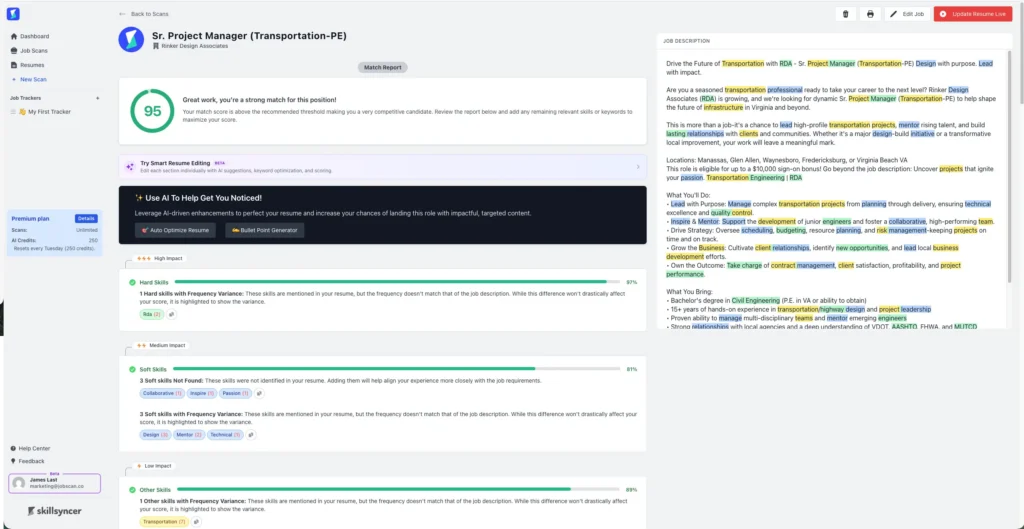
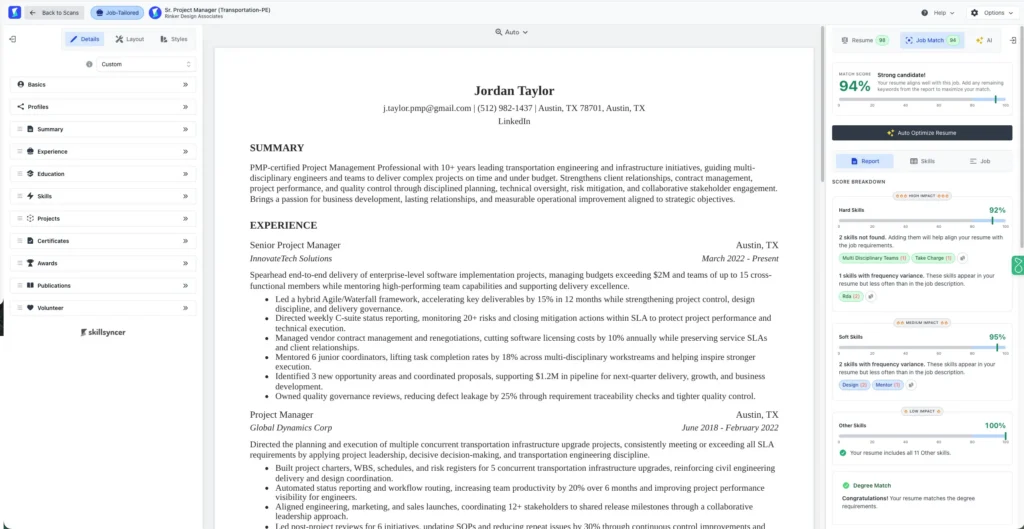
For the SkillSyncer ATS side, both interfaces scan your resume against the job description to surface keyword gaps and content issues. Neither provides ATS-specific guidance tied to a named platform. You will not get advice on how Workday or Taleo will parse your resume, and you will not get file-type diagnostics. That is the boundary.
What does each tool’s match score actually measure?
This is where the Jobscan vs Skillsyncer comparison gets more nuanced than it first appears.
An applicant tracking system is no longer just a storage system for resumes. Modern ATS systems at large employers increasingly apply artificial intelligence ranking before a human looks at your application. According to Jobscan’s research on whether an ATS can detect AI resumes, here is the scale of that shift:
According to Jobscan’s research on whether an ATS can detect AI resumes, 79.3% of Fortune 500 applicants now go through a platform with active AI ranking, including Workday, Oracle, iCIMS, and Taleo. Even Greenhouse added AI-assisted matching in early 2026. A keyword overlap score is not the same thing as how an AI-driven screen will rank you.
When we ran the same resume and job description through both tools, both returned an identical starting score of 42. The core scan is a wash. The difference is what each tool does with it next.
SkillSyncer’s score measures keyword and skill alignment with the job description, drawing on factors like years of experience, degree match, and job title. Jobscan’s Match Rate weighs those same factors, and where it can identify the specific ATS behind a posting, it layers in platform-specific guidance. That guidance depends on the ATS being in Jobscan’s database. When it can identify the system, the advice is meaningfully more targeted. When it cannot, it defaults to general best practice.
Keyword suggestions and actionable feedback: how each tool shows what is missing
Key takeaway: Both tools surface keyword gaps effectively in a Jobscan vs SkillSyncer test, and SkillSyncer’s main scanner report is genuinely clean and fast to read.
Winner: a tie. Both tools give you actionable feedback here. SkillSyncer’s interface is arguably faster to read for a quick pass.
Resume optimization: how each tool helps you fix your resume
SkillSyncer’s Smart Resume Editor
The Smart Resume Editor breaks your score into sections and shows sub-scores per parameter. Its AI tools are separated by purpose: keyword boost, full rewrite, quality fix, and bullet point generator. In testing, working through those tools produced a thorough and detailed revision.
The tradeoff is coherence. Each AI tool re-edits the same bullets in sequence. Run keyword boost, then a full rewrite, then a quality fix. The later passes can overwrite what the earlier ones built. You end up with a heavily revised resume, but it is hard to know if every parameter was considered together rather than against each other.

SkillSyncer’s main scanner also has an Auto-Optimize button. In testing, it tended to append missing keywords to the end of existing bullets rather than weaving them into the language. It also did not show which lines had changed. The output passes a scan, but the mechanics are visible to a recruiter.
Jobscan’s AI Optimize
Jobscan takes a different approach with its AI Optimize tool. It considers keywords, phrasing, and structure in a single pass and integrates the suggested terms into the natural flow of your existing bullets. Each suggestion appears as an in-context edit and you can see exactly what the AI wants to change and why. One considered rewrite rather than four sequential ones.

Winner: Tie for granularity, Jobscan for coherence. SkillSyncer and Jobscan both provide extensive analysis. While SkillSyncer provides more angles for AI editing, overwriting makes it difficult to mesh them together. Jobscan considers every parameter at once.
ATS compatibility and formatting, the layer SkillSyncer does not cover
SkillSyncer evaluates words. Jobscan evaluates the resume. Nowhere is that difference more concrete than here.
SkillSyncer’s scanner checks content quality: word count, verb strength, accomplishments, buzz words, first-person language, and date formatting. It is a solid resume quality check. What it does not do is evaluate how a resume will parse in a specific ATS. It will not flag that a two-column layout breaks in Workday, or that certain heading formats confuse Taleo.
Jobscan’s ATS resume checker evaluates more than 30 parameters and, where it can identify the system behind a posting, tailors its advice to how that platform reads a file. Not every posting triggers a detected ATS, but when it does, the guidance is platform-specific: the kind of detail a keyword-only scanner will never surface.
Optimizing keywords on a resume the system cannot parse correctly is like polishing a key that does not fit the lock.
Winner: Jobscan, clearly. This is the layer SkillSyncer does not attempt.
Is Jobscan the best SkillSyncer alternative for active job seekers?
SkillSyncer’s job tracker is a basic board for filing saved postings. It does not search for jobs, match you to them, or connect to the scan. There is no browser extension. Jobscan covers the entire search with tools built around the same keyword intelligence.
| Capability | SkillSyncer | Jobscan |
|---|---|---|
| Cover letter generation | No | Yes |
| LinkedIn optimization | No | Yes |
| Resume building | No | Yes |
| Integrated job tracker | Basic board, no integration | integrated search and tracker |
| Auto apply | No | Yes |
| Browser extension | No | Yes |
That resume-building edge got stronger—Jobscan’s resume builder now includes an AI resume coach that interviews you question by question and drafts quantified bullet points from your answers, instead of leaving you to fill in a blank form.
Verdict
SkillSyncer evaluates words. Jobscan evaluates the resume. That distinction holds up across every section of this comparison. SkillSyncer is a focused, capable optimizer with a genuinely strong Smart Resume Editor and the best price in the category. For students, active military, and light applicants who need a fast keyword pass and nothing else, it is the right call.
For an active job search, Jobscan does more. ATS-specific guidance, cover letter generation, LinkedIn optimization, and auto apply all run from the same keyword intelligence as the scan. That coherence is what separates a toolkit from a collection of tabs.
The cheapest tool is not always the wrong call. Just know what it checks, and what it does not.
Related comparisons:
For some job seekers, yes. In a straight Skillsyncer vs Jobscan comparison on value, students and military members should use SkillSyncer’s free year. If you only need a fast, low-cost keyword pass and resume quality check, it is also a good fit. For active job seekers who need ATS-specific formatting guidance and want cover letters, LinkedIn, and auto apply in the same workflow, Jobscan does more per scan.
SkillSyncer has a limited free plan. It is also free for a full year for students and active military with a .edu or .mil email. Both free and paid tiers cap your weekly AI credits, and those credits do not roll over, so unused credits expire at the end of each week.
In the Jobscan vs SkillSyncer comparison, SkillSyncer’s resume score measures how well your skills and keywords align with a specific job description. Jobscan’s Match Rate weighs hard skills, job title, and other parameters. Where it can detect the specific ATS behind the posting, it factors in how that platform reads resumes. Both tools returned the same starting score (42) on the same resume and job description in our testing, so the core scan is comparable. The difference is what each tool does next.
Yes, and it is a practical workflow. The Jobscan vs SkillSyncer choice does not have to be binary. Use SkillSyncer’s Smart Resume Editor for a granular optimization pass while drafting. Then run your final version through Jobscan for a full ATS check, formatting review, and cover letter generation before you submit.
This is one of the sharper distinctions in a Jobscan vs SkillSyncer comparison. SkillSyncer scans your resume against the job description but does not check how your resume will parse in Workday, Taleo, or any other specific ATS system. For platform-specific guidance, Jobscan identifies the ATS behind the posting where possible and tailors its recommendations to that system’s parsing rules.