Best System Administrator Resume Examples for 2026
System administrator resume examples for 2026 across junior, senior, Linux, and Windows roles, with the infrastructure and certification keywords ATS scans for.



System administrators keep the lights on. You manage servers, networks, backups, accounts, and security so everyone else can do their jobs, and when something breaks, you are the one who fixes it. That breadth is your strength, but it also makes a resume hard to write, because “I keep everything running” does not stand out on its own.
Hiring managers want proof you can be trusted with critical infrastructure. They look for uptime numbers, the systems and tools you actually administer (Windows Server, Linux, Active Directory, VMware, AWS), and certifications like CompTIA, RHCSA, or Microsoft. Before a person ever reads it, an ATS scans your resume for those exact skills and tools, so the right keywords decide whether you make the shortlist at all.
The examples below show how to do both. Each one turns day-to-day admin work into measurable results, surfaces the certifications and tools recruiters filter for, and formats cleanly so it parses correctly. Use the version closest to your level and specialty as a starting point, then tailor it to the job you want.
Ready to build yours? Try our ATS-friendly resume builder or scan your draft against the job description.
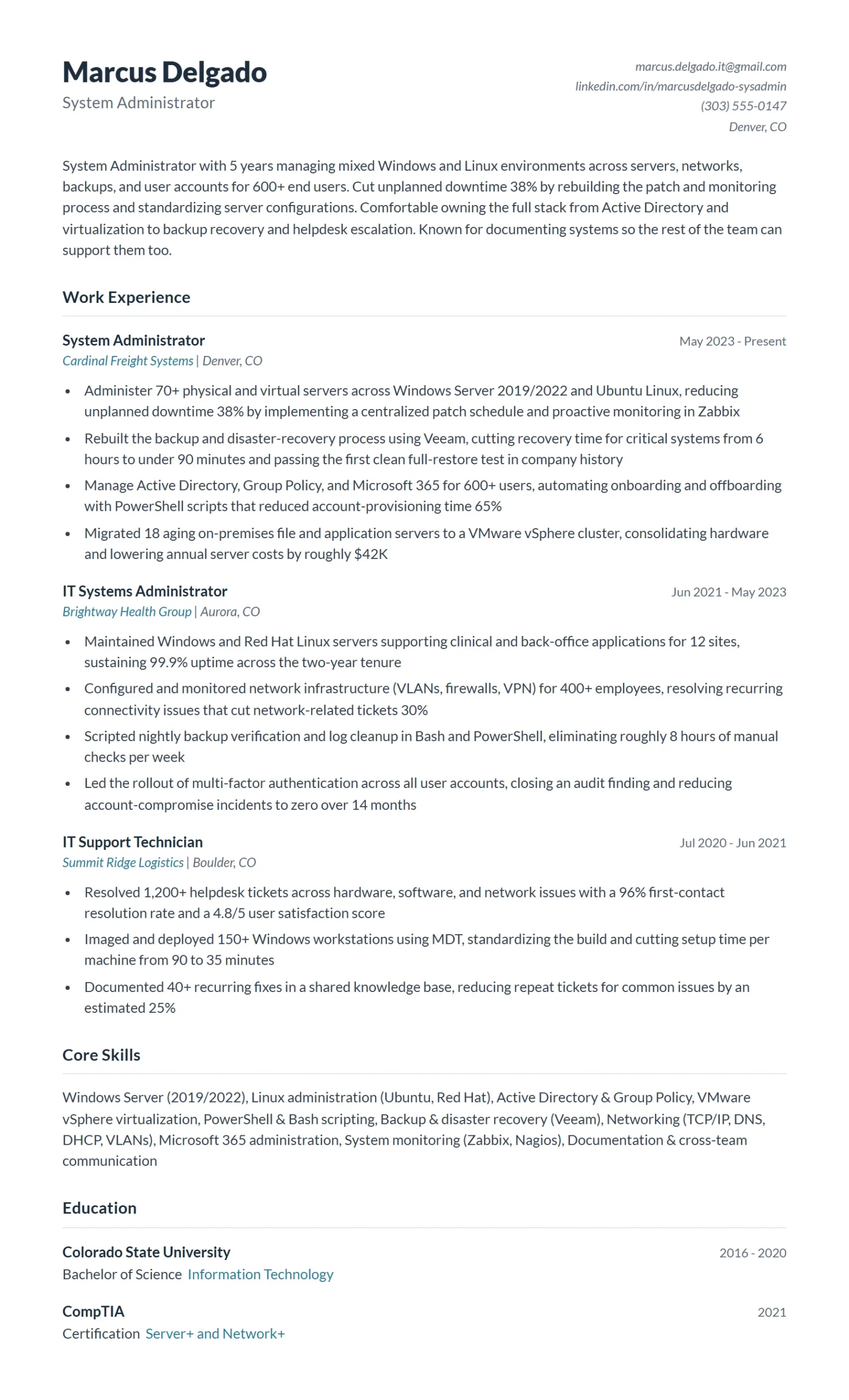
System Administrator resume example
A mid-level generalist managing servers, networks, and user accounts across a mixed Windows and Linux environment. This is the broad, role-defining example most system administrators should start from.
It works because every bullet pairs an admin task with a number: uptime percentage, tickets resolved, systems migrated, hours saved through automation. The skills section names concrete tools (Active Directory, VMware, Bash, PowerShell) instead of vague phrases like “server management,” which is exactly what ATS keyword filters and hiring managers look for. The result reads as someone who can be trusted with production infrastructure, not just keep it running.
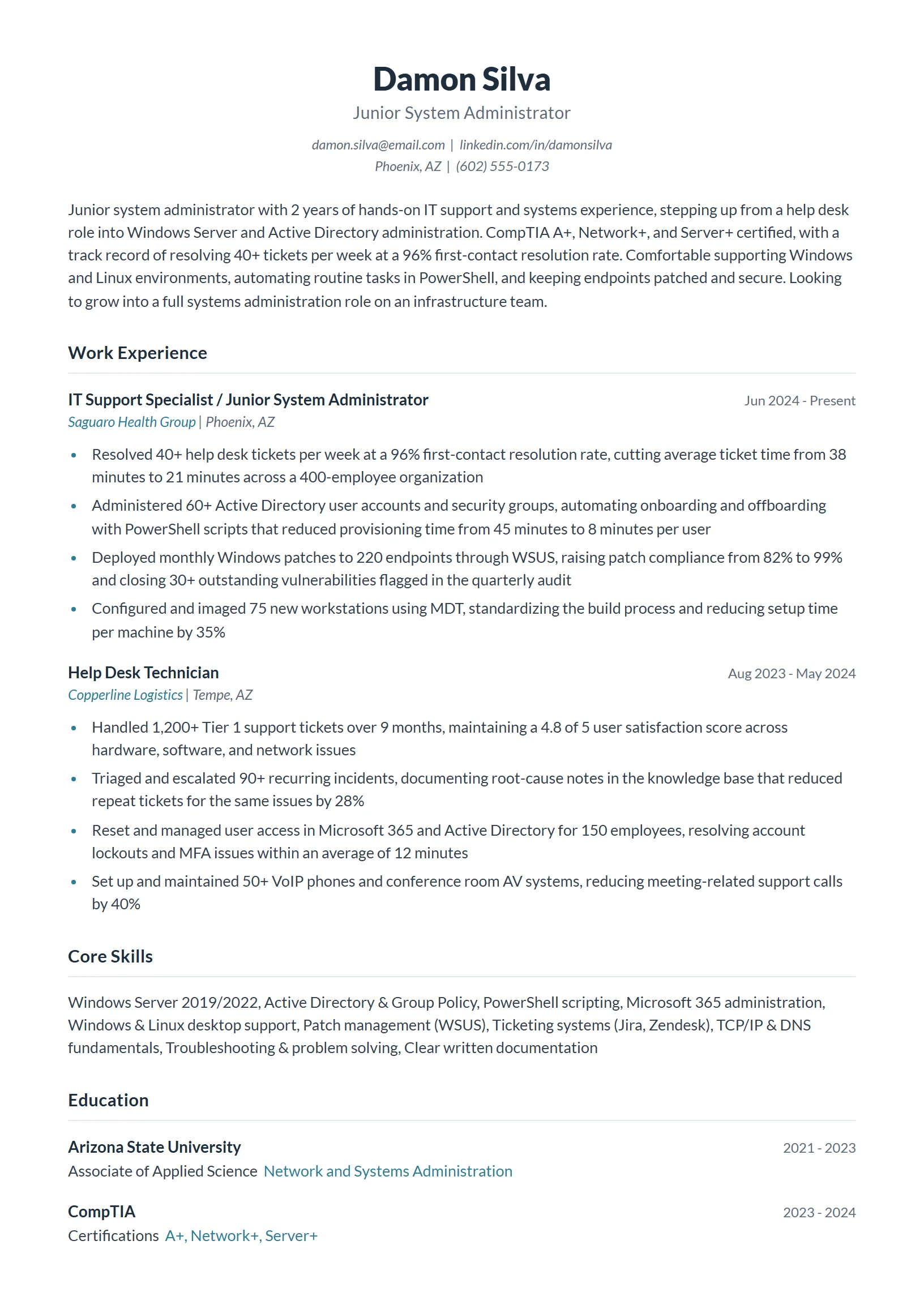
Junior System Administrator resume example
An early-career admin stepping up from help desk or IT support into a first dedicated sysadmin role. Built for candidates with strong fundamentals but limited years on the job.
With less experience to lean on, this version leads with certifications (CompTIA A+, Network+, Server+) and turns support work into infrastructure signals: accounts provisioned, tickets closed, systems patched, backups verified. It shows hands-on exposure to the tools the next role uses, so a recruiter sees readiness rather than a gap. That framing is how an entry candidate clears an ATS that is scanning for the same keywords a senior posting would.
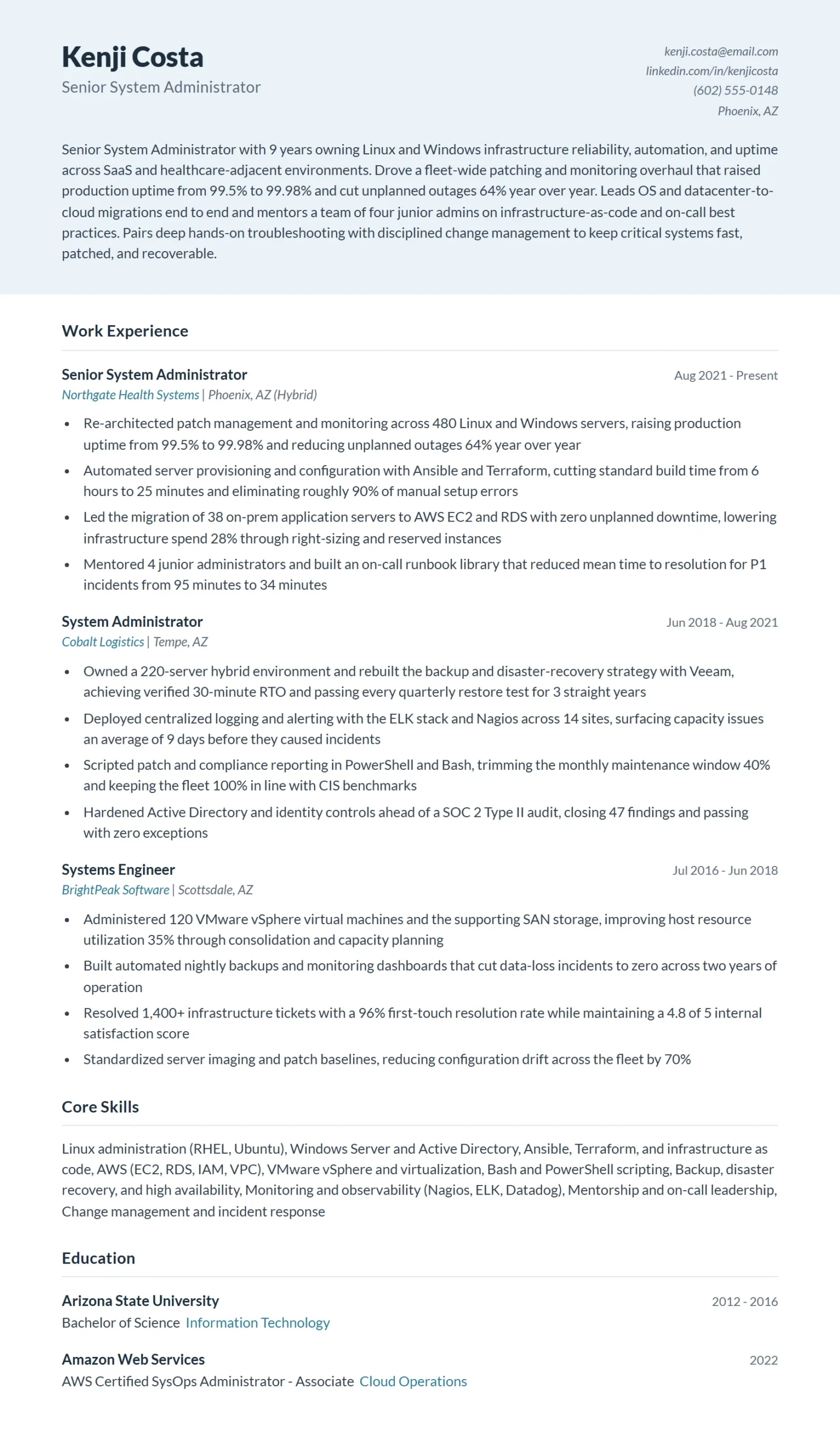
Senior System Administrator resume example
A seasoned admin owning infrastructure reliability, automation, and security across the organization, mentoring junior staff and leading migrations. For candidates with roughly eight or more years of experience.
This resume shifts from tasks to ownership and scale: number of servers and users supported, uptime SLAs met, major migrations led, and automation that cut manual work. It highlights leadership and project scope without claiming a management title, keeping it firmly in the sysadmin lane. Quantified reliability and cost outcomes are what separate a senior candidate from a mid-level one in both ATS scoring and the hiring manager’s read.
Linux System Administrator resume example
A Linux- and Unix-focused admin working in RHEL, Ubuntu, and CentOS environments with shell scripting and configuration management. For specialists targeting Linux-specific roles.

Specialization is the whole point here, so the resume goes deep on the Linux stack: Bash and Python scripting, Ansible, Docker, cron, kernel tuning, and an RHCSA or LFCS certification. Bullets show automation that eliminated manual work and incidents resolved without downtime. Because Linux postings filter hard on exact tooling, naming the real distributions and tools (not just “Linux administration”) is what gets this resume past the ATS.
Windows System Administrator resume example
A Windows-environment specialist managing Windows Server, Active Directory, Group Policy, and Microsoft 365. For admins targeting Microsoft-centric infrastructure roles.

It mirrors the Linux example but in the Microsoft stack: Windows Server, Active Directory, Group Policy, PowerShell automation, Exchange, and Microsoft 365 administration, anchored by a relevant Microsoft certification. The bullets quantify scale (users and devices managed) and reliability (patch compliance, migration uptime). Listing the specific Microsoft tools by name is the keyword match that Windows-focused ATS screens and recruiters are filtering for.
How to write a System Administrator resume that gets interviews
Hiring managers and ATS scans look for proof you can keep infrastructure running, secure it, and scale it without constant firefighting. A strong System Administrator resume leads with uptime, the size of the environment you managed (servers, users, sites), and the automation or hardening work that cut tickets and downtime. Mirror the job posting’s exact stack (Windows Server, Linux, VMware, Active Directory, Azure or AWS) so you clear the keyword filter, then back every claim with a number.
- Quantify the environment you ran: Recruiters need to gauge scope in seconds. State server count, user count, site/office count, and ticket volume. Write “Administered 120 Windows and Linux servers supporting 1,400 users across 6 sites” instead of “Responsible for server administration.” Scale is the fastest signal that you can handle their environment.
- Lead with uptime and reliability numbers: Uptime is the metric your role is judged on, so put it up front. Quantify availability (“maintained 99.98% uptime across production systems”), mean time to resolution, and reduction in outages or P1 incidents. If you cut downtime, say by how much and over what period.
- Show automation and the hours or tickets it saved: Modern sysadmin roles reward people who script themselves out of repetitive work. Highlight PowerShell, Bash, Python, Ansible, or Terraform and tie each to a result: “Automated patching for 200 servers with Ansible, cutting a 12-hour monthly task to 90 minutes.” Automation impact separates senior candidates from ticket-takers.
- Mirror the exact tech stack from the job posting: ATS keyword matching is literal. If the posting says “Active Directory, Group Policy, VMware vSphere, Microsoft 365, Azure,” use those exact terms (not “AD” alone or “virtualization” alone). List your stack in a skills section and prove the top items inside your experience bullets so they read as real, not padded.
- Surface security, backup, and compliance work: Reliability now includes security. Call out patch management, backup and disaster recovery (RPO/RTO, successful restore tests), MFA and endpoint hardening, and any framework you supported (SOC 2, HIPAA, ISO 27001, PCI DSS). “Built and tested DR plan achieving 4-hour RTO; passed annual SOC 2 audit with zero infrastructure findings” is a standout line.
- Put certifications where they get scanned: Certs are often filtered for directly. List active credentials (CompTIA Server+, Network+, Security+, Microsoft Azure Administrator Associate, RHCSA, VCP, CCNA) with the year, near the top if they are central to the role. They validate your skills and frequently satisfy a hard requirement in the screen.

System Administrator resume summary examples
Your summary is the first thing a recruiter reads. Lead with your specialty, years of experience, and a quantified win.
Good system Administrator resume summary examples
- System Administrator with 7 years managing hybrid Windows and Linux environments for organizations up to 1,500 users. Maintained 99.97% uptime across 140 servers, automated patching and provisioning with Ansible and PowerShell to reclaim 30+ hours monthly, and led a DR overhaul that cut RTO from 12 hours to 3. CompTIA Security+ and Azure Administrator Associate certified.
- Results-driven System Administrator specializing in Active Directory, VMware vSphere, and Microsoft 365 administration for a 6-site, 900-user company. Reduced P1 incidents 45% in one year through proactive monitoring and standardized imaging, and passed two consecutive SOC 2 audits with zero infrastructure findings.
- Linux-focused System Administrator with 5 years supporting 200+ production servers on RHEL and Ubuntu. Cut deployment time 60% by migrating manual builds to Terraform and Ansible, and sustained 99.99% service availability while reducing monthly incident volume by a third.
What to avoid
- Hardworking and detail-oriented IT professional seeking a System Administrator role where I can use my skills to grow and contribute to a great team. (No environment scale, no tools, no metrics, and no proof of anything. It is all generic ambition. A hiring manager learns nothing about what this person can actually run or how big an environment they can handle.)
- Experienced System Administrator responsible for maintaining servers, fixing issues, and supporting users on a daily basis. (Lists duties instead of results. “Maintaining” and “fixing issues” describe the job title itself, not impact. There is no uptime figure, no server or user count, and no named technology to match a posting.)
System Administrator resume skills
List your stack to match the posting, then prove the top tools inside your experience bullets. For a full breakdown of technical and soft skills, see the dedicated System Administrator skills page.
Hard skills for a system Administrator resume
- Windows Server (AD, Group Policy, DNS, DHCP)
- Linux administration (RHEL, Ubuntu, CentOS)
- VMware vSphere and Hyper-V virtualization
- PowerShell, Bash, and Python scripting
- Azure and AWS cloud administration
- Microsoft 365 and Exchange administration
- Backup and disaster recovery (RPO/RTO, Veeam)
- Patch management and endpoint security
- Networking (TCP/IP, VPN, firewalls, VLANs)
- Ansible and Terraform automation
Soft skills for a system Administrator resume
- Incident response under pressure
- Clear technical documentation
- Cross-team communication
- Methodical troubleshooting
- Capacity and change planning
System Administrator resume work experience bullet point examples
Lead each bullet with a strong verb and a measurable result.
Good bullet point examples
- Administered 120 Windows Server and RHEL hosts supporting 1,400 users across 6 sites, maintaining 99.98% uptime over 3 consecutive years
- Automated server patching and provisioning with Ansible and PowerShell, reducing a 12-hour monthly maintenance window to under 90 minutes and eliminating 95% of manual configuration drift
- Designed and tested a backup and disaster recovery plan achieving a 3-hour RTO and 15-minute RPO; validated quarterly restores with a 100% success rate
- Migrated 40 on-prem VMware workloads to Azure, cutting infrastructure costs 28% and reducing provisioning time from 2 days to under 1 hour
Bad bullet point examples
- Responsible for managing servers and making sure everything was running smoothly. (Vague and unquantified. “Everything running smoothly” is not a metric. No server count, no uptime, no technology named. It reads as a job description, not an accomplishment.)
- Handled tickets, reset passwords, and helped users with various IT problems. (Describes routine help-desk tasks with no scale or outcome. It positions the candidate as a ticket-taker rather than someone who manages and improves infrastructure, and it omits any tool or result a recruiter can scan.)
- Worked with the team to improve the network and fix things when they broke. (Passive and immeasurable. “Improve” and “fix things” have no before-and-after numbers, and “the network” names no actual technology. There is nothing here an ATS can match or a hiring manager can verify.)
System Administrator resume tips
A well-targeted System Administrator resume proves to both ATS and hiring managers that you can own the infrastructure, not just maintain it.
- Mirror the Stack: Pull the exact tool names from the job posting (for example, RHEL vs. Linux, vSphere vs. VMware) and use them verbatim in your skills section and bullets so ATS keyword matching scores you accurately.
- Quantify Environment Scale: State the size of every environment you managed: number of servers, VMs, endpoints, users, or sites, because a hiring manager needs to know whether your experience maps to their infrastructure footprint.
- Lead with Uptime and RTO: Replace vague claims like ‘ensured reliability’ with hard DR and availability numbers such as 99.97% uptime or an RTO reduced from 4 hours to 45 minutes using Veeam replication.
- Certify Your Credibility: List relevant active certifications (Microsoft AZ-104, VMware VCP, CompTIA Security Plus, Red Hat RHCSA) in a dedicated line near the top because recruiters use them as quick filters before reading bullets.
- Highlight Automation Wins: Call out specific PowerShell, Bash, or Python scripts you wrote and tie each to a measurable result, such as automating patch deployment across 400 endpoints and cutting patching time by 70 percent.
- Separate Cloud from On-Prem: If you have both Azure or AWS experience and traditional on-premises skills, group them explicitly in your skills section rather than blending them, because many postings screen for one or the other and ambiguity costs you the match.
Pair your system Administrator resume with a cover letter
A strong resume goes further with a tailored cover letter. Browse our system administrator cover letter examples to round out your application.
System Administrator resume frequently asked questions
List the operating systems, platforms, and tools you actually work in: Windows Server, Linux distributions (RHEL, Ubuntu), Active Directory, VMware or Hyper-V, and your scripting languages (PowerShell, Bash, Python). Add networking fundamentals (DNS, DHCP, TCP/IP, VPN, firewalls), backup and disaster recovery tools, and any cloud or monitoring platforms you have hands-on with (Azure, AWS, Nagios, Datadog). Match the exact tools named in the job description, because those keywords are often what the ATS scans for first.
Sysadmin work is full of numbers once you look for them, so anchor bullets to scale and outcome. Cite the size of the environment you supported (servers, endpoints, users, sites), the uptime or availability you maintained (such as 99.9 percent), and the time or cost you saved through automation or process changes. For example: “Automated patch deployment across 400 servers with PowerShell, cutting monthly maintenance time by 30 hours.”
The certifications that carry the most weight are CompTIA Server+, Microsoft certifications (such as Azure Administrator Associate), Red Hat (RHCSA or RHCE), and Cisco CCNA if your role touches networking. List them in a dedicated Certifications section with the credential name and year, and put any that the job posting explicitly asks for near the top. If you are studying for one, you can note it as “in progress” with the expected date.
Reframe your existing work around the skills the target role values: automation, infrastructure as code, CI/CD, and cloud platforms. Pull forward any scripting, configuration management (Ansible, Puppet, Chef), containerization (Docker, Kubernetes), or cloud migration projects you have touched, even small ones, and describe them with concrete results. Add a summary that names the role you are targeting (for example, “System administrator transitioning to cloud infrastructure”) so both the recruiter and the ATS see the direction clearly.
Include it if it shows progression or relevant depth, but frame it as infrastructure work rather than ticket-taking. Emphasize the systems you managed, the escalations you owned, and the projects you led, not the volume of tickets you closed. If you have several years of senior administration experience, keep early support roles brief so the resume stays focused on your strongest, most current work.
One page is right for most sysadmins with under 10 years of experience, and two pages are acceptable once you have a long record of senior roles, large environments, or extensive certifications. Lead with a skills section and your most recent roles, since recruiters often spend under a minute on a first pass. Keep formatting to a clean single-column layout with standard headings so the ATS parses it correctly, then scan it against the job description with a tool like Jobscan to confirm your keywords match.