Best WordPress Developer Resume Examples for 2026
Build a WordPress Developer resume for 2026 with real examples, the PHP and theme-development skills, and the keywords ATS scanners look for.



WordPress Developers build and maintain the sites that run a huge share of the web, from custom themes and plugins to performance, security, and integrations. Whether you work in an agency, in-house, or freelance, your resume has to prove you can ship clean, fast, maintainable WordPress code, not just install themes.
Hiring managers scan for evidence: custom theme and plugin development, PHP, the WordPress REST API, ACF, page speed wins, and security hardening. Before a person ever reads your resume, an applicant tracking system (ATS) checks it for those exact keywords. If the terms from the job description are missing, strong candidates get filtered out before the interview stage.
The examples below show how to do both at once: pass the ATS scan and impress the human reading next. Use them as a starting point, then tailor your skills and bullets to each WordPress role you apply for.
Ready to build yours? Try our ATS-friendly resume builder or scan your draft against the job description.
WordPress Developer resume example
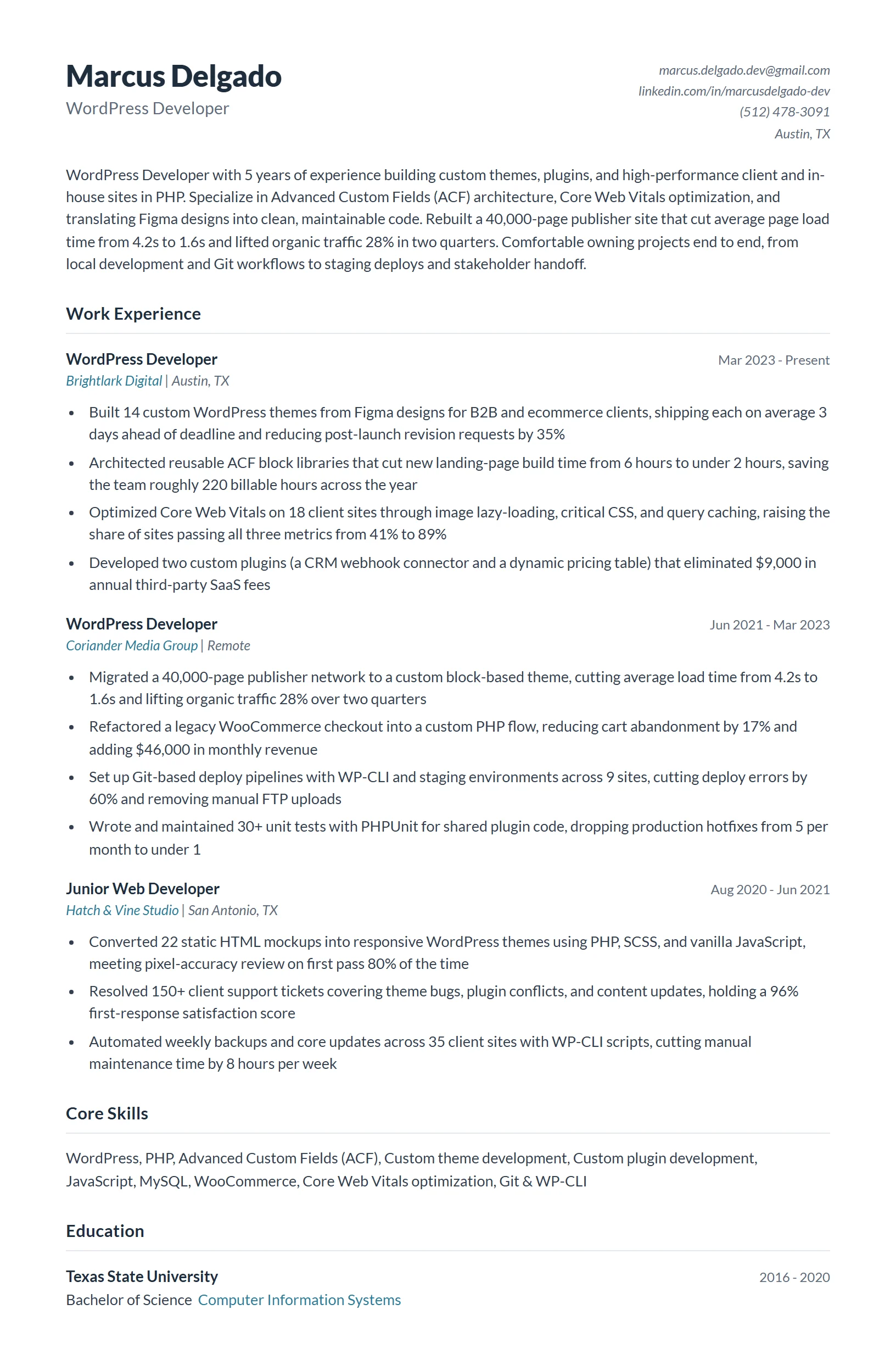
A mid-level WordPress Developer with five years building custom themes, plugins, and ACF-driven layouts for client and in-house sites. The strongest all-around template to model first.
It leads with concrete delivery: custom themes and plugins shipped, page-load times cut, and uptime maintained across dozens of sites. Each bullet pairs a WordPress-specific skill (PHP, ACF, the REST API) with a measurable result, so it reads as both keyword-rich for the ATS and credible to a hiring manager. The skills section mirrors the language of real WordPress job postings.
Senior WordPress Developer resume example
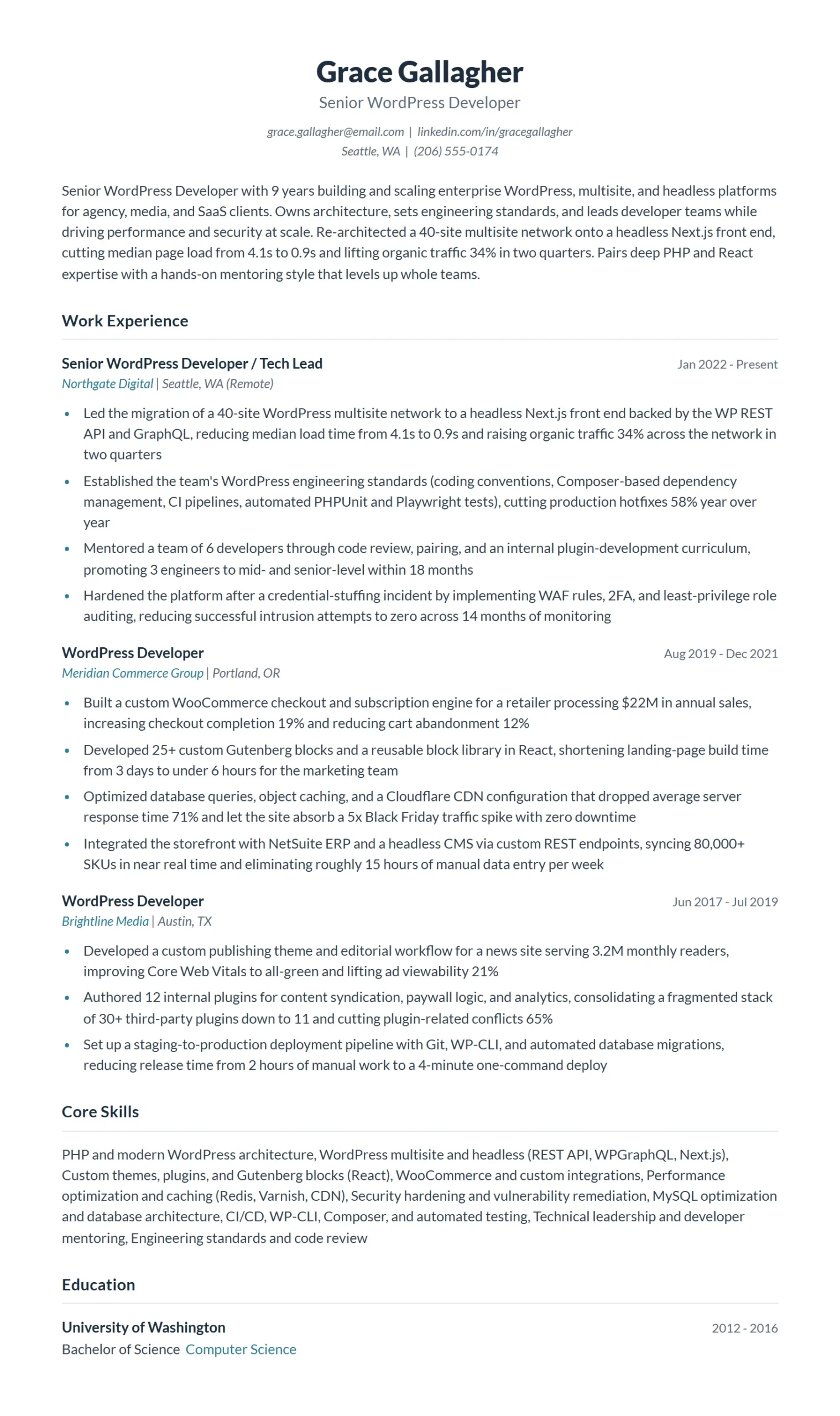
A senior or lead developer with eight-plus years who owns WordPress architecture, leads multisite and headless builds, and mentors a small team.
This version shifts the proof from tasks to ownership and scale: architecting multisite networks, leading a headless WordPress and React migration, and setting code standards the whole team follows. Metrics move up a level too, covering platform-wide performance gains and security incidents prevented. It signals the strategic judgment and leadership a senior title demands.
Entry-Level WordPress Developer resume example
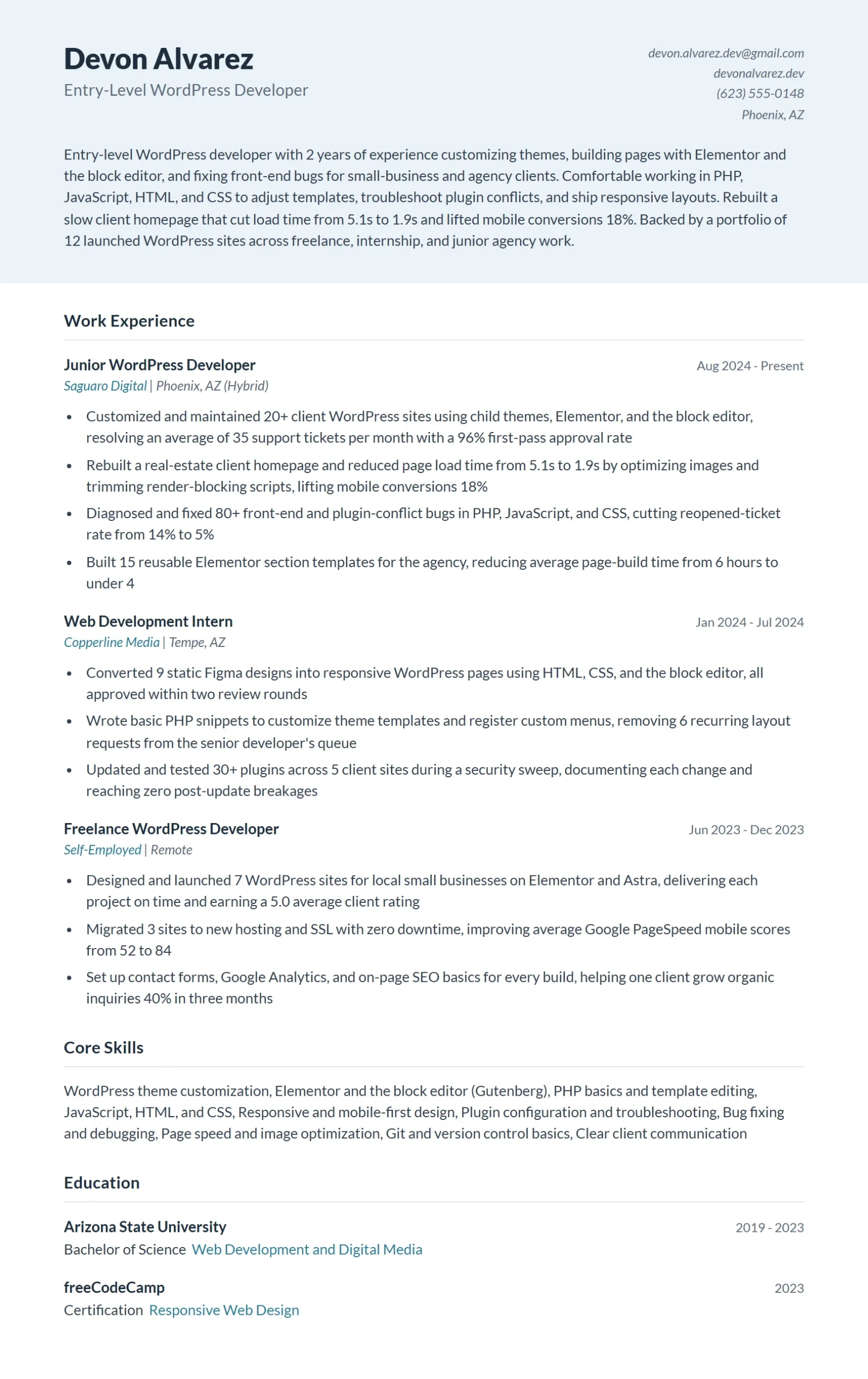
An early-career developer with zero to two years, leaning on a project portfolio, internships, and a first agency or freelance role.
With limited work history, it foregrounds tangible builds: portfolio sites, a custom plugin published to a repo, and freelance projects delivered on deadline. Coursework, certifications, and core skills (PHP basics, theme customization, Git) fill the gap experience would normally carry. It proves capability through what the candidate has actually shipped rather than years on the job.
Full Stack WordPress Developer resume example
A developer working across the entire WordPress stack, from custom Gutenberg blocks and the REST API to React front ends and database work.

It balances front-end and back-end evidence in equal measure: building Gutenberg blocks and React interfaces on one side, MySQL optimization and REST API integrations on the other. The skills section spans both worlds without looking thin in either, which is exactly what full-stack postings screen for. Bullets tie each layer to shipped features and measurable performance wins.
WordPress / PHP Developer resume example
A back-end-focused developer specializing in custom plugin development, hooks and filters, and secure, performant server-side PHP.

This template goes deep on engineering depth rather than breadth: custom plugins built from scratch, the WordPress hooks system, query and MySQL optimization, and security hardening against common vulnerabilities. It is dense with the PHP and back-end keywords these roles require, and the bullets quantify reliability and speed gains. It positions the candidate as the developer trusted with the harder, under-the-hood work.
WordPress Web Developer resume example
A site-delivery-focused developer building responsive WordPress and WooCommerce sites for agency or client work, with an eye on speed and SEO.
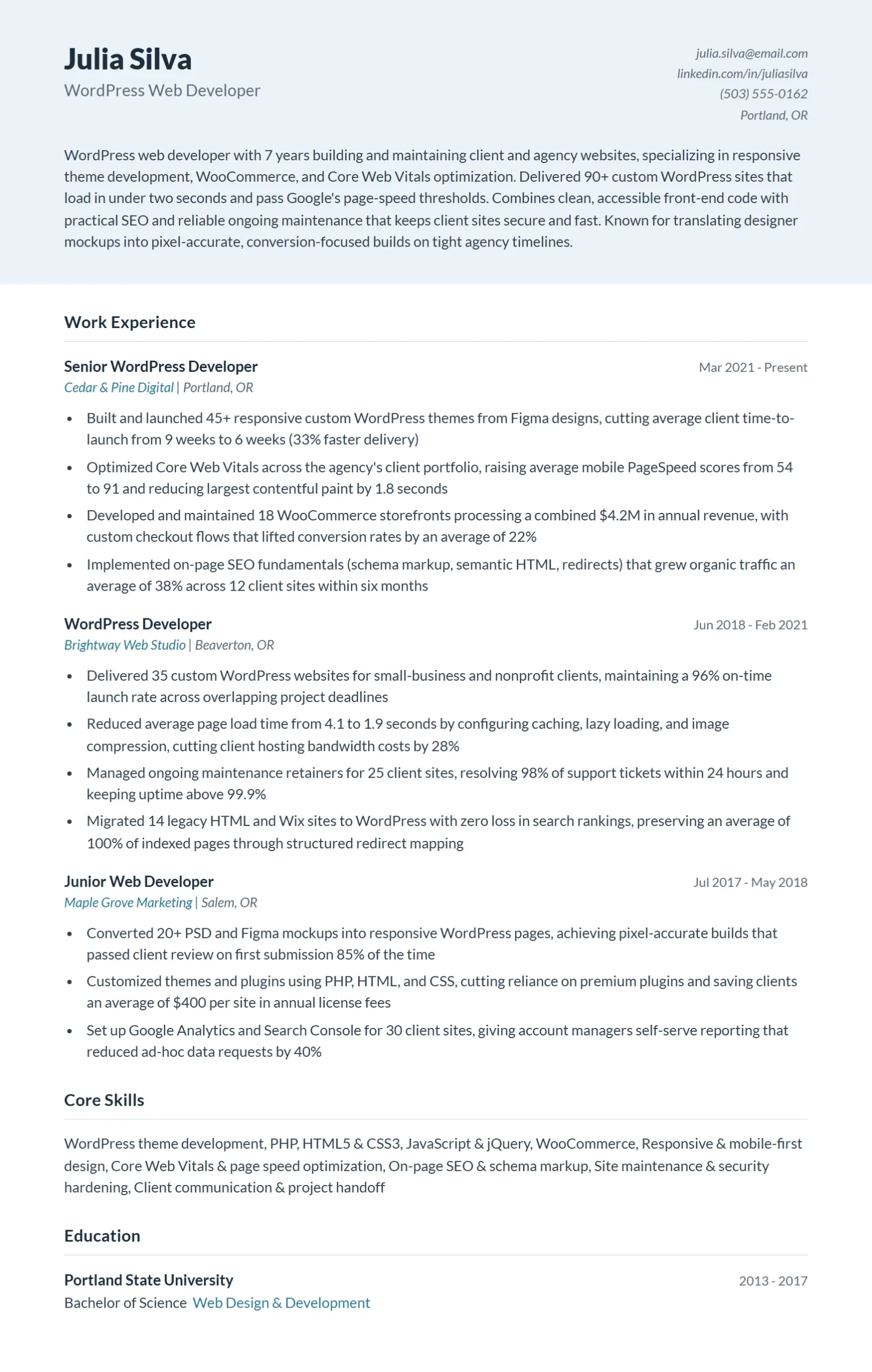
It frames the work around client outcomes: responsive theme builds, WooCommerce stores launched, page-speed and Core Web Vitals improvements, and ongoing maintenance that keeps clients renewing. The skills blend WordPress, WooCommerce, basic SEO, and front-end fundamentals to match agency and freelance postings. Bullets connect each build to business results like conversions and load times, not just tasks completed.
How to write a WordPress Developer resume that gets interviews
Hiring managers screen WordPress Developer resumes for one thing first: can you actually build, not just configure? There is a wide gap between someone who installs themes and plugins and someone who writes custom PHP, builds blocks, and ships secure, fast sites. Your resume has to prove you are the second kind. Most companies also run your resume through an Applicant Tracking System (ATS) before a human reads it, so your language has to match the job description to clear the scan. The tips below show you how to do both: pass the ATS and convince the lead developer reading next.
- Lead with custom development, not site administration: Recruiters can tell the difference between “built” and “updated.” Open your experience with the code you wrote: custom themes from scratch, plugins, Gutenberg blocks, REST API endpoints, custom post types and taxonomies. Phrases like “developed a custom plugin” or “built a block-based theme in PHP and JavaScript” signal an engineer. “Managed WordPress sites” and “installed plugins” signal an administrator, and for a developer role that reads as junior. Put your strongest custom work in the first two bullets of your most recent job.
- Name your real stack, including the WordPress-specific APIs: ATS scans for exact terms, so list the tools you actually use: PHP, MySQL, JavaScript, the WordPress Hooks API (actions and filters), the Template Hierarchy, the WP REST API, Advanced Custom Fields (ACF), WP-CLI, and Composer. If the posting names Gutenberg block development with React, WooCommerce, or a headless setup with Next.js, mirror that wording when it is true. Generic “WordPress, HTML, CSS” reads like a hobbyist. The specific APIs read like a professional.
- Quantify performance, scale, and outcomes: Turn vague work into measurable proof. Use numbers that matter for web work: “cut Largest Contentful Paint from 4.1s to 1.3s,” “improved PageSpeed score from 58 to 94,” “reduced plugin count from 47 to 19,” “shipped a custom theme serving 2M monthly visitors,” or “migrated 30 client sites with zero downtime.” If you do not have business metrics, use technical ones: query reduction, Core Web Vitals, page weight, deploy frequency. They prove impact just as well.
- Show security and maintainability, not just features: WordPress powers a huge share of the web, which makes it a constant target. Senior developers stand out by proving they write defensively. Reference sanitizing and escaping input, nonces, prepared statements with $wpdb, capability checks, and keeping core, themes, and plugins patched. A bullet like “hardened 12 client sites and remediated a malware infection, then implemented automated backups and a staging-to-production deploy flow” tells a hiring manager you can be trusted with production access.
- Prove you write standards-compliant, update-safe code: The fastest way to flag yourself as junior is to imply you edit core files or hack themes directly. Show the opposite. Reference child themes, the WordPress Coding Standards, enqueueing scripts and styles properly, custom plugins instead of functions.php dumping grounds, and version control with Git. “Refactored a 2,000-line functions.php into modular, namespaced plugins following WordPress Coding Standards” is the kind of line that gets a senior developer interviewed.
- Link your portfolio and tailor to each posting: Add a clickable GitHub link and a portfolio of live sites or plugins in your header next to your email. A WordPress Developer with no code to show is at a disadvantage. Then tailor: a WooCommerce role, a headless React role, and an agency role each reward different keywords and projects. Reorder your skills and swap your headline projects to mirror the posting, keep the format to a single clean column with standard headings so the ATS parses it, and run it through Jobscan to check your match rate before you apply.

WordPress Developer resume summary examples
Your summary is the first thing a recruiter reads. Lead with your specialty, years of experience, and a quantified win.
Good wordPress Developer resume summary examples
- WordPress Developer with 7+ years building custom themes, plugins, and Gutenberg blocks in PHP and JavaScript. Cut average page load 60% across a 30-site portfolio and lifted Core Web Vitals to all-green on flagship clients. Fluent in the WordPress Hooks API, ACF, the WP REST API, and WooCommerce, with production code serving 4M+ monthly visitors.
- Full-stack WordPress Developer specializing in headless builds and high-traffic publishing. Owns work end to end, from custom post types and REST endpoints to a React front end on Next.js. Recent migration moved 40 sites to a managed, version-controlled deploy pipeline with zero downtime and cut hosting costs 35%.
- WordPress Developer with a strong security and performance focus. Built a custom plugin adopted across 15 client sites, hardened sites against a live malware incident, and reduced a plugin-bloated stack from 47 plugins to 19 while improving PageSpeed from 58 to 94. Comfortable in PHP, MySQL, WP-CLI, Git, and the WordPress Coding Standards.
What to avoid
- Passionate WordPress developer who loves building beautiful websites and is a quick learner looking for an exciting opportunity to grow. (It is all adjectives and all about what the candidate wants. No stack, no APIs, no portfolio signal, and zero measurable results. A lead developer learns nothing they can act on, and the ATS finds no keywords to match.)
- Experienced in WordPress, able to install themes and plugins, manage content, and keep websites running smoothly. (This describes a site administrator, not a developer. It names no code, no PHP, no custom development, and no APIs, so for an engineering role it reads as junior or mistitled. There is also no metric to prove anything was done well.)
WordPress Developer resume skills
Pull the 8-12 skills that match the job description and weight the WordPress-specific APIs (Hooks, REST, block development) over generic web skills, since those are what separate a developer from a site administrator.
Hard skills for a wordPress Developer resume
- PHP and MySQL
- WordPress Hooks API (actions and filters)
- Custom theme and plugin development
- Gutenberg block development (React/JSX)
- Advanced Custom Fields (ACF)
- WP REST API and headless WordPress
- JavaScript, HTML5, CSS3/Sass
- WooCommerce development
- WP-CLI, Git, and Composer
- Core Web Vitals, performance, and security hardening
Soft skills for a wordPress Developer resume
- Clear technical communication with non-technical clients
- Cross-functional collaboration with designers and PMs
- Problem solving and debugging under deadline
- Code review and mentoring
- Project scoping and estimation
WordPress Developer resume work experience bullet point examples
Lead each bullet with a strong verb and a measurable result.
Good bullet point examples
- Built a custom block-based WordPress theme in PHP and React for a publisher with 2M monthly visitors, cutting Largest Contentful Paint from 4.1s to 1.3s and taking Core Web Vitals all-green.
- Developed and shipped a custom plugin using the WordPress Hooks API and WP REST API, replacing 6 paid plugins and saving the agency $9,000 per year in license fees.
- Led a headless migration of 12 client sites to a WordPress + Next.js stack with REST and GraphQL endpoints, reducing average page load 55% and supporting a 3x traffic spike with zero downtime.
- Hardened 15 client sites by enforcing input sanitization, nonces, and capability checks, then remediated a live malware infection and implemented automated backups and a staging-to-production Git deploy flow.
Bad bullet point examples
- Responsible for building and maintaining WordPress websites for various clients. (“Responsible for” describes a duty, not an accomplishment. It names no technologies, no scope, and no result, so it could belong to anyone at any level and gives the reader nothing to evaluate.)
- Installed plugins and themes and made updates to client sites as needed. (This is administration, not development, and it reads as junior for an engineering role. No custom code, no metric, and “as needed” signals reactive task work rather than ownership.)
- Used WordPress and PHP to improve website performance and fix bugs. (Vague on every axis. “Improve” and “fix” have no numbers behind them, and naming the tools without the outcome proves nothing. Quantify the gain (load time, PageSpeed score, bugs closed) to make it land.)
WordPress Developer resume tips
A strong WordPress Developer resume shows exactly where your code shipped, scaled, and solved real problems for real sites.
- Mirror Job Description Keywords: Pull exact terms from each posting, such as ‘custom plugin development,’ ‘WP REST API,’ or ‘Gutenberg block development,’ and use them verbatim in your skills and bullet points so ATS parsers score you as a match before a human ever reads your name.
- Quantify Site Performance: Replace vague claims with load-time and revenue numbers: ‘Reduced page load time from 4.2s to 1.1s using caching and image optimization, lifting organic traffic 38 percent’ tells a hiring manager far more than ‘improved site performance.’
- Separate Theme from Plugin Work: ATS systems and senior developers scan for distinct competencies, so list custom theme development and custom plugin development as separate line items in your skills section rather than grouping them under a single ‘WordPress’ entry.
- Name Your Stack Precisely: Write ‘PHP 8.1, MySQL 8.0, React 18 (JSX), Sass, ACF Pro, WooCommerce 7.x’ instead of ‘PHP, JavaScript, WordPress’ because precise version familiarity signals active, production-level experience to both ATS filters and lead developers.
- Flag Headless and REST Work: If you have built decoupled or headless WordPress projects using the WP REST API with a React or Next.js front end, call that out explicitly, because it is a fast-growing requirement that many applicants omit and it will immediately differentiate you.
- Prove Security Awareness: WordPress is the most attacked CMS on the web, so include at least one bullet that references a concrete security practice, such as input sanitization with wp_kses, nonce verification, or a successful hardening audit, to show you build defensively and not just functionally.
Pair your wordPress Developer resume with a cover letter
A strong resume goes further with a tailored cover letter. Browse our wordpress developer cover letter examples to round out your application.
WordPress Developer resume frequently asked questions
Yes, and make the links impossible to miss. Put a portfolio or GitHub URL in your header next to your email and LinkedIn, then reference 2 or 3 specific builds inside your experience bullets (a custom theme, a plugin, a WooCommerce store) with the measurable result of each. Recruiters and hiring managers want proof you ship real sites, not just claims that you can. A short list of live URLs you actually built often carries more weight than a long skills section.
Cover the WordPress stack and the broader web stack behind it, because most roles expect both. Name your core languages and tools (PHP, MySQL, JavaScript, HTML, CSS), WordPress-specific work (custom theme and plugin development, the REST API, ACF, Gutenberg block development, hooks and filters), and the ecosystem pieces (WooCommerce, Git, local dev environments, page builders like Elementor or Divi). Match the exact tools named in the job posting, since an ATS often scans for those precise terms. Group skills into clear categories so a reader can find your strengths in a few seconds.
Be specific about how far past theming your work actually goes. If you write custom PHP, build plugins, work with the database, and handle deployment, say so in your bullets and summary so you are not mistaken for a page-builder-only candidate. If your strength is fast, polished site builds with established themes and plugins, lead with that and the volume and quality of sites you have shipped. Mirror the language in the job description: some postings want a WordPress specialist, others want a full-stack engineer who happens to use WordPress.
Write 2 or 3 sentences that name your focus, your years of experience, and one quantified result. For example: “WordPress developer with 5 years building custom themes and plugins for high-traffic sites, including a caching and query rewrite that cut page load time 40 percent.” Include the exact job title and a few keywords from the posting so both the recruiter and the ATS see an instant match. Skip generic lines like “passionate web developer” and lead with evidence instead.
Keep the format clean and the keywords precise. Use a single-column layout with standard headings (Experience, Skills, Education), real selectable text instead of icons or text inside images, and a .docx or text-based PDF. Then mirror the specific terms from the job description, such as PHP, custom post types, REST API, or WooCommerce, using the same wording the posting uses. Scan your resume against the job description with a tool like Jobscan to confirm your skills and formatting parse correctly before you apply.
Translate your work into outcomes a hiring manager can measure. Use numbers like page speed gains (load time reduced from 6 seconds to 2), traffic or conversion lifts, the number of sites or plugins you built and maintained, uptime you protected, or hours saved through automation. Pair each metric with the technical action that produced it, for example optimizing database queries, refactoring a bloated theme, or migrating a site to a new host with zero downtime. Concrete results separate you from candidates who only list responsibilities.