




- Auto-apply tools submit applications on your behalf. That’s the line that separates them from resume builders, optimizers, and auto-fill tools, and it’s why they come with a different risk profile.
- Three categories exist, each for different job seekers: fully automated (high-volume commodity roles), AI copilot (professional roles where you keep oversight), and managed services (senior or complex searches). None is objectively “best.”
- Platform detection is real and getting smarter. LinkedIn, Greenhouse, Indeed, and Workday all have active systems that identify and suppress automated submissions. Cloud-based, high-velocity tools carry the highest risk.
- Callback rates vary widely by category: roughly 1–6% for fully automated tools, 5–15% for copilot tools, and 40–60% for managed services (though the last figure is vendor-reported, not independently audited).
- The single highest-impact action you can take is optimizing your resume for each specific role before anything gets submitted. Jobscan’s resume scanner does this in under five minutes per application.
- The market has a credibility problem. Alongside legitimate tools, there’s a wave of low-quality apps built quickly to cash in on job seeker desperation. Knowing the difference can save you money, protect your accounts, and protect your personal data.
You’ve spent weeks picking over every detail of your applications, but still radio silence from employers. So the instinct kicks in: If I just starting blasting out hundreds of applications, surely some will stick.
It’s an understandable impulse. Application volumes have more than doubled since 2022. Recruiters are managing three times as many candidates per role compared to just a few years ago.
Applications per hire: 2021–2025
Source: Ashby 2026 Talent Trends Report (~14M applications analyzed). U.S. job openings remained historically elevated during this period — the surge is driven by AI compressing application time, not job scarcity.
At the same time, the U.S. job market has cooled significantly since 2022.
U.S. job openings: 2021–2025
Source: U.S. Bureau of Labor Statistics, Job Openings and Labor Turnover Survey (JOLTS). Annual averages, seasonally adjusted. Job openings peaked at ~11.3 million in 2022 before declining steadily to ~7.2 million in 2025 — a 36% drop, and the lowest level since 2018.
That’s when “auto-apply” enters the scene, promising to send out applications in a way no human ever could. But before you hand the wheel to a bot, it’s worth asking the question most tools don’t want you to ask:
Are these tools actually trustworthy, and do they actually work?
That’s what this guide answers. It’s not a simple yes or no. The category is real, fast-growing, and genuinely useful in the right context. But there’s also a lot of noise, a lot of overpromising, and — if you pick the wrong tool — very real risks to your accounts, your reputation, and your personal data.
What is auto-apply?
Auto-apply is software that automates the submission step of a job application. That’s the defining characteristic that separates it from other AI job search tools.
The distinction matters because several types of AI tools get lumped together under the “auto-apply” label when they do very different things. Here’s how they actually break down by job search stage:
| Job search stage | What AI tools do here | Does it submit for you? |
|---|---|---|
| Job discovery | Aggregates listings, makes personalized recommendations based on your profile and career goals, organizes your search | ❌ No |
| Application prep | Builds, rewrites, or optimizes your resume and cover letter against the job description | ❌ No |
| Form filling | Pre-populates application fields (name, address, work history) across applicant tracking systems | ❌ No — you still click submit |
| Auto-apply | Handles some or all of the above AND auto applies on your behalf after filling in your info | ✅ Yes (varies by tool) |
The risk profile, time investment, and outcomes are genuinely different across these stages. An auto-fill tool that saves you from retyping your address 40 times is a very different product from a bot submitting applications in the background while you sleep.
Auto-apply tools specifically cross the line from assisting you to acting on your behalf. That’s the line that matters.
What AI auto-apply tools are available in 2026?
Three distinct categories of tools exist. They serve different job seekers with different needs, and none of them is objectively the “right” choice for everyone.
The auto-apply spectrum
Category 1: Fully automated tools
You upload your resume, set your preferences — job title, location, salary range — and the tool runs in the background. It finds listings, fills forms, and submits without asking you to review each one. Some tools target 50 to 750+ applications per day.
Approach this category with caution. Applications go out without individual review, which means form-filling errors, mismatched roles, and missed disqualifying requirements are common. That said, for high-volume standardized roles in fields like customer service, logistics, hospitality, or retail, where dozens of employers post nearly identical descriptions, the volume approach can add value as a supplement to your targeted applications.
| Tool | Pricing | Platform | Resume tailoring | Review before submit | Trustpilot |
|---|---|---|---|---|---|
| LazyApply | $99+ one-time | LinkedIn, Indeed, ZipRecruiter | AI-generated | ❌ No | 2.4/5 (56% 1-star) |
| Sonara | $24.99/mo+ | Cloud-based (multi-board) | AI-generated | ❌ No | Limited reviews; acquired by BOLD 2024 |
| LoopCV | Free + $24.90/mo | Cloud-based (20+ boards) | Uses your uploaded resume | Optional | 4.1/5 |
| JobCopilot | $19/mo+ | Cloud-based (multi-board) | AI-generated | ❌ No (autopilot mode) | 3.4/5 |
- Maximum volume with minimal time.
- Useful for commodity roles where job descriptions are nearly identical across employers.
- No per-application review means errors go out uncaught.
- Form-filling accuracy drops significantly on complex ATS platforms like Workday and Greenhouse.
- Cloud-based tools run from data center IPs, which some platforms flag automatically.
- One-time “lifetime” pricing models are worth scrutinizing. ATS integrations require ongoing maintenance, and vendors using that model have no recurring revenue to fund it.
Category 2: AI copilot tools
This model keeps you in the driver’s seat. Depending on the service, AI handles the heavy lifting of pre-filling forms and looking for job openings. You review and approve before each submission. Typically deployed as a browser extension you activate on a job you’ve already chosen to pursue.
This is the category most professional job seekers find the best balance of speed and quality. You still move fast. You just don’t give up judgment at the finish line.
| Tool | Pricing | Platform | ATS compatibility | Review before submit | Credibility signals |
|---|---|---|---|---|---|
| Jobscan | Free trial + paid tier | Web app | Major ATS platforms | ✅ Yes (enabled by default) | Built on 12+ years of ATS data; YC-backed, 2M+ users; match scoring built in |
| Simplify Copilot | Free extension + paid tier | Chrome/Firefox extension | Workday, Greenhouse, Lever, Taleo, iCIMS | ✅ Yes | YC W21, $3.2M seed, 1M+ installs, 4.9/5 Chrome |
| Jobright | Free tier + $29.99/mo | Web app + extension | Multi-platform | ✅ Yes | $7.7M funding, 550K+ users; Trustpilot 2.9/5 — check recent reviews |
| AiApply | $19/mo+ | Web app + extension | Multi-platform | ✅ Yes (when review enabled) | Smaller team; mixed reviews on reliability and cost transparency |
- You move significantly faster without losing oversight.
- Browser-based tools submit from your own IP at human speeds, which avoids most platform detection systems.
- Each application gets reviewed, so form accuracy is higher and mismatched roles get caught before they go out.
- You still need to be present and engaged. This is not set-and-forget.
- Application volume lower than full automation.
Category 3: Human-assisted managed services
A newer tier. You provide your information, preferences, and career goals. Human operators under the roles of trained virtual assistants or career strategists use internal AI tools to source roles, tailor your materials, and submit applications manually on your behalf.
This category serves a specific niche: senior professionals, executives, visa-dependent searches, career transitions, and highly competitive specialized fields where per-application quality matters more than volume.
| Tool | Pricing | How it works | Human review | Reported callback rates* |
|---|---|---|---|---|
| Scale.jobs | $199+/engagement | Human VAs apply manually using real browsers | ✅ Complete | 40–60% (vendor-reported) |
| Oaki | $349+/engagement | Career strategists + AI backend | ✅ Complete | Not independently verified |
*Callback rates are vendor-reported estimates, not independently audited. Treat them as directional, not guaranteed.
- Submissions come from a human browser on a residential connection, which sidesteps detection systems entirely.
- Highest per-application quality in the category.
- Best suited for searches where each application needs to be carefully matched to a specific role.
- Most expensive tier by far.
- Turnaround is slower than software tools.
- Outcome data comes almost entirely from vendors, so approach the reported figures with appropriate skepticism.
Does automation actually get you more interviews?
The short answer: fully automated job application tools produce estimated callback rates of roughly 1 to 6%. Copilot tools with human review show 5 to 15%. Managed services report 40 to 60%, though those are vendor-supplied numbers. Across all three categories, the single biggest factor in outcomes is whether your resume was tailored to the specific role before submission.
Now for the nuance.
Outcome data in this space is sparse and hard to verify. Most tools don’t publish third-party audited conversion rates. What exists is a mix of user accounts, vendor claims, and limited case studies. Take all of it with appropriate skepticism — including the headline numbers above, which come from vendor and platform research, not independent audits.
What the available evidence suggests:
- Fully automated tools: One Reddit user testing Sonara showed a user submitting 900 applications and receiving 48 interview requests — a 5.4% rate. Other accounts on Reddit describe rates closer to 0 to 1% per 100 to 300 applications. Results track closely with role type: commodity roles respond better to volume, specialized roles respond better to fit.
- Copilot tools: Higher per-application outcomes because each submission is reviewed and tailored. Independent analysis suggests these work well for organized job seekers targeting dozens of well-matched roles per week rather than hundreds of anything.
- Managed services: Highest reported rates by a significant margin, though the source is vendor marketing. Treat accordingly.
The metric that matters most isn’t applications sent. It’s interviews per application.
According to Jobscan’s analysis of Fortune 500 hiring practices, 97.8% of Fortune 500 companies use an applicant tracking system. A well-tailored resume navigates those systems dramatically better than a generic one, and that gap compounds whether you’re applying manually or through a bot.
For an entry-level customer service role with standardized requirements, volume has real value. For a senior product manager position at a specific company, 30 targeted, tailored applications will typically outperform 300 generic ones by a wide margin.
Is it safe to use auto-apply for job applications?
It depends on the category and the platforms you’re applying through. Browser-based copilot tools that submit from your own computer at human speed are generally lower risk. Cloud-based tools that submit autonomously at high velocity are significantly more exposed.
Here’s what the major platforms are actively doing about it:
How major platforms detect automated applications
- Behavioral tracking: monitors scroll speed, hover time, session length, and typing rhythm to identify non-human patterns.
- Browser fingerprinting: flags cloud server and data center IPs automatically.
- Rate limits: viewing 100+ profiles/day triggers algorithmic suppression — your profile visibility drops in recruiter searches.
- Automation blacklist: maintains an actively updated list of banned extensions.
ToS risk: LinkedIn’s User Agreement Section 8.2 explicitly prohibits bots and automated methods. Documented cases of permanent account bans exist.
- CAPTCHA walls: many extension-based tools fail to bypass Indeed’s CAPTCHA, rendering them effectively useless on one of the world’s largest job boards.
- Hidden qualification penalties: employers embed disqualifying criteria (state residency, certifications, intake questions) that bots miss. Repeatedly applying to mismatched roles reduces your visibility over time.
- IPQS fraud detection: integrated IPQualityScore flags applications from data center IPs, VPNs, and proxy networks.
- Email age verification: newly created email addresses used by spam scripts get flagged. Established inboxes pass cleanly.
- Spam blocklists: companies can permanently block IP ranges associated with bulk auto-apply campaigns.
Key context: Greenhouse’s “Real Talent” suite performs invisible risk assessments on all incoming applications. You don’t know you’re being scored.
- Shadow DOM architecture: Workday hides form fields from standard JavaScript queries. Basic autofill extensions can’t find the fields to fill them. Parsing accuracy drops to ~34% for basic tools.
- When tools fail, applications arrive with blank or incorrect fields. That’s a wasted submission — and sometimes a visible red flag to the recruiter reviewing it.
Sources: Greenhouse Support · LinkedIn User Agreement · CrossClassify
There’s also an identity risk worth flagging. Fully automated tools apply to every matching listing, including fake job postings designed to harvest personal data. Job search scams have surged alongside AI adoption. The fundamental safeguard of job hunting gets bypassed entirely when a bot is running. There’s no chance to pause and evaluate a company’s legitimacy before sharing your home address, work history, and contact information.
How do you tell if an auto-apply tool is legitimate?
Alongside the established tools, there’s a wave of apps flooding this space. Judging their quality and knowing what to look for can save you real money, and protect your accounts.
Named founders with verifiable LinkedIn profiles and employment histories are a strong signal. Anonymous operations with no traceable team behind them are a hard stop. Legitimate platforms like Simplify and Jobright have publicly identifiable teams. Predatory tools often don’t.
Look at the distribution, not just the average rating. Five hundred reviews split 70/30 tells a very different story than 12 reviews averaging five stars. Pay particular attention to the one-star complaints. If the pattern is “tool broke after one week,” “wrong data submitted,” or “impossible to get a refund” — those are structural problems, not edge cases.
Subscription pricing signals that the vendor needs to keep the product working to keep getting paid. Steep one-time “lifetime” fees ($99 to $249) are a major warning sign. Maintaining live integrations with Workday, Greenhouse, and LinkedIn requires constant engineering work. A vendor with no recurring revenue has no financial reason to do that work after you’ve paid.
Confident tools let you test before you commit. No free option and no trial means you’re taking on all the risk. That’s a pattern you see consistently with the lower-quality tools.
These tools handle your home address, work history, and sometimes EEOC demographic data. Before you hand over that information, understand what gets sent, to whom, and whether you can review it before it goes. If the answer isn’t clear from the product’s own documentation, that’s a problem.
Tools to approach with extra caution
Beyond the three core categories, my research behind this article turned up several tools that raised credibility concerns significant enough to flag.
These tools may technically work for some users in some contexts. But each one showed enough warning signs like low review scores, anonymous teams, refund issues, broken integrations, or no verifiable corporate history, that I don’t feel confident recommending them. If you encounter them, do your own research thoroughly before paying.
| Tool | Why we’re flagging it |
|---|---|
| JobHire.ai | F rating from the Better Business Bureau. Mixed user reviews with recurring complaints about inaccurate matches and subscription cancellation difficulties. No free trial. |
| LazyApply | 2.4/5 on Trustpilot with 56% one-star reviews. Documented issues with wrong data injection, failing Indeed CAPTCHA, and difficulty obtaining refunds. $99+ one-time pricing. |
| Generic AI wrappers | A large category of low-visibility tools built on open-source APIs with no identifiable team, no corporate registration, and AI-generated website copy. They often advertise “1,000 applications per day” and charge $149+ upfront. |
The safest filter: if a tool can’t pass the five questions in the section above, investigate before you spend your money.
Which type of auto-apply tool is right for your job search?
The right category depends on what kind of roles you’re targeting, not which tool has the best marketing copy.
| Your situation | Category to consider | Why |
|---|---|---|
| High-volume, standardized roles (retail, hospitality, logistics, customer service) | Category 1 — as a supplement | Volume has real value when descriptions are nearly identical. But optimize your base resume first, and don’t use it as your only strategy. |
| Professional, technical, or specialized roles | Category 2 (AI copilot) | You need speed, but each application benefits from your review. Best balance for most professional job seekers. |
| Senior/executive roles, visa-dependent, or career transitions | Category 3 (Managed service) | Per-application quality matters more than volume. Higher upfront cost may pay off faster than months of low-conversion applications. |
| Not sure you’re ready to automate yet | Start with auto-fill only | Simplify’s free extension or LinkedIn Easy Apply give you the time savings without the submission risk. A good first step. |
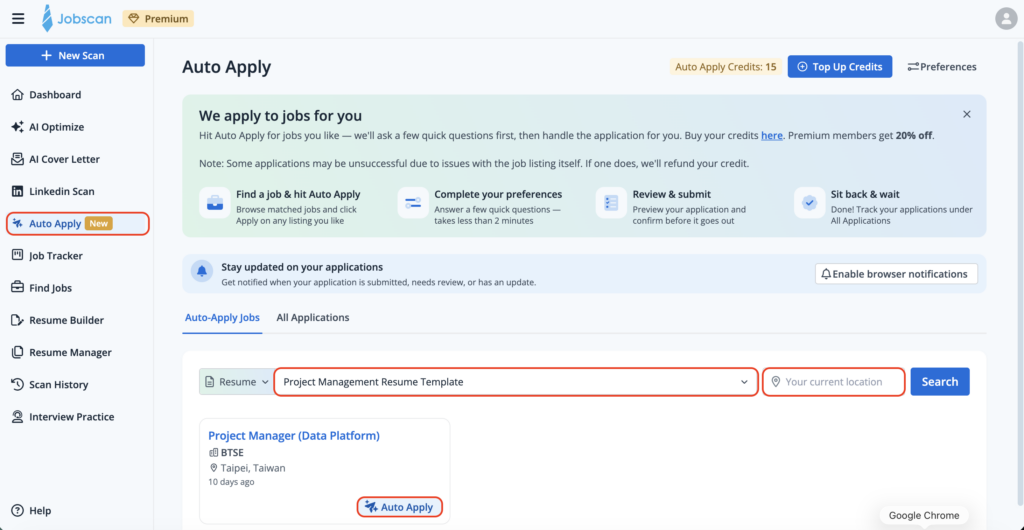
How our copilot model works: Auto Apply
Maintain the efficiency, keep the quality: that is the idea behind Jobscan’s Auto Apply. The AI tailors each application to the specific job instead of blasting the same resume everywhere.
Auto Apply uses it to recommend matching roles and to draft application answers that reflect your actual background.
Roles are sourced from Lever, Workable, and more than 20 other ATS platforms, ranked by how well they match your profile. Each is labeled clearly so you know which are strong fits before you spend time on them.
Jobscan’s AI reads that specific application form and drafts tailored answers from your resume and preferences.
Enter your experience level, target industries, work type, expected salary, and location. Takes about two minutes.
We always recommend keeping yourself in the loop unless you’re repeatedly applying to similar jobs in the same industry and position.
You see every field exactly as it will appear when submitted. Edit anything, rewrite any answer, or skip the role entirely.
The submit button belongs to you. Every application goes out with your explicit approval.
Every application, its status, and its answers live in one dashboard.


No auto-apply tool compensates for a resume that hasn’t been optimized.
This is the highest-return step in any application strategy. Don’t skip it just because you want to move fast. Before any application goes out, your resume needs to be tailored to the specific job description and the applicant tracking system that company uses.
Each ATS handles resume parsing differently. What works in Greenhouse may fail in iCIMS or Lever. A well-optimized resume navigating those systems produces a fundamentally different outcome than a generic one.
Part of Jobscan’s AI × Job Search series:
Auto-apply tools are software that automates some or all of the job application process — from finding roles and filling forms to submitting applications on your behalf. They range from fully autonomous bots to AI copilots that keep you in control of each submission.
Fully automated tools produce estimated callback rates of 1 to 6% depending on role type and resume quality. Copilot tools with human review show 5 to 15%. The biggest single factor isn’t the tool — it’s whether your resume is tailored to each role before submission.
LinkedIn’s User Agreement Section 8.2 explicitly prohibits bots and automated methods. Browser-based copilot tools operating at human speeds are lower risk than cloud-based bots, but you should review the terms of any platform before using automation on it.
Auto-fill tools pre-populate form fields with your stored information, but you still review and click submit yourself. Auto-apply tools go a step further and submit on your behalf, with varying degrees of human oversight depending on the category.
Look for a named founding team, a meaningful volume of third-party reviews with a realistic distribution, subscription-based pricing, a free tier or trial, and clear documentation about what gets submitted on your behalf. Cloud-based tools operating from data center IPs carry significantly higher platform detection risk than browser-based tools running from your own computer.