



If you’ve spent any time job hunting, you know this feeling. You find a role that looks like a good fit, you click “Apply,” and then you’re staring at the same form you’ve filled out a hundred times before. Name. Email. Phone. Upload resume. Paste your LinkedIn. Answer the salary question. Repeat tomorrow, and the day after that.
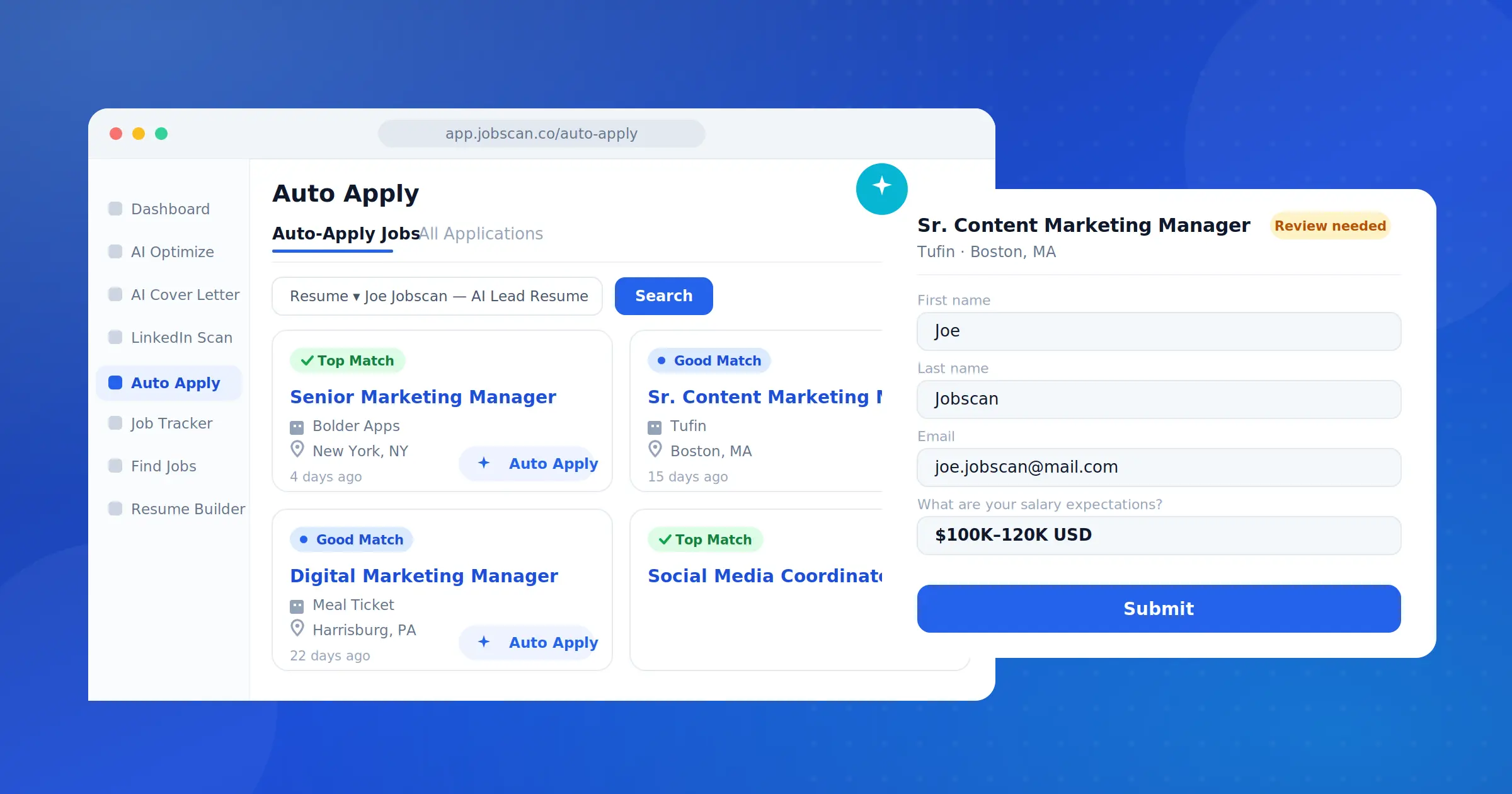
Today we’re introducing our newest feature Auto Apply, that allows you to apply for jobs with AI. Auto Apply is built right into Jobscan, and takes the repetitive work off your plate without taking you out of the driver’s seat.
You set your preferences once.
Jobscan’s AI finds roles that actually match your profile and prepares a thoughtful, tailored application for each one.
Then you review it, edit anything you want, and decide whether it’s worth submitting.
The idea is simple: spend less time on the busywork of applying, and more time on the applications that matter.
Assisted applying, not auto-applying
Let’s be honest about the “auto-apply” category. These tools have earned a reputation for spraying hundreds of generic applications into the void. That’s not what this is, and we want to be clear about it up front.
Auto Apply by Jobscan is a native part of your Jobscan workflow. It’s not a browser extension, it’s not a form-filler bolted onto LinkedIn, and it’s not a mass-apply spammer. It’s an assistant that reduces the effort of applying without reducing the thoughtfulness of it.
We think of it as applying smarter, not just faster. Speed is a nice side effect. Quality is the point.
How Auto Apply works
The whole experience is designed around one principle: the AI does the prep, and you make the call. Here’s the flow.
- Set your preferences once. Tell Jobscan your experience level, target industries, work type, salary expectations, location, and work authorization. You do this a single time, and it shapes everything that follows.
- Pick the resume that represents you. Auto Apply uses your resume to recommend matching roles and to prepare answers that actually reflect your background.
- Browse jobs that fit. Instead of an endless feed, you see roles matched to your profile. Each job is clearly labeled so you know which ones are strong fits before you spend a second on them. Prefer to drive the search yourself? You can search by keyword instead.
- Click “Auto Apply” on any role you like. Jobscan’s AI reads that specific application form and drafts thoughtful, tailored answers based on your resume and preferences. (Preparing an application can take a little while behind the scenes so feel free to keep browsing other roles while it works.)
- Review the drafted application. This is the heart of it. You see every field on the application exactly as it will be submitted. Edit anything. Rewrite an answer. Or decide the role isn’t worth it after all.
- Approve to submit. Nothing goes out until you say so. You make the final call on every single application.
- Track everything in one place. Every application and its status live in a single dashboard, so you always know what’s been prepared, what needs your review, and what’s already out the door.
AI does the prep. You stay in control.
Assisted applying, not auto-applying.
-
Step 1 · You
You set it up
Set your preferences, pick your resume, and choose a matching role.
-
Step 2 · Jobscan AI
AI preps it
Jobscan reads the application form and drafts tailored answers from your resume.
-
Step 3 · You
You review & approve
See every answer, edit anything, and decide what gets submitted.
That review step isn’t a hoop to jump through. It’s what makes Jobscan’s Auto Apply different. It’s the difference between an application you’d actually want a recruiter to read and one you’d be embarrassed to have sent.
What makes Jobscan’s Auto Apply different
A few things set Auto Apply apart from the volume-first tools out there.
- Quality over quantity. Auto Apply only surfaces roles that genuinely match your profile. We’re not here to help you apply to everything. We’re here to help you apply well to the right things.
- You stay in control. Every application passes through a review step. The AI prepares it; you approve it. Your resume, your preferences, your final say.
- Tailored, not templated. Answers are drafted from your actual resume and preferences for each specific role. This is not a copy-paste automation.
- Built on Jobscan’s match intelligence. This is the same platform that already helps job seekers optimize resumes and understand how well they match a job. Auto Apply pulls roles straight from the source and ranks them against the resume you choose.
- Transparent tracking. Status, answers, and outcomes for every application live in one dashboard. No guesswork about where things stand.
What makes Auto Apply different
Most auto-apply tools chase volume. We built the opposite.
| Other auto-apply tools | Jobscan Auto Apply | |
|---|---|---|
| Quality over quantity | Blast out as many applications as possible | Surfaces only roles that genuinely match you |
| You stay in control | Sends applications automatically, sight unseen | You review and approve every application |
| Tailored, not templated | Generic, copy-paste answers | Answers tailored from your resume, role by role |
| Built on match intelligence | A standalone bot, separate from your tools | Built on Jobscan’s resume and match scoring |
| Transparent tracking | Little visibility once it’s running | Every status and answer in one dashboard |
Who it’s for
Auto Apply is built for people who care about where they apply, not just how many places. If you’re actively searching and tired of re-entering the same information into form after form, it gives you those hours back. If you’re casually keeping an eye out while employed and only want to apply to a handful of strong-fit roles, it removes the friction that usually stops you from bothering.
Either way, the promise is the same: less busywork, more intention.
Try Auto Apply
Auto Apply is available to Jobscan Premium members, with 2 free credits to get you started and your balance topped up to 2 credits each month. Need more applications? You can purchase additional credits at any time. One credit is used for each job you choose to Auto Apply to, so you stay in control of how your credits are used.
Set your preferences, point it at a job that excites you, and let Jobscan handle the prep…while you keep the final say.
Apply smarter. Stay in control.




