
You’re job hunting. Maybe you’ve been at it for weeks, sending applications into what feels like a void.
It’s not your imagination; the job search has genuinely gotten harder.
Since AI tools made it trivial to mass-apply, hiring managers are now sifting through 3x more candidates per role than they were just a few years ago. Application volume has risen 102% since 2022. Your competition isn’t just other qualified people anymore. It’s bots.
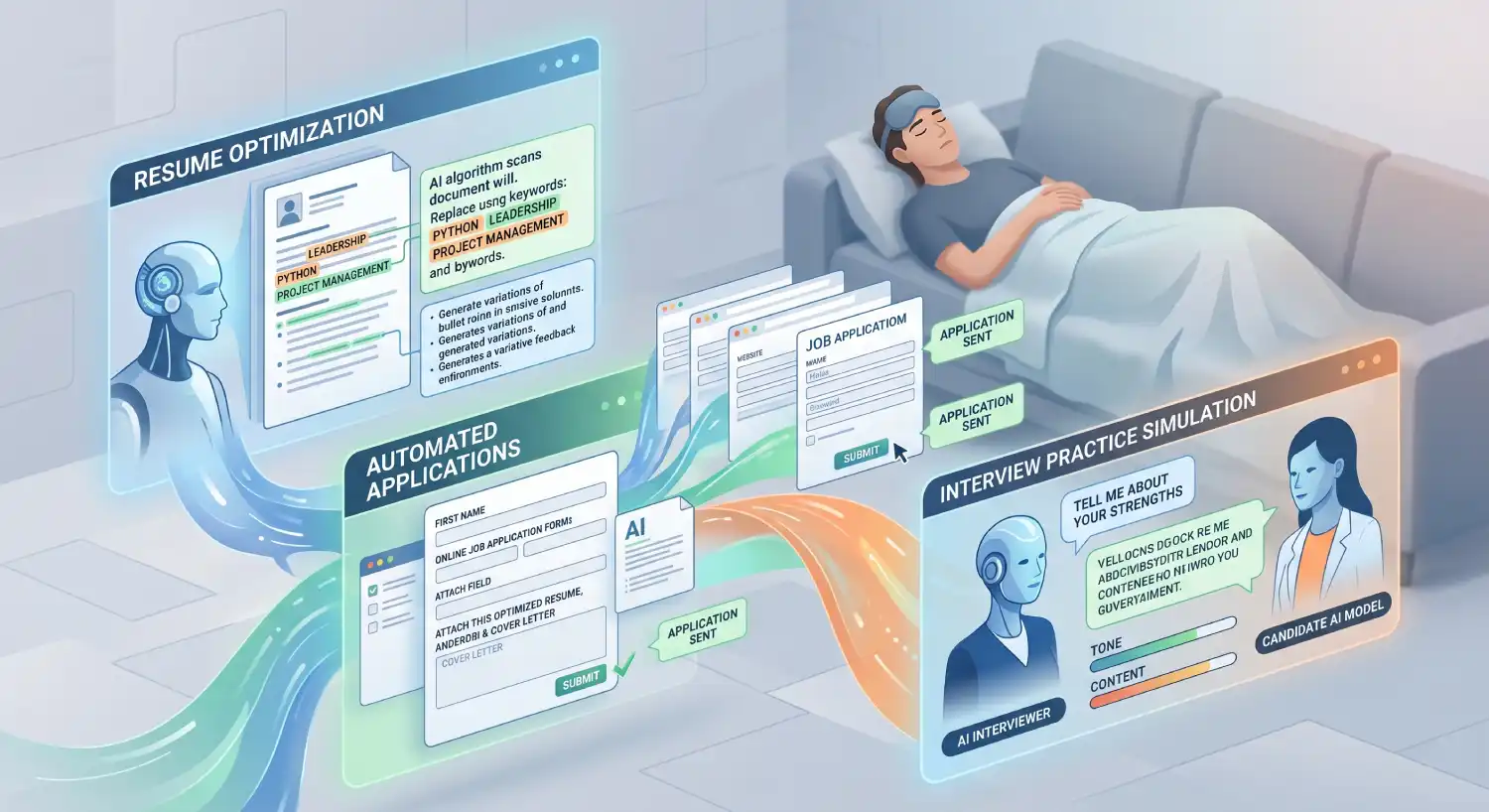
So you do what makes sense: you look for AI job search tools to help level the playing field. And you find dozens of them. Browser extensions, platforms, and apps all promising to land you your dream job. Some automating the entire job application process, some building your resume or CV, some optimizing your LinkedIn, some practicing your interviews.
How are you supposed to tell which of these AI job search tools actually produce more interviews?
That’s exactly what this article covers. We evaluated five categories of tools based on real user outcomes, not marketing claims. And because Jobscan is one of the tools in this space, we’re being upfront about that. We have a stake in this market. But we’ve also spent over a decade reverse-engineering ATS platforms, analyzing millions of resumes, and working with hundreds of recruiters and career coaches. That’s what makes our evaluation different.
AI job search tools: feature comparison
A wide range of tools and services are available on the market. We collected the top picks in each category and stacked them all together to give you a side-by-side look at what you get when you sign up, free or paid.
Swipe left or right to see the full feature list:
| Build | Optimize | Apply | Track | Prep | Pricing | ||||||
|---|---|---|---|---|---|---|---|---|---|---|---|
| Tool | Resume builder | Cover letter gen | ATS optimization | LinkedIn optimizer | Job finder | App autofill | App tracker | Profile discoverability | Mock interviews | Live copilot | Free tier |
| Resume optimization & full suites | |||||||||||
| Jobscan ★ | Free (5 scans/mo); from $49.95/mo | ||||||||||
| Teal | Free forever core; Teal+ from $29/mo | ||||||||||
| Resume Worded | Free (limited); Pro from $19/mo | ||||||||||
| Kickresume | Free (limited); from $10/mo | ||||||||||
| Rezi | Free (1 resume); Pro $29/mo; Lifetime $149 | ||||||||||
| Auto-apply & job discovery | |||||||||||
| Simplify Copilot | Free (autofill + tracker); Simplify+ $39.99/mo | ||||||||||
| AiApply | No free tier; from ~$19/mo + volume credits | ||||||||||
| JobsAI Copilot | Limited free preview; from $8.90/wk | ||||||||||
| Sonara | $2.95 trial → $23.95/4 wks | ||||||||||
| LoopCV | Free (limited); from €9.99/mo | ||||||||||
| LazyApply | No free tier; from $99/yr | ||||||||||
| Interview prep | |||||||||||
| Interview Sidekick | Free (core); Ultimate from $60/mo | ||||||||||
| Big Interview | No free tier; from $39/mo; Lifetime $299 | ||||||||||
| Mockinterviews.dev | Free mocks available; from $47/mo | ||||||||||
| Final Round AI | Free (basic sessions); from $99/mo | ||||||||||
| LinkedIn audience growth | |||||||||||
| Taplio | 7-day free trial; from $39/mo | ||||||||||
| Free & general tools | |||||||||||
| General LLMsChatGPT · Claude · Gemini Live* | Free tiers on all three; paid from $20/mo | ||||||||||
How we evaluated
For years, job seekers measured their effort by the number of applications sent. In 2026, that’s the wrong metric. The only number that matters is your interview conversion rate: how many interviews you’re getting per application submitted.
There’s a trap we call “desperation math.” It’s the belief that if you blast 500 generic applications, the odds have to work in your favor eventually. But research on job application ROI tells a very different story. Job seekers who use AI strategically to customize each application see a 2.5x increase in interview rates compared to traditional methods. When AI is used strictly for mass automation without tailoring, interview conversion rates plummet.
More applications does not mean more interviews. Better applications do.
Here are the criteria we used to evaluate every tool:
- Interview conversion rate. Does this tool demonstrably help you get more callbacks?
- ATS compatibility. Does it format your data in a way that modern ATS platforms can accurately read?
- Ease of use. Can you figure it out quickly without hours of setup?
- Cost and pricing transparency. Is the pricing straightforward, or does it rely on hidden paywalls and bait-and-switch free tiers?
- Risk of getting flagged. Does the tool generate patterns that trigger red flags with recruiters or job boards?
- Credibility and track record. How long has this company been operating, and are their claims backed by verifiable data?
What are the best AI resume optimization tools?
These tools scan your resume against a specific job description and surface keyword gaps, formatting problems, and skill mismatches. In a market where 97.8% of Fortune 500 companies use ATS platforms, getting past that first filter matters.
The key distinction to understand: an applicant tracking system is primarily a smart filing and storage system. Recruiters search it using keywords to find candidates. If your resume doesn’t contain the right terms in a readable format, you simply won’t show up. Generic keyword tools check for word presence. ATS-specific tools go deeper, identifying how a particular system will actually parse your data.
| Tool | 2026 pricing | What sets it apart | Best for |
|---|---|---|---|
| Jobscan | Free (5 scans/mo); Premium: $49.95/mo or $89.95/quarter | Reverse-engineers specific ATS platforms (Greenhouse, Taleo, Workday). Checks keywords, formatting, job level match, education match, and ATS-specific formatting tips. Includes AI Optimization, AI Cover Letter Generator, Resume Builder, Job Tracker, LinkedIn Optimizer, Auto Apply and job search tools. Backed by 10+ years of ATS research. | Job seekers who want a complete, integrated platform built around ATS precision. |
| Teal | Free (unlimited tracking); Teal+: $29/mo, $13/week, or $79/quarter | Combines job bookmarking, application tracking, and resume tailoring in a CRM-style workspace. Requires more setup than Jobscan to get full value. | Job seekers who want a centralized dashboard to organize and track a high-volume search. |
| Resume Worded | Free (limited); Pro: $49/mo | Line-by-line writing analysis focused on action verbs, measurable achievements, and professional impact. Provides a general resume health score but lacks ATS-specific intelligence. | A quick initial audit of resume writing quality before moving to targeted optimization. |
| Kickresume | Free (basic); Premium: $24/mo or $96/year | AI-assisted resume drafting and rewriting. Strong template library. Less focused on ATS precision than Jobscan. | Starting from scratch or doing a major resume rewrite, particularly for creative roles. |
Who should use what
If your goal is to gain an edge for competitive positions with many applicants, Jobscan is the most technically precise option available. No other tool is built with proprietary software based on ATS reverse-engineering. Jobscan checks over 30 factors including hard skills, soft skills, job level, education, and formatting issues that could cause your resume to be misread entirely. Its AI Optimization applies those findings directly, generating suggested edits you review and approve before anything changes.
Jobscan also covers the full job-search workflow in one platform: building an ATS-friendly resume, generating a tailored cover letter, finding matched jobs, autofilling and submitting applications, tracking your pipeline, and optimizing your LinkedIn profile — so you’re not stitching together a stack of separate tools. For deeper comparisons, see Jobscan vs. Teal and Jobscan vs. Resume Worded.
If you need a dedicated place to track your pipeline and Jobscan’s tracker doesn’t fit your workflow, Teal’s free tier offers unlimited job tracking and is worth using alongside your primary optimization tool. Keep in mind it requires more setup to get full value, and its tailoring features are less technically precise than Jobscan’s.
If your resume writing fundamentals need work before you target specific roles, Resume Worded provides a useful general-quality audit. It’s a good starting point for polishing your writing, but it won’t tell you how a specific ATS will read your file.
If you’re starting from scratch or need a complete rewrite, Kickresume’s templates and AI drafting can give you a strong first draft. Just run it through Jobscan before submitting. See our Jobscan vs. Kickresume comparison for a full breakdown.
How to optimize your resume with Jobscan’s AI
Jobscan incorporates AI into its proprietary ATS resume optimizing software to enable swift and precise resume tailoring for each job application. You can access these features through our AI resume optimizer tool (available with Premium) or our free resume scanner.
Step 1: Upload your resume. Upload your current resume to Jobscan or start with an existing file.
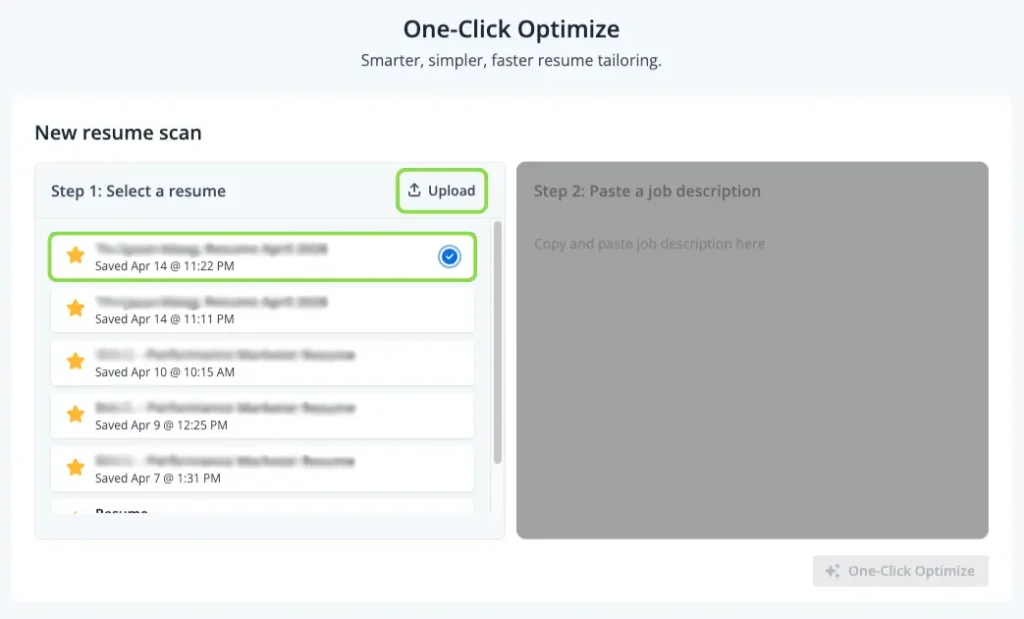
Step 2: Paste the job description. Add the job description for the role you want to apply to. Jobscan compares your resume directly against the employer’s requirements. Be sure to take out any sections not directly related to the job requirements and responsibilities (like employee benefits, company ‘about us’ summaries, etc.).
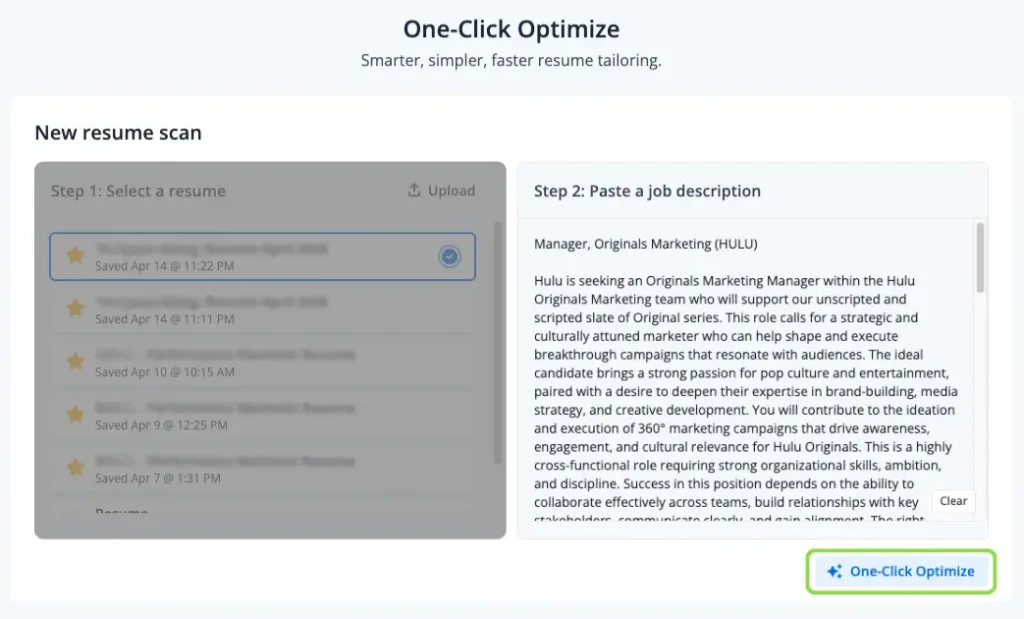
Step 3: Use AI Optimize. The scan and targeted resume improvements are laid out in one step. Jobscan rewrites bullet points, summaries and cover letters. As well it adds missing keywords, and flags formatting issues based on the specific ATS the employer uses.
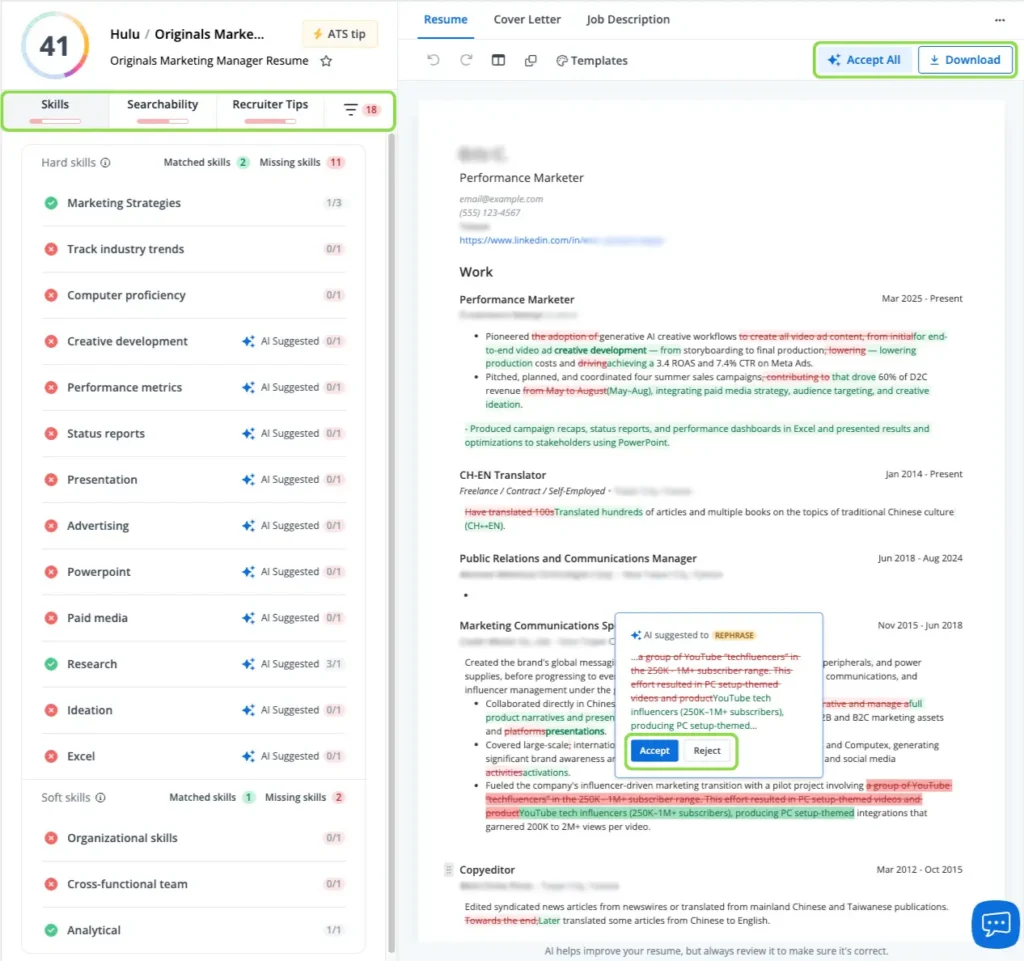
Step 4: Review every suggested change. You choose between instantly accepting all suggested edits, or reading every edit before accepting it. Delete anything that doesn’t accurately reflect your real experience, and add specific details, real metrics, and context that only you can provide.
Step 5: Download and submit. Download your optimized resume, confirm the formatting looks right, and submit.
The whole process takes about 5-15 minutes per application. The key is that you always have the final say. That’s what separates this from auto-apply tools.
AI auto-apply and job discovery bots
This is the most heavily marketed category in the AI job search space, and the one where you need the most context before deciding whether to use these tools.
These platforms scrape job boards, match your profile to listings, fill out application forms, and submit on your behalf. The pitch is compelling when you’re exhausted: upload your resume once and let the bot apply to hundreds of jobs automatically.
As a category, these tools share a core architectural problem: they send the same base resume to many different roles without adapting it to each job description. That means they consistently underperform on ATS keyword matching. They can also trigger bot-detection systems on major job boards, leading to account restrictions or shadowbanning. And they routinely apply to mismatched roles, duplicating applications or targeting positions that don’t fit your background.
That said, this space ranges from tools that look like they were built in a weekend with AI, to products backed by legitimate businesses that are genuinely trying to solve a hard problem. The architectural challenges are real across the board, but it’s worth knowing that not every tool in this category carries the same level of risk. Do your research.
Here’s a look at what’s available:
| Platform | 2026 pricing | How it works | Key considerations |
|---|---|---|---|
| Jobscan | Free (5 scans/mo); Premium: $49.95/mo or $89.95/quarter | Finds and surfaces roles that match your profile, then fills out the application in the background for your final review. | Lowest risk in the category. Saves meaningful time without sacrificing accuracy or control. The human-in-the-loop approach we recommend. |
| Simplify Copilot | Free (basic); Pro: $29/mo | Autofills application forms across 20,000+ career pages. You review every field and click submit yourself. No autonomous submission. | Lowest risk in the category. Saves meaningful time without sacrificing accuracy or control. The human-in-the-loop approach we recommend. |
| AiApply | $74/mo to $149/mo plus $29/mo base | High-volume automated background submissions. | Reported targeting failures (wrong locations, wrong languages). F-rating from the Better Business Bureau. |
| JobsAICopilot | $8.90 to $12.90/week | Batch-and-match automation targeting up to 50 career pages daily. | Sub-2% callback rates reported by users. Complaints about auto-renewal billing. |
| Sonara | Subscription (pricing not publicly listed) | Daily-refreshed job list with multi-step matching before submission. | More user-friendly interface than most. Same core architectural limitations apply. |
| LoopCV | $19.99/mo to $89.99/mo | Parallel job title searches with priority placement at higher tiers. | Users report geographic and remote-match failures despite broad filter settings. |
| LazyApply | Lifetime/subscription | Browser extension applying 50–100 times per day via LinkedIn and Indeed. | High risk of account shadowbanning on major job boards. Generic applications |
| JobCopilot | Premium: $29.90/month or $74.90/quarter Elite: $39.90/month or $94.90/quarter | Automatically finds jobs for you and fills out the applications based on your preferences. You can turn on auto-apply or choose to review each application before submission. | We highly recommend turning off auto-apply since some users report scam jobs, multiple submissions for the same job, or application answers with made-up information. |
When auto-apply makes sense
Fully autonomous auto-apply can work in one scenario: high-volume standardized roles like entry-level logistics, warehouse, or customer service, where job descriptions are nearly identical across employers and volume genuinely matters.
For specialized, technical, creative, or managerial roles, the better path is “human-in-the-loop” automation. Simplify Copilot takes this approach: rather than applying for you, it autofills application forms across 20,000+ career pages, reducing a 15-minute form to about 2 minutes while you review the data and click submit yourself. Lower risk, meaningful time savings.
Jobscan’s own Auto Apply takes the control-first approach: it drafts each application from your resume against the specific job, and nothing is submitted until you approve it.
The pattern that works: optimize first, automate the mechanical data entry second, always review before submitting.
For a deeper breakdown of the category, see our guide to AI auto-apply tools.
AI resume and cover letter builders
As more job seekers use large language models (LLMs) like ChatGPT, Claude or Gemini to draft materials from scratch, a new problem has emerged: “AI-slop.” This is the polished but entirely generic text that experienced recruiters now recognize almost immediately.
Short answer: no. As of 2026, major ATS platforms (Greenhouse, Taleo, Workday, iCIMS, Lever) do not use AI detection software to automatically reject resumes. An ATS is a filing and storage system, not a content analyzer. Automated detection is also impractical for employers due to high false-positive rates, legal liabilities around bias, and accessibility concerns.
The real detection happens at the human level.
Red flags that signal AI-generated content to recruiters, ATS systems, and job boards
- Vague power verbs and filler adjectives. Words like “Spearheaded,” “Orchestrated,” “Synergized,” “Visionary,” and “Results-driven” read as machine-generated immediately. Recruiters see these hundreds of times a day.
- Identical sentence rhythm. AI defaults to a rigid “Action + Result” pattern, producing bullet points that are all the same length with the same structure. Human writing has natural variation.
- Missing contextual anchors. AI fabricates plausible-sounding metrics (“Increased revenue by 200%”) but leaves out the specific tools, team size, and circumstances behind the result. You have the “what” but none of the “how.”
- “Kitchen sink” skill inflation. AI lists exhaustive skill arrays at expert level. An entry-level candidate claiming mastery of 25 complex platforms is an immediate credibility flag.
- Keyword stuffing. Repeating keywords unnaturally or listing them in a hidden section to game the match score. Modern ATS platforms flag this.
- Inconsistent formatting. AI-generated resumes often mix formatting styles, use non-standard fonts, or include columns and tables that cause parsing errors in certain ATS systems.
- Application velocity. If you or an auto-apply tool submits applications to many roles at the same company in a short period, internal ATS systems and job boards can flag the pattern.
How to use AI builders the right way
Skip “AI humanizer” tools that claim to rewrite AI text to bypass detection. They frequently make things worse with awkward phrasing and deliberate grammatical errors.
Instead, use AI builders like Rezi ($29/mo) or Kickresume as a starting point to beat blank-page syndrome. Then do the real work: inject your specific, verifiable data. Name the actual tools you used. Describe the real size of your team. Explain the obstacles you overcame to hit a result.
The golden rule: if you can’t defend a bullet point in an interview with real operational details, rewrite or remove it.
Jobscan’s AI resume builder and AI Optimization are built around this philosophy. They apply ATS-targeted suggestions as edits you review and approve.
Jobscan’s AI Resume Builder takes the opposite approach to generic AI drafting: its AI Resume Coach interviews you one question at a time and turns your real answers into specific, quantified bullet points, the contextual detail recruiters say AI-slop lacks. Every suggestion is a card you accept, edit, or ignore.
The AI drafts, you decide. That’s how AI-assisted job search should work.
See where your resume stands right now. Run a free resume scan and get an instant breakdown of your keyword gaps and ATS compatibility.
AI interview prep tools
Once you’re past the ATS and the resume screen, the interview is the ultimate filter. By 2026, roughly 87% of companies use AI in some part of their hiring process, and a growing share use asynchronous (one-way) video interviews for initial screening. This is the most underused category in the AI job search toolkit, and it likely has the highest return on investment of anything in this article.
Most job seekers spend hours optimizing their resume and then walk into interviews unprepared. That’s skipping the step with the highest payoff.
| Tool | 2026 pricing | What it does | Best for |
|---|---|---|---|
| Jobscan Interview Practice | Included in Jobscan Enterprise | AI-powered mock interview practice powered by a third-party partner. Practice sessions tailored to your role and industry. | Universities or businesses that need large-scale services for clients or students |
| Interview Sidekick | Free tier; Ultimate: $60/mo | Unlimited mock interviews, 10,000+ question bank, and real-time Copilot for live interview support. | Candidates who want comprehensive standalone prep with both practice and live assistance. |
| Big Interview | BootCamp: $39/mo; Pro: $299 lifetime | AI-powered video feedback on delivery, clarity, tone, and pacing. Expert-led structured curriculum. | Long-term skill building and foundational confidence training. |
| Mockinterviews.dev | $47/mo or $279 lifetime | AI simulations replicating the pacing and pressure of technical coding and system design interviews. | Software engineers and technical candidates needing rigorous, timed drills. |
| Final Round AI | Free tier; Premium: $25/mo | Real-time Copilot that generates STAR-formatted answers in 2-3 seconds during a live interview. | High-stakes rounds where structured recall under pressure is the challenge. |
A note on real-time interview copilots
Real-time copilot tools capture your interview audio and surface structured response suggestions on your screen within seconds. They can help with brain fog in high-pressure moments. But if you don’t have the foundational knowledge to back up what appears on screen, you’ll get caught. Employers have deployed anti-cheat measures on Zoom and Teams to detect eye-tracking anomalies and screen overlays. Use these tools for structural guidance during practice, not as a live teleprompter.
AI LinkedIn optimization tools
Here’s the strategy most job seekers overlook: making recruiters come to you.
As the application pipeline gets clogged with bot noise and generic AI content, recruiters are increasingly sourcing candidates directly through LinkedIn using Boolean search strings and AI-powered tools like Gem. Your profile isn’t a static resume. It’s a searchable page, and the right keywords in the right fields determine whether you show up at all.
How the key tools compare
Jobscan LinkedIn Optimizer (included in Jobscan Premium at $49.95/mo) compares your LinkedIn profile against target job descriptions and identifies specific keyword gaps by section. It’s built for one purpose: making sure you show up when a recruiter searches for someone with your skill set. If passive discoverability is part of your strategy, this is the most targeted tool available.
Taplio ($39 to $199/month) is a different category entirely. It’s a LinkedIn content creation and growth platform for personal branding, social selling, and lead generation. It’s not a profile optimizer. If you’re in sales, marketing, consulting, or executive leadership and want to build inbound recruiter interest through consistent publishing, Taplio is purpose-built for that. Note that independently verifiable company information for Taplio is limited, so evaluate their claims carefully before subscribing.
Resume Worded ($49/mo) offers a LinkedIn profile “health score” focused on headline quality, summary, and formatting. It’s a useful starting audit but less targeted than Jobscan for keyword alignment to specific roles.
Why this matters
Spending 30 minutes aligning your LinkedIn profile with the keywords recruiters actually search for can generate months of passive inbound contact. It’s the highest-ROI, lowest-effort move in a modern job search, and most job seekers never do it.
The optimal AI job search stack
No single tool replaces strategy and effort. The workflow that consistently produces interviews in 2026 is: Build > Optimize > Apply > Track > Prep.
Jobscan covers all five steps in one platform:
- Build: AI Resume Builder
- Optimize: Resume Scanner + AI Optimization
- Apply: Job Finder + Auto Apply
- Track: job application tracker
- Prep: Interview Practice (for enterprise clients)
If you want to supplement with standalone tools, here are the best options at each budget:
Free stack ($0/mo)
- Build: Kickresume free tier for AI-assisted drafting.
- Optimize: Jobscan free tier (5 scans/month) for your highest-priority applications.
- Apply: Simplify Copilot free extension for fast, human-reviewed form autofill.
- Track: Teal free tier for unlimited pipeline management.
- Prep: Google Interview Warmup for no-cost practice.
Mid-range stack (~$50/mo)
- All-in-one: Jobscan Premium ($49.95/mo) covers resume optimization, building, cover letters, job finding, application autofill, tracking, LinkedIn optimization, and interview practice in one platform.
Premium stack ($80+/mo)
- All-in-one: Jobscan Premium ($49.95/mo).
- Dedicated interview prep: Interview Sidekick Ultimate ($60/mo) for unlimited mock interviews and a 10,000+ question bank.
The one rule at every budget level
Always review before you submit. AI assists, you decide. Read every resume before it goes out. Edit every cover letter so it sounds like you. Check every autofilled form field before clicking submit. The final quality check is always yours.
The bottom line
AI has created a paradoxical job market in 2026. The barrier to submitting an application has dropped to nearly zero, but the barrier to actually getting an interview has never been higher.
The job seekers who succeed use AI with precision: navigating ATS filters, accelerating mechanical tasks, preparing for interviews more thoroughly. But they rely on their irreplaceable human edge to close the deal. Real metrics from real work. Specific context only you can provide. Authentic communication that connects with another person on the other side of the screen.
The tools that matter aren’t the ones that let you apply the fastest. They’re the ones that make each application worth submitting.
The best AI job search tools in 2026 depend on what you need. Jobscan is the strongest all-in-one platform, covering resume optimization, building, cover letters, job finding, tracking, LinkedIn optimization, and interview practice. For dedicated job tracking alongside another tool, Teal’s free tier is well-regarded. For autofilling applications while staying in control, Simplify Copilot is the best free option.
Yes, when they are used to tailor each application, improve ATS compatibility, and prepare for interviews. They are less effective when used only to mass-submit generic applications. Research shows job seekers who use AI strategically to customize applications see a 2.5x increase in interview rates compared to traditional methods.
For most job seekers, the risks outweigh the benefits. Fully automated tools send the same base resume to many different roles, which consistently underperforms on ATS keyword matching and can trigger account restrictions on major job boards. They can work for high-volume standardized roles where job descriptions are nearly identical across employers. For specialized, technical, creative, or managerial roles, a human-reviewed process produces significantly better results.
AI-written content alone is not what causes ATS rejections. An applicant tracking system is a filing and storage system. What matters is whether your resume is formatted correctly and contains the right role-specific keywords. If those conditions are met, the ATS will surface your resume when a recruiter searches. Recruiters, however, have become skilled at recognizing generic AI writing, so reviewing and personalizing every resume before submitting is essential.
Use AI to build a strong base resume, optimize it for each job description using a tool like Jobscan, use automation only for repetitive data entry tasks like form autofill, track your applications, and prepare for interviews. The key principle: AI should assist the process, but you should review every resume, cover letter, and application before submitting.
Jobscan is best used as a complete job search platform. Its core strength is tailoring your resume to a specific job description and improving ATS compatibility using intelligence from reverse-engineering actual ATS platforms. Beyond optimization, it includes a resume builder, cover letter generator, job finder, application tracker, LinkedIn optimizer, and interview practice tool, all in one place.