



You have probably been told a hundred times to “use keywords from the job description.” Almost no one shows you how to actually find them. So you stare at the posting, highlight a few words that feel important, and hope you guessed right.
Here is the good news. The keywords are not hidden. Job descriptions follow a predictable pattern, and once you can see that pattern, you can pull the right keywords from any posting in three quick passes.
This guide shows you how to find keywords in a job description using that method, walks you through a real job description marked up keyword by keyword, and shows you how to turn those resume keywords from job description postings into a stronger resume. If you have a posting open in another tab right now, even better. You can use it.
To find keywords in a job description, read it three times. First, pull the required skills, tools, and credentials from the requirements section. Second, pull the action verbs and deliverables from the responsibilities. Third, flag anything that repeats or sits in the first paragraph, because those are the most important keywords. That gives most job seekers the eight to ten terms to build a resume around.

What counts as a “keyword” in a job description
A keyword is a specific, searchable term an employer uses to identify a qualified candidate. These are almost always nouns: skills, tools, credentials, and job-title language. They come straight from the job description, which is exactly why the posting is your answer key.
When you read a posting, you are looking for five kinds of terms:
Hard skills
Measurable, job-specific abilities, also called technical skills. e.g. financial reporting, paid search
Tools & technologies
Named products and platforms. e.g. Salesforce, Google Analytics, Python
Credentials
Certifications, licenses, and degrees. Spell out and abbreviate. e.g. PMP, CPA, bachelor’s degree
Job-title language
The role name and its variations. The single highest-value term. e.g. Marketing Manager, Account Executive
Soft skills
Traits that count only when the posting repeats them. Otherwise, prove them in your bullets. e.g. cross-functional collaboration
You do not need a master list of every possible keyword. You need the right terms for the posting in front of you. (If you do want broader inspiration by role, see our roundup of top resume keywords.)
How to find keywords in a job description: the 3-pass method
Read the posting three times, looking for something different each time. Once you know how to read a job description this way, spotting the keywords in job postings becomes second nature. Each pass takes a couple of minutes, and by the end you will have a short, ranked list of the keywords that matter.
Requirements and qualifications
This is where the must-haves live. Scan the “requirements,” “qualifications,” or “what you’ll need” section and highlight every hard skill, tool, credential, and the years of experience required. These are the terms recruiters search and filter on first, so missing one here hurts the most.
Example: “4+ years managing paid social campaigns” → paid social, campaign management
Responsibilities and duties
This is where you learn what you would actually do. Highlight the action verbs paired with deliverables, because these become your resume bullets.
Example: “Own reporting and present results to stakeholders” → reporting, stakeholder communication
Repetition and placement
This is your prioritizer. Anything mentioned more than once, written into the job title, or placed in the first paragraph is load-bearing. Circle those important terms. They move to the top of your list no matter which section they appeared in. If you want to be thorough, skim two or three more postings for similar roles. The keywords that show up across all of them are the most important keywords for that job.
So the checklist is simple: Pass 1 finds the must-haves, Pass 2 finds the verbs and deliverables, and Pass 3 tells you which of them matter most. By the end you will have roughly eight to ten keywords worth building around. Here is what that looks like on an actual posting.
A real job description, marked up
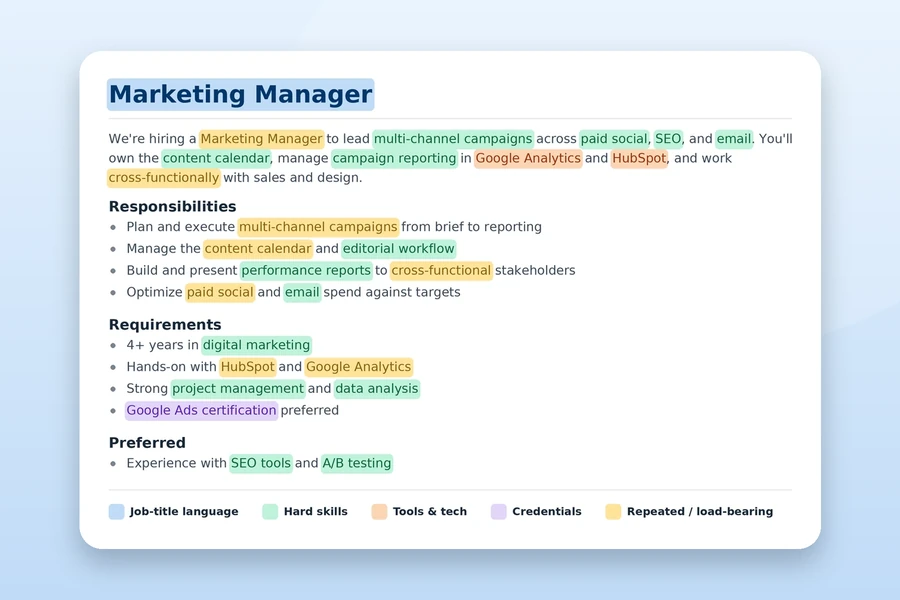
Below is a realistic mid-level posting for a Marketing Manager. It is invented, but it behaves like the real thing. The colors show each keyword type and why it earned a highlight.

The color key:
- Blue: job-title language (highest-value search term)
- Green: hard skills (the bulk of your match)
- Orange: tools and technologies (match these exactly)
- Purple: credentials (spell out and abbreviate)
- Yellow: repeated or first-paragraph terms (load-bearing)
Read the posting through the three passes and the winners sort themselves out. The role wants a Marketing Manager who can run multi-channel campaigns across paid social, SEO, and email, manage a content calendar, and report on performance in Google Analytics and HubSpot while working cross-functionally with other teams. The requirements section adds digital marketing experience, project management, and data analysis, plus a preferred Google Ads certification.
Now apply Pass 3. Several terms repeat: Marketing Manager, HubSpot, Google Analytics, multi-channel campaigns, paid social, and cross-functional all appear more than once or sit in the opening paragraph. Those top your list. The Google Ads certification lives in the “preferred” section, which tells you something important: include it if you have it, and leave it off without worrying if you do not. That is the difference between a must-have and a nice-to-have, and learning to tell them apart is most of the skill.
Your final set of keywords for this posting comes out to about ten terms, ranked by how hard the employer leaned on each one. That ranked set is what you build your resume around.
Where to put keywords so recruiters and the ATS notice them
Finding the keywords is half the job. Placing them well is the other half. Three rules cover most of it.
Put them where they count
Your skills section is the natural home for tools and hard skills. Your experience sections are where keywords prove themselves, because a keyword sitting inside a real accomplishment shows the employer how you actually used it. Your summary is where you lead with the job title and your top must-have terms. A relevant keyword woven into a result (“Managed paid social campaigns that cut cost-per-lead by 22%”) does more work than the same word sitting alone in a list. The same weaving works in your cover letter.
Mirror the exact phrasing
Many applicant tracking systems match the literal term and do not reliably recognize synonyms. If the posting says “paid social,” write “paid social,” not “social advertising.” For credentials, include both the full name and the abbreviation so you are covered either way.
Weave, do not stuff
Only use relevant keywords for skills you genuinely have. Cramming the same term in over and over, or padding your resume with skills you cannot back up, reads as a stunt to recruiters and is not something the software rewards. (More on where that line is in our guide to keyword stuffing.)
That is the keyword layer. For the full step-by-step on reshaping an entire resume around a single posting, see how to tailor your resume to the job description.
The fast way: let the keyword scanner extract them
The three-pass method works, and it is worth doing by hand at least a few times because it sharpens your judgment. It also takes about 15 minutes per posting.
When you want the same result in seconds, paste the job description into Jobscan’s free resume scanner. This ATS resume checker pulls the keywords for you, then scores your resume against them so you can see exactly what is missing before you apply. It is the instant version of the skill you just learned. The scanner surfaces the keywords and the gaps, and you still make the honest call about which ones are true for you. If you only need the terms from a posting, the resume keywords generator is a job description keyword finder that does that piece on its own. Either way, it is one fast step in a smarter job search.
There is no magic number. Focus on the eight to ten terms that matter most for the specific posting, and prioritize relevance over volume. For role-by-role ideas, see our top resume keywords guide.
No. Mirror the exact phrasing for skills you genuinely have, but copying whole sentences is keyword stuffing. Recruiters spot it quickly and it does not help your ranking. Here is more on avoiding keyword stuffing.
Yes, they rank and filter by relevance, but they do not auto-reject you the moment a keyword is missing. A human recruiter still makes the call. The stakes are real, though: in a Harvard Business School study, 88% of employers said their own hiring software screens out qualified candidates who don’t match the job description’s exact criteria. Keywords matter because they decide whether you surface in a recruiter’s search and whether your relevant experience is easy to see, not because a bot is hunting for reasons to delete you.
Yes. AI screening tools and applicant tracking systems rank and filter candidates by keyword relevance, so the right terms help you surface. A human still makes the final decision, so your experience has to back the keywords up.
Yes. The same three passes work on a LinkedIn job posting, and the keywords you find belong on your LinkedIn profile as well as your resume, since recruiters search there too.
The bottom line
Now you know how to find keywords in a job description: find the must-haves in the requirements, pull the verbs and deliverables from the responsibilities, and let repetition tell you what matters most. Do it by hand to build the instinct, then run a free resume scan to do it in seconds and see your match score before you hit apply.