





Hiring managers take as little as 12 seconds to scan your resume before making a “yes” or “no” decision. Worse, before a human eye even sees your application, an Applicant Tracking System (ATS) programmed to ruthlessly parses your resume, disadvantaging poorly optimized files. So, how do you make a resume stand out when the odds feel stacked against you?
It takes more than just listing your daily responsibilities or picking a colorful template. You need a document engineered for both robot parsers and human psychology. If you do start from a template, favor a clean, ATS-safe modern resume template over a decorative one.
In this guide, we’re breaking down the exact strategies to optimize your layout, bypass ATS formatting traps, and transform boring job duties into quantifiable, interview-landing achievements.
What do hiring managers actually look for?
Your resume is a make-or-break document. It doesn’t just list your credentials, key skills, and experience—it has to prove, almost instantly, that you’re an asset to the organization.
Resumes generally fall into three formats:
- Chronological: Lists your work experience in reverse chronological order, with your most recent role at the top.
- Hybrid: Leads with skills and accomplishments, followed by your reverse chronological work history.
- Functional: Focuses on skills and glosses over years of experience. Most hiring managers dislike this format, so stick to chronological or hybrid.
Whichever format you choose, use Jobscan’s resume scanner to get a match report showing which keywords are missing, the level of keyword importance, and an overall score—before the 12 seconds even start.

What resume formatting traps lead to rejection?
Your resume should be visually appealing, but don’t overdo it. Fancy graphics can confuse the ATS and cause your resume to get lost in the database before a human ever sees it.
Why you must avoid tables, columns, and heavy graphics in your resume
Section headings break up information and make your resume easy to skim—but only if the ATS can read them. Avoid creative heading labels like “Autobiography,” “My Career Journey,” or “What I Know.” Stick to standard headings:
- Summary or objective
- Work experience
- Education
- Certifications
- Skills
Tables, columns, and decorative graphics are the most common reason a well-written resume never reaches a recruiter: the ATS can’t extract information from design elements, and once uploaded, they can scramble your formatting entirely.
- Non-standard date formats—stick to MM/YYYY (04/2023) or the fully spelled month and year (April 2023).
- Using acronyms alone—recruiters often search the full term, so use “client relationship management” alongside “CRM.”
- Saving your file with the wrong name or file type.
- Writing in the wrong tense—your resume should generally be written in the past tense.
ATS-friendly fonts and margin settings
Avoid trying to pack in more content by widening your margins—it makes your resume harder for both the ATS and the hiring manager to parse. Stick to standard one-inch margins:
- In Microsoft Word, one-inch margins are the default. Confirm by selecting Layout > Margins > Normal.
- In Google Docs, confirm your margins by selecting File > Page Setup.
The ATS and hiring managers both prefer clean, crisp, legible fonts for your resume, and used sparingly, color on a resume can draw attention to your headings without overwhelming the layout. Though conservative industries like law, finance, engineering, and medicine are better served by darker, muted shades.
Designing for skimmability: The F-Pattern layout
Some recruiters don’t read a resume top to bottom like a novel—they scan in an F-pattern, skimming headlines and left-aligned text first and only slowing down when something catches their eye. Your job is to put your strongest material where that scan actually lands.
Mastering white space, bolding, and bullet points
An overcrowded resume is hard to scan. White space, bolded headings, and bullet points let a hiring manager find the information they need in seconds rather than paragraphs.
Include only what’s relevant to the job description—clutter from unrelated skills or experience eats up valuable scanning time. A two-page resume is sometimes acceptable, but one page is usually the safer bet.
Choosing the right resume format: chronological vs. hybrid
A chronological format is the safest default for most job seekers, since it’s the format both ATS software and recruiters are most used to parsing. A hybrid format can work well if your most relevant qualifications are skills-based rather than tied to a specific job title. For example, if you’re changing careers and want to lead with transferable skills before your work history.
Crafting a powerful top-third of your resume (the hook)
The top portion of your resume needs to be captivating to keep the recruiter engaged. When the value-packed content is below the top-third, the hiring manager might not even make it there, and abandon your resume before they can see that you’re one of the right candidates for the role.
Here’s how to strengthen the hook in your standout resume.
Write a clear resume headline to make your resume stand out
The first step is clarifying your resume headline. Your resume headline should include your professional title or the title of the dream job you’re applying for. Including the job title from the job description increases your chance of getting found when a hiring manager searches by exact title match in their ATS.
The introduction: summary vs. objective
Your resume summary sits at the top of your resume. If you are a career changer or entry-level, use a resume objective statement instead.
If you are a recent graduate, returning to the workforce, or changing careers, a standard summary won’t work. Instead, you should explore resume objective examples to craft an introduction that highlights your transferable skills and future goals.
For everyone else, your resume summary should include 2–3 brief sentences stating your key experiences, measurable achievements, and top skills or expertise. If you’ve never held the specific role you’re applying to, use this space to connect your transferable skills, certifications, and education to the job title instead.
Quantifying your impact: the XYZ bullet point formula
Your day-to-day responsibilities don’t tell a hiring manager much about who you are as a professional. What moves the needle is measurable impact—and the fastest way to write it is the XYZ formula:
Accomplished [X] as measured by [Y], by doing [Z].
Boring responsibilities vs. measurable achievements
- “Managed social media accounts for the company.”
- “Handled customer service inquiries.”
- “Oversaw inventory and stock levels.”
- “Grew social media followers by 45% in six months by developing targeted content strategies, resulting in a 30% increase in engagement.”
- “Resolved 95% of customer service inquiries on the first contact, improving customer satisfaction scores from 82% to 96% over one year.”
- “Reduced stock discrepancies by 20% and improved inventory turnover by 35% by implementing an automated tracking system.”
Swapping weak words for powerful action verbs
Every bullet should open with a strong action verb—“grew,” “resolved,” “reduced”—instead of a passive phrase like “responsible for” or “duties included.” Passive language buries your impact right where a recruiter’s eye is scanning fastest, so let action words do the heavy lifting.
Optimizing your skills section for job descriptions
Hiring managers want to know if you have the in-demand skills to do the job. Your skills section is where you directly tie your background to the responsibilities in the job description.
Balancing hard technical skills with core soft skills
Hard skills are technical and specific to the job or industry, such as:
- Project management
- Graphic design
- Marketing
- Sales
- Accounting
- Computer software knowledge
- Search engine optimization (SEO)
Soft skills (sometimes called transferable skills) show how well you work with others and handle pressure, such as:
- Collaboration
- Attention to detail
- Time management
- Growth mindset
- Adaptability
- Leadership
Read through and identify the hard and soft skills for each job description to ensure you’re adding them to your resume.
A time-saving tool is Jobscan’s resume scanner. Upload your resume and the job description, and the scanner will create a match report to tell you whether you have the right skills to get an interview.
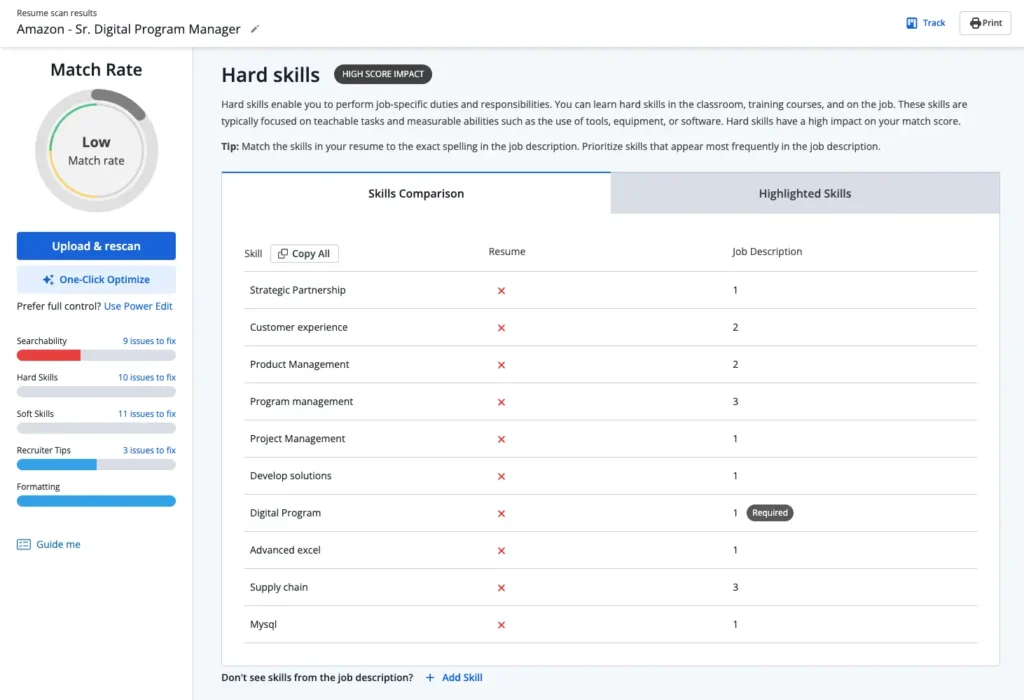
For example, this report illustrates that management system and Google workspace are missing from the resume. But if you want a chance to secure the interview, you need to add those skills that the hiring manager is searching for.
Final polish: The best file format to save your resume
Before you submit, double check your file format. Saving your resume as the wrong file type—or naming the file poorly—can cause parsing issues before a human ever opens it. Read our full breakdown of PDF vs. Word for your resume if you’re not sure which to use, and check that your file name is clear and professional.
Once your file is saved correctly, do one final review. Don’t let a spelling or grammatical error undo everything else you’ve optimized.
- Are you using strong action verbs?
- Are your accomplishments measurable?
- Is everything relevant to this specific job?
- Is it designed with the ATS in mind?
- Is it concise and clean?
When you can answer “yes” to all five, you’re ready to submit.
- Upload your resume to get started.
- Add a job description.
- Click the “Scan” button.
FAQs
Highlight relevant education, relevant coursework or projects, and a strong resume summary. Use an ATS resume template to help guide your formatting and create a resume that still stands out.
Use an ATS-friendly resume template suited to your industry, or try Jobscan’s ATS resume builder, which lets you build an ATS-compatible resume that will capture the hiring team’s attention. Browse our resume examples for extra inspiration.
To make your resume stand out, tailor it for each job. Use keywords from the job description. Highlight achievements that match the role’s requirements.
Tailor your resume for each job: use specific keywords from the job posting and highlight achievements that match the role’s requirements.



