



I recall when the functional resume template was standard advice for job seekers with little work experience, like recent grads. The idea was to lead with your skills and keep a thin work history out of the spotlight.
That advice has aged badly. Hiring managers now read the format with suspicion.
Below you will find a functional resume template, three examples you can model, and an honest answer on whether you should use one at all. The short version: usually not, and there is a better format that gets you the same benefit without the downside.
What is a functional resume?
A functional resume is a resume format that organizes your experience by skill category instead of by job. Your skills and achievements sit at the top, and your work history drops to the bottom as a short list of titles, employers, and dates.
You are probably more familiar with the chronological resume format, which leads with work experience, starting with your most recent job and working backward. The functional resume inverts that order.
The format exists to surface value that did not come from a traditional job: coursework, personal projects, volunteer roles, freelance work. Career changers, recent graduates, and people returning after a gap are the ones who reach for it, because it shifts a recruiter’s attention from timelines to what you can actually do.
Here’s an example of a functional resume template:

You can see the appeal. It puts your strengths in the first third of the page and lets a short work history sit quietly at the bottom.
Recruiters are less enthusiastic, and we get into exactly why further down. If you are still weighing your options, our guide to resume formats compares all three side by side.

Functional resume template
Here is the structure a functional resume follows, top to bottom. The order matters more than the styling.
Three blocks decide whether this format works for you:
Skills grouped by category is the engine of the whole thing. Pick three to five categories that match the job, and give each one three or four bullets that show a result rather than a duty.
Work history still belongs on the page. Keep it to title, company, and dates. Cutting it entirely is the move that makes recruiters suspicious, and it is the fastest way to get your resume set aside.
Education carries more weight here than it would on a chronological resume, so list relevant coursework and certifications rather than just the degree.
You can build this layout free in Jobscan’s AI Resume Builder, or start from one of our free resume templates if you would rather work from a finished design. Our ATS resume templates are built to parse cleanly, which matters more for this format than most.
One honest note before you start building: a hybrid resume usually performs better than a pure functional one. Jobscan’s AI Resume Builder will produce either, and we cover the difference below.
Functional resume examples
Three profiles use this format more than anyone else. Here is what the skills section looks like for each.
The career changer. A marketing coordinator moving into UX groups her experience under Research, Design, and Collaboration rather than under two job titles that say “marketing.” Her work history stays on the page as three short lines. Why it works here: the skill categories carry the language of the job she wants, not the one she is leaving. If this is you, our guide to the career change resume goes deeper on the transition itself.
The recent graduate. A finance grad with one internship groups everything under Financial Analysis, Reporting, and Tools. Coursework, a capstone project, and a part-time bookkeeping role all become evidence instead of filler. Why it works here: it lets three unrelated experiences add up to one coherent skill set. More on this in our entry-level resume guide.
The returner. An operations manager back after three years of caregiving groups her experience under Process Improvement, Vendor Management, and Team Leadership, then lists her work history with dates intact. Why it works here: the skills lead, but the dates are still there. Hiding the gap is what gets a resume rejected. Explaining it in your summary is what gets it read.
Notice what all three have in common: a real work-history section with real dates. That is the difference between a functional resume that works and one that reads as evasive.
How to write a functional resume
This format highlights your skills instead of listing work experience first. It’s great if you gained experience from projects, internships, school, or volunteering. This format can highlight your transferable skills. But you need a strategy to show your value clearly.
Here’s how to structure it:
1. Start with your contact information
Write your full name at the top. Then, add your professional email, phone number, and your city and state. If applicable, include links to your LinkedIn profile or online portfolio.
Make sure your contact info is up-to-date, professional, and matches your online profiles. This helps prevent confusion. Avoid using a street address for privacy, and double-check for typos.
2. Write a tailored resume summary
Craft a 3 to 4 sentence paragraph or bulleted summary that highlights:
Highlight your job-specific and transferable skills here. This is important if you’re changing careers or have gaps in your experience.
3. Create a skills summary section
This is the core feature of a functional resume. Group your skills into 3 to 5 categories that fit the job. Examples include project management, digital marketing, and customer relations.
Under each category, list 3 to 4 bullet points that show measurable achievements, not just duties. For example, “Implemented a new onboarding system, reducing training time by 30%.” Tailor every skill to match the language used in the job description.
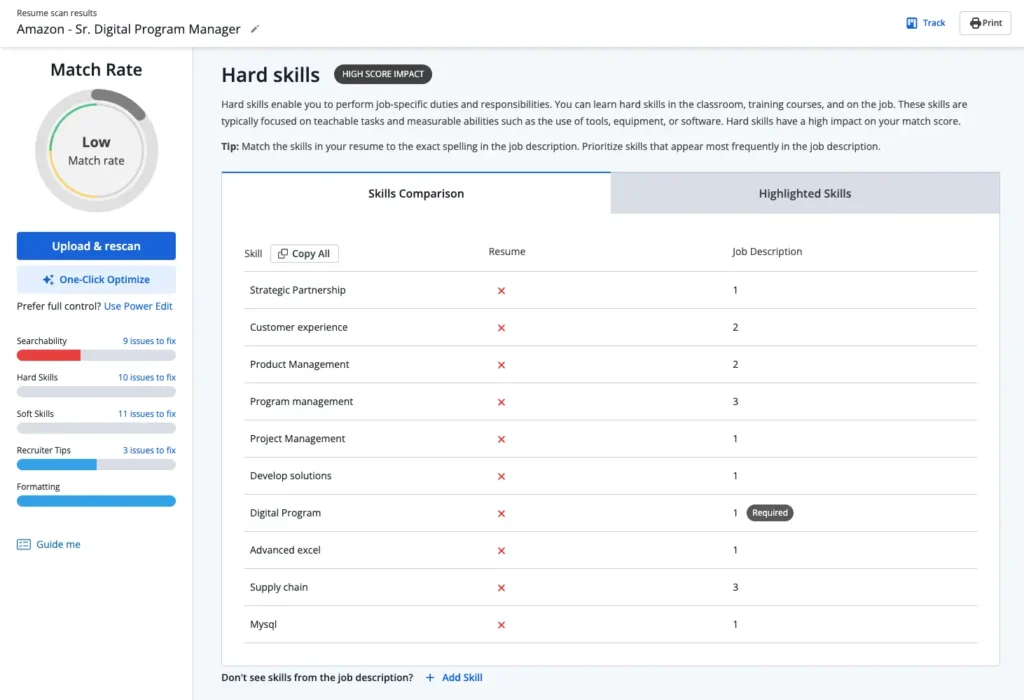
Jobscan’s ATS-friendly resume scanner checks your resume against the job description to confirm you have listed the skills that are relevant to the role you are applying for.
4. List your work experience
While your skills are important, add a brief section for your work history. This should include your job title, company name, and the years you worked there.
Place emphasis on roles that relate to your skill categories above. Keep it short and sweet so the recruiter’s focus stays on your competencies, not employment gaps.
Below is an example of a work experience section.

5. Add your education
List your educational background clearly. You can mention any coursework, certifications, or projects that relate to the role.
- Institution name.
- Degree or certification earned.
- Graduation year or “expected graduation.”
- Relevant coursework (if applicable).
This part is key if you have little formal experience. Use it to show your transferable skills and knowledge in the subject area. Focus on academic achievements that reinforce your skill sets or industry focus.
6. Include optional sections
Add any extra credentials that show your qualifications. This can include certifications, awards, important projects, or leadership experience.
Create separate sections for each entry. Also, integrate them into your education or skills categories.
This is a great way to enhance your resume. If your work history is short or unusual, it shows your value clearly.
- Certifications: List full title, issuer, and date
- Projects: Especially if relevant to your career change
- Awards or Honors: Leadership roles, academic recognition, or performance-based awards
Once you have the pieces, you do not have to lay them out by hand. Jobscan’s AI Resume Builder will build a functional or hybrid resume free, and its AI Resume Coach turns your answers into quantified, ATS-ready bullets.
Do functional resumes work with an ATS?
Sometimes, but they carry real risk. Applicant tracking systems are built to read a dated, reverse-chronological work history, and they use job titles and employment dates to build your career timeline. A functional resume de-emphasizes exactly that structure, so a parser can end up with a long list of skills and almost no work record attached to them.
If you use the format anyway, protect yourself two ways. Keep a clear work-history section with standard job titles, company names, and dates, even if it is only three lines. And use standard section headings like “Work Experience” and “Education” rather than creative labels a parser will not recognize.
The way to know for certain is to test it. Run your resume through a resume scanner and check whether your job titles and dates come back correctly parsed. If they do not, the layout is the problem, and our guide to ATS formatting mistakes covers the usual culprits.

Why don’t recruiters like the functional resume template?
In my experience, hiring managers and recruiters can be skeptical when reviewing resumes. That’s why they tend to shy away from functional resumes.
The problem is, functional resumes often feel like they’re hiding something. This format puts skills first and work experience last. This makes it harder for recruiters to see the full picture of your career.
“Some recruiters see a functional resume and immediately think, ‘What are they hiding?'” says professional resume writer Clair Levy. “It’s like showing up to a first date in sunglasses indoors—it might make you look cool, but it also raises some eyebrows.”
Recruiters avoid digging for key details like job titles, dates, or career paths. A functional resume often hides this information. When recruiters have to work harder to find what they need, they’re more likely to move on to the next candidate.
One recruiter I spoke to put it bluntly, “Recruiters hate the functional resume format. It’s a waste of time.”
Should you ever use a functional resume template?
If everyone’s saying “Don’t use a functional resume,” you might wonder if there’s ever a time when it’s actually a good idea.
Honestly, in most cases, I would say the answer is no. But, there are a few rare situations where it might still make sense.
If you’re a recent graduate or are changing careers, a functional resume could be a good fit. But even then, I believe there’s a better alternative.
Use the hybrid resume format instead
If you don’t have a lot of work experience, I recommend using a hybrid resume format instead of the functional format. (The hybrid is sometimes called the combination resume).
The beauty of the hybrid resume is that it gives you the best of both worlds. You can showcase your key skills, like a functional resume. You also give recruiters the work history details they need, such as a chronological resume.
The best and easiest way to create a hybrid resume is with Jobscan’s AI Resume Builder. Its AI Resume Coach interviews you one question at a time and turns your answers into strong, quantified, ATS-ready bullet points, which is exactly the help you need when your experience comes from internships, projects, or volunteering.
This is the honest recommendation. You get the skills-first emphasis that drew you to the functional format, and recruiters get the work history they need to say yes. When you are ready, build a hybrid resume free and let the Builder handle the layout.
Key takeaways
- The functional resume format is out of favor. It used to help job seekers with little experience. Recruiters now distrust it, because it reads as an attempt to hide gaps or a thin career record.
- Functional resumes can break in an ATS. Leading with skills instead of a dated work history means a parser may not build your career timeline correctly, which can cost you the match before a human sees it.
- Keep your work history no matter what. Title, company, dates, three lines minimum. Removing it is what turns a skills-first resume into a red flag.
- A hybrid resume is usually the better answer. It combines the skills-first emphasis with a clear chronological work history, which is what both recruiters and ATS want to see.
- Little experience is not the same as no evidence. Internships, volunteer work, part-time jobs, freelance projects, relevant coursework, certifications, and leadership roles all belong on the page.
When you are ready to build, browse our free resume templates and pick a layout that puts your strengths up front.
FAQs
A functional resume focuses on skills and abilities rather than work experience. It organizes skills into categories with examples of how they were applied, while work history is listed briefly at the bottom.
Many employers and recruiters don’t like functional resumes. They hide work history, which makes it tough to see how a career has progressed. They can also raise concerns about hidden employment gaps. Also, functional resumes don’t work well with ATS. This means automated hiring systems might not scan them properly. As a result, they could get rejected before a recruiter sees them.
Don’t use a functional resume if you have a steady work history. Recruiters like chronological or hybrid formats better. Traditional industries like finance and healthcare often reject functional resumes. If a job posting specifies a chronological or hybrid format, follow those instructions. Functional resumes can have issues with ATS software because they don’t show a clear work history.
In 2026, functional resumes are still rarely recommended. The format lets you lead with skills instead of experience, but recruiters tend to read it as evasive and applicant tracking systems struggle to parse it. Most career experts recommend a hybrid resume, which shows your skills first while keeping a clear work history.
Start with a strong summary highlighting key skills. Organize skills into relevant categories with examples of how you applied them. Keep work history minimal but include job titles and company names. Add education, certifications, and relevant coursework. Avoid complex formatting for ATS compatibility. A hybrid resume is often a better choice, as it balances skills and experience.
We rarely recommend using a functional resume. They can help career changers, recent grads with little work experience, and those with job gaps. It can also work for freelancers or those with non-traditional experience. A hybrid resume is often the best choice.
Functional resumes often struggle in an applicant tracking system. Parsers rely on job titles and employment dates to build your career timeline, and the functional format pushes both to the bottom or removes them. If you use one, keep a clear work-history section with standard headings and dates, then run it through a resume scanner to confirm it parses correctly.


