




Choosing the right font for your resume can make the difference between getting noticed and getting passed over. It’s not just about looking polished, it also determines whether an applicant tracking system (ATS) can actually read what you’ve written.
- The best resume fonts are clean, ATS-friendly typefaces like Calibri, Arial, Georgia, and Helvetica, kept at 10 to 12 point.
- Both hiring managers and applicant tracking systems read these fonts reliably, so your resume looks professional and stays fully searchable.
- These picks come from Jobscan testing how the top applicant tracking systems actually read each font, not from guesswork.

What font is best for a resume in 2026?
Jobscan tested how the top applicant tracking systems (ATS) parse different resume fonts. The 10 fonts below rendered cleanly, kept their formatting intact, and stayed legible to both ATS software and hiring managers:
- Calibri
- Cambria
- Georgia
- Helvetica
- Arial
- Times New Roman
- Garamond
- Palatino
- Tahoma
- Verdana
Calibri, Arial, and Georgia are the safest all-around picks. They’re pre-installed on both Windows and Mac, so your formatting won’t shift when a recruiter opens your file on a different machine.
Best resume fonts at a glance
| Font | Type | Best for | ATS-safe |
|---|---|---|---|
| Calibri | Sans-serif | Modern, general purpose | Yes |
| Arial | Sans-serif | Corporate, widely compatible | Yes |
| Helvetica | Sans-serif | Corporate, design-forward | Yes |
| Georgia | Serif | Readable at small sizes | Yes |
| Cambria | Serif | Formal, modern | Yes |
| Times New Roman | Serif | Traditional, academic | Yes |
| Garamond | Serif | Elegant, space-efficient | Yes |
| Tahoma | Sans-serif | Technical, engineering | Yes |
| Verdana | Sans-serif | Screen-first, wide spacing | Yes |
What’s the difference between serif and sans serif?
Fonts fall into two main categories:
- Serif fonts have small decorative lines or “feet” at the ends of their letters, giving them a classic and traditional feel. These subtle details can improve readability, especially in print.
- Sans serif fonts lack these embellishments, creating a clean, modern look that’s often preferred for on-screen reading.
No matter which font or size you choose, always test your resume by printing it out and viewing it on different devices to ensure it looks professional across all formats.

The top 10 best fonts for your resume
See which fonts to use on a resume and how they’ll appear on your document.
1. Calibri font
Calibri is a modern sans-serif typeface that became the default font for Microsoft Word in 2007. Its clean design, combined with rounded edges and a warm appearance, makes it highly legible both on screen and in print.

Pros: Calibri’s sleek design gives documents a contemporary and professional appearance. It’s easy to read on both digital displays and in print.
Cons: Being the default font for Microsoft Word, Calibri can be perceived as generic or lacking originality.
Here’s what the Calibri font looks like on a resume:

2. Cambria font
Introduced with Microsoft Office in 2007, Cambria was specifically optimized for on-screen reading and to look elegant when printed at small sizes.

Pros: Cambria strikes a balance between contemporary and classic. This makes it suitable for a wide range of professional documents, both in print and digital.
Cons: Some might find Cambria too neutral or generic for creative or design-focused projects.
Here’s what the Cambria font looks like on a resume:

3. Georgia font
Created in 1993 for Microsoft Corporation, Georgia is a serif typeface designed to be read on computer screens. Georgia’s versatility and readability have made it a staple for web content, articles, and professional documents.

Pros: Georgia’s clear character design ensures that it remains readable even at smaller sizes, both on screen and in print.
Cons: Given its popularity and widespread use, especially on the web, Georgia might be perceived as a standard or generic choice.
Here’s what the Georgia font looks like on a resume:

4. Helvetica font
Helvetica is so popular that on its 50th anniversary, a documentary film was released chronicling the font’s use in modern design. It has a reputation for representing corporate branding, making it a great choice for corporate candidates.

Pros: As one of the most iconic fonts, Helvetica has a timeless quality that remains modern and relevant, even decades after its creation.
Cons: While Helvetica is a standard font on Macs, Microsoft Windows does not include it. Instead, Microsoft provides Arial, which is similar to Helvetica.
Here’s what the Helvetica font looks like on a resume:

5. Arial font
Commissioned by Microsoft, Arial was created as an alternative to the popular Helvetica font. Characterized by its clean and modern design, Arial has become one of the most widely used fonts for both print and digital media.

Pros: As a default font in Microsoft Windows, Arial is widely recognized and compatible across many platforms and devices.
Cons: While Arial was designed as an alternative to Helvetica, some designers believe it lacks the subtle design nuances that give Helvetica its iconic status.
Here’s what the Arial font looks like on a resume:

6. Times New Roman font
Designed in 1931 for The Times of London, Times New Roman became a standard for books and academic papers. However, Times New Roman is not the best font for screens. Since most resumes are viewed on screens today, a font like Calibri, Arial, or Georgia may be a better choice.

Pros: Times New Roman allows for a good amount of text to fit on a page without compromising legibility.
Cons: While it’s optimized for print, Times New Roman might not always be the best choice for digital platforms, where sans-serif fonts often prevail for clarity and legibility.
Here’s what the Times New Roman font looks like on a resume:

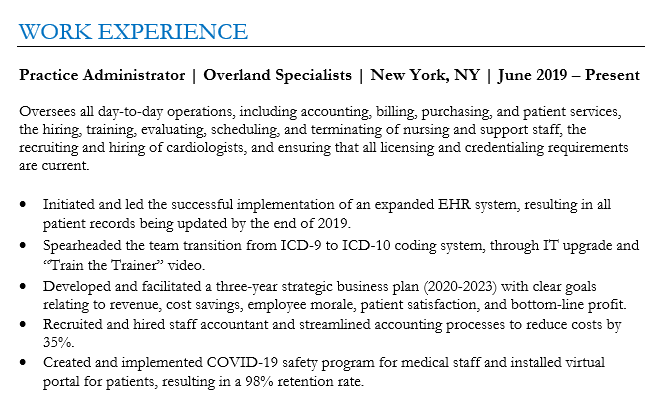
7. Garamond font
Garamond is a classic serif typeface designed in the 16th century. It remains a popular choice for book printing, branding, and a wide range of print materials.

Pros: Garamond is a space efficient font. It uses less horizontal space compared to other fonts.
Cons: While Garamond is optimized for print, it might not always be the best choice for digital platforms where sans-serif fonts are often favored for clarity and legibility.
Here’s what the Garamond font looks like on a resume:
8. Palatino font
Designed in the 1940s, Palatino has a classic and timeless quality that evokes a sense of tradition and sophistication. It works as a great alternative to Times New Roman for those who have grown tired of the more generic font.

Pros: The Palatino font works well in both print and digital media. It’s commonly used in books, magazines, and websites.
Cons: Palatino’s bold version might not have the same visual impact as other typefaces.
Here’s what the Palatino font looks like on a resume:

9. Tahoma font
Tahoma is a sans-serif typeface designed in 1994. It was specifically created to be legible on computer screens. Tahoma has a technical feel to it and is a great option for engineers.

Pros: Tahoma remains clear and readable even when used at small font sizes.
Cons: Tahoma’s frequent use in Microsoft’s products and operating systems can make it feel overused and dated.
Here’s what the Tahoma font looks like on a resume:

10. Verdana font
Verdana is another Microsoft commissioned sans-serif font. It was developed specifically for improved legibility on digital screens, making it a safe choice for resumes.

Pros: Verdana’s design versatility allows it to be effective in both on-screen and print contexts.
Cons: Verdana’s relatively generous spacing can sometimes lead to more space-consuming layouts when compared to other typefaces.
Here’s what the Verdana font looks like on a resume:


Fonts to avoid on your resume
Some fonts work against you the moment an ATS or a recruiter opens your file.
- Script and cursive fonts. ATS software often misreads them, and they read as unprofessional in a business document.
- Decorative or display fonts. Built for headlines and posters, not dense blocks of resume text.
- Comic Sans. It undercuts your credibility before a recruiter reads a word of your experience.
- Overly condensed fonts. They pack in more text but hurt readability, for both people and ATS parsing.
- Fonts not installed on common systems. If a recruiter’s computer doesn’t have your font, it falls back to a substitute and can break your formatting.
When in doubt, pick from the shortlist of ATS-friendly resume fonts above.
Use a resume scanner to check your formatting
Choosing the right font, and formatting your resume correctly, can make a big difference. Font choice is ultimately an ATS-parsing concern: if your resume isn’t formatted properly, an ATS may misread it, making it harder for recruiters to find you.
To avoid that risk, run your resume through Jobscan’s free ATS resume scanner. It checks your entire resume and gives you a report on exactly what to adjust to make it searchable.
- Upload your resume file.
- Paste the job description for a job you want to apply for.
- Review your resume report to see what adjustments you need to make.
- Follow the advice to optimize your resume.
- Apply using your now ATS-friendly resume.
If your formatting isn’t ATS-friendly, start from an ATS-friendly resume template with fonts and formatting already handled.
How to choose a resume font for your industry
Your resume font should match your industry and the job you’re going for.
For law, finance, and corporate jobs
Choose classic, professional fonts that convey credibility.
- Times New Roman – Traditional and widely accepted.
- Cambria – Formal yet modern.
- Georgia – Readable in both print and digital formats.
For business, marketing, and tech jobs
Choose modern sans-serif fonts that balance professionalism and readability.
- Calibri – Clean, contemporary, and widely used.
- Arial – Simple and effective.
- Tahoma – A polished, slightly technical feel.
For marketing, design, and media jobs
Choose stylish yet readable fonts that reflect creativity.
- Garamond – Elegant and sophisticated.
- Palatino – A refined serif font with a creative edge.
- Georgia – Classic yet modern, great for digital and print.
For engineering, IT, and data roles
Choose precise, structured fonts for clarity.
- Verdana – Clear and widely spaced.
- Tahoma – Crisp and professional.
- Helvetica – Sleek and corporate-friendly.
How to choose the right font size
Font size matters just as much as font choice. Using the right size ensures your resume is easy to read for both hiring managers and applicant tracking systems (ATS). Pair the right size with proper resume margins so the page has room to breathe.
- Body text: Stick to 10–12 pt for clarity and readability.
- Headings: Use 14–16 pt to make section titles stand out.
- Your name: Can be slightly larger, around 18–22 pt, to grab attention.
PRO TIP: Avoid shrinking your font just to fit more content. If your resume feels cramped, tighten your wording instead.
And if you are fighting for space, check how long your resume should be before you shrink anything.
How to format your resume properly
Beyond font choice, a few habits keep your resume readable for both people and ATS software:
-
- Stick to standard fonts. Avoid script, cursive, and decorative typefaces; they’re harder for an ATS to parse and can look unprofessional to a hiring manager.
-
- Skip graphics, logos, and photos. ATS software reads text, not images, so visual elements can confuse the parser instead of impressing it.
-
- Use simple bullet points. Circles and dashes scan cleanly; more elaborate symbols can trip up some ATS.
Font choice is only part of the picture. For the rest of your resume’s structure, date formatting, and keyword strategy, learn more about resume formats and resume formatting mistakes.
FAQs
The best resume fonts are Calibri, Cambria, Georgia, Helvetica, Arial, Times New Roman, Garamond, Palatino, Tahoma, and Verdana.
Recommended font size for your resume are 10–12 pt for the body of your resume, 14–16 pt for section headings, and 18–22 pt for your name at the top of your resume.



