Best Administrative Resume Examples for 2026
Administrative resume examples for 2026, from receptionist to data entry clerk. Learn how to show scheduling, office software, and the keywords that get past ATS.



Administrative roles play a pivotal part in ensuring an organization operates smoothly and efficiently. In this blog, we will provide expert-written resume examples and essential tips tailored to administrative professionals, helping you highlight the skills that employers truly value.
Employers seek candidates who can demonstrate strong organizational skills, adaptability, and attention to detail. A well-written resume is crucial in showcasing these qualities and standing out in the competitive job market.
Ready to take your administrative career to the next level? Keep reading as we walk you through some powerful resume strategies that will help you land your dream job.
Receptionist resume example
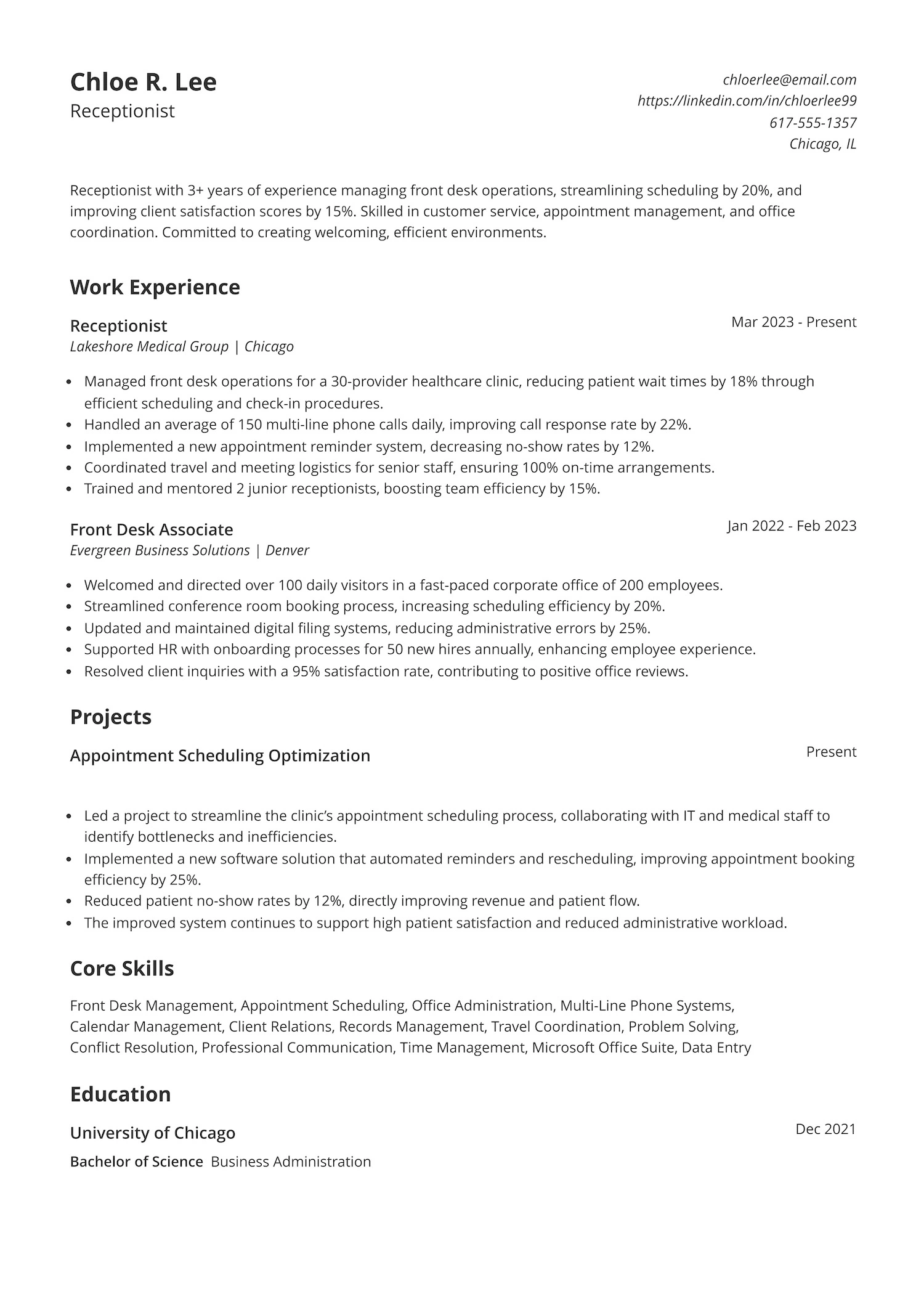
Are you looking for a receptionist position where you can put your organizational skills to work? Do you want to improve office operations and create a positive first impression for clients? This resume example highlights the experience and skills that can help you stand out in a competitive job market, focusing on front desk management, scheduling optimization, and customer service skills.

In this role, you’ll be expected to manage phone systems, handle appointment scheduling, and maintain smooth office operations. Employers look for candidates who are organized, able to manage multiple tasks efficiently, and communicate professionally with clients and administrative staff members. Strong time management and problem-solving skills are key to succeeding in this role.
This resume template clearly demonstrates impact through specific achievements. In the work experience section, strong action verbs like “managed,” “streamlined,” and “implemented” show initiative and leadership. Metrics, such as reducing patient wait times by 18% and increasing scheduling efficiency by 20%, highlight tangible results. Employers are drawn to these quantifiable outcomes, as they show the candidate can drive improvements and contribute to the company’s success right from the start.
Administrative assistant resume example
Struggling to craft the perfect administrative assistant resume? Check out this strong resume example—it highlights key administrative skills, measurable accomplishments, and a clean, ATS-friendly format to help you land more interviews.
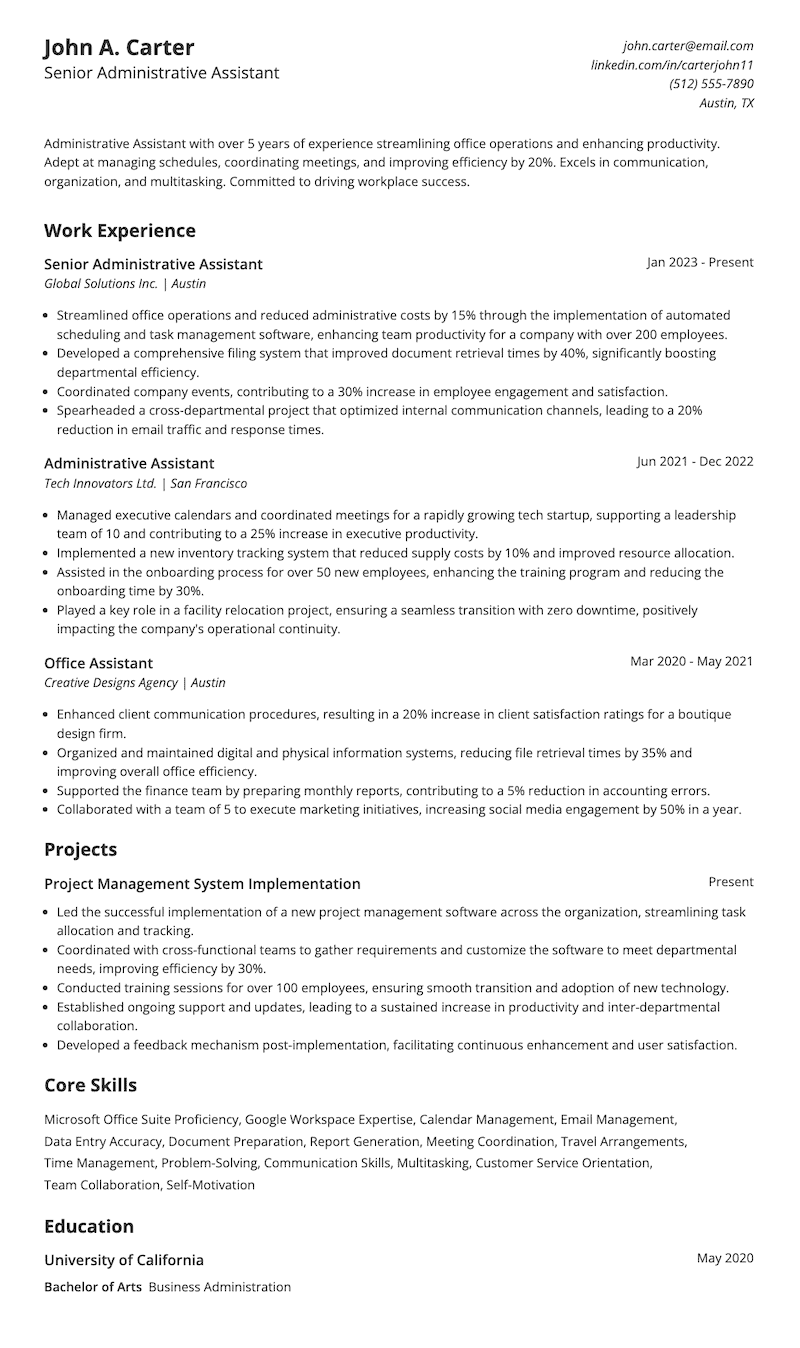
Administrative assistants are the backbone of any office, expected to manage schedules, coordinate meetings, and streamline operations while staying highly organized. Potential employers look for candidates who can boost efficiency, solve problems, and communicate effectively. Your administrative assistant’s resume must demonstrate exactly.
This resume stands out due to its strong emphasis on measurable achievements, particularly in the projects section. This section highlights leadership, problem-solving, and cross-functional collaboration—key skills for an administrative assistant.
By detailing efficiency improvements and team training, the resume demonstrates an ability to drive organizational success. Combined with quantifiable results in work experience, clear formatting, and relevant skills, this resume effectively positions the candidate as a high-impact administrative professional.
Administrative resume example
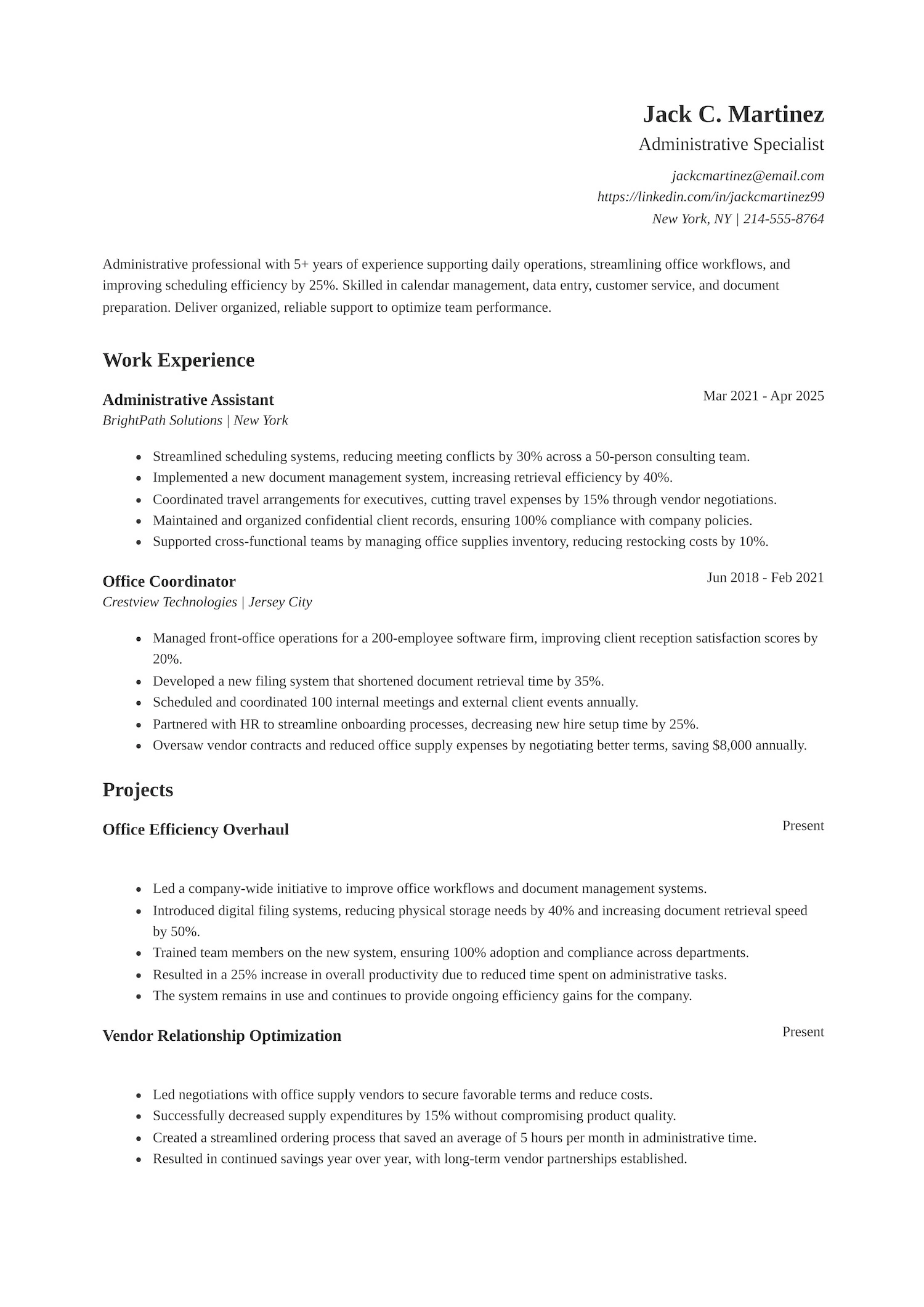
Looking to land an administrative role where your organizational skills and attention to detail can truly make an impact? This resume example shows how to effectively demonstrate these strengths in an administrative role, showcasing accomplishments that can help you stand out.
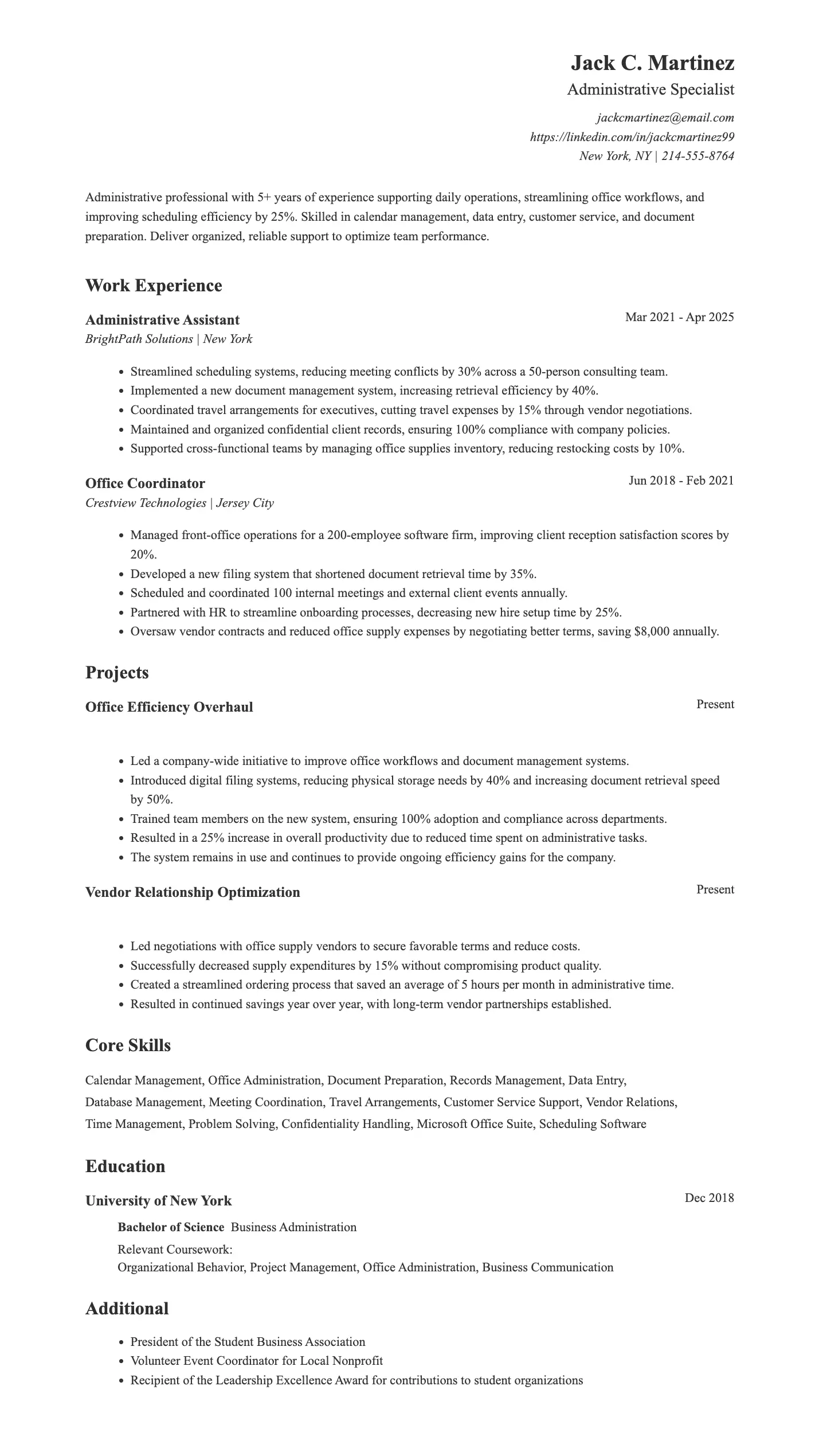
Administrative roles require strong organizational skills, multitasking, and attention to detail. Employers expect candidates to efficiently manage calendars, coordinate meetings, and handle office tasks while improving workflows. The ideal candidate can show proficiency in document management, vendor relations, and supporting team productivity.
This resume works because it highlights key skills like calendar management and document preparation, which are crucial for an office administration role. The dedicated projects section, including projects like “Office Efficiency Overhaul” and “Vendor Relationship Optimization,” adds significant value by showcasing real-world impact, which is likely to grab the attention of hiring managers.
Adding relevant projects to your resume demonstrates problem-solving and process improvements. The clean layout and ATS-friendly format ensure it’s easy to read for both employers and applicant tracking systems, making it highly appealing.
Data entry clerk resume example
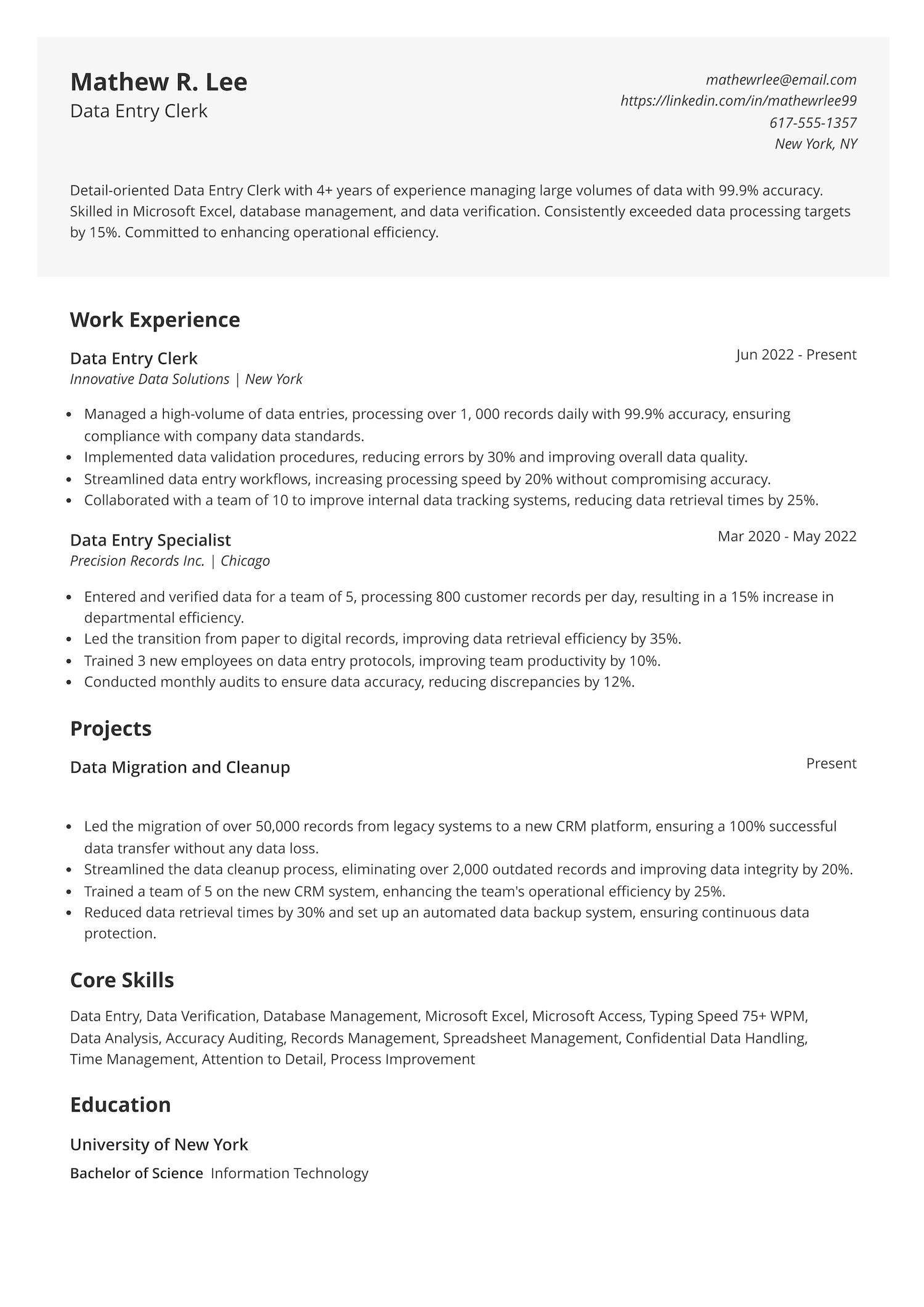
Struggling to land a data entry role that values accuracy and speed? Wondering how to show hiring managers you can handle large volumes of data without missing a beat? This data entry clerk resume example highlights exactly what employers want to see—real numbers, strong skills, and proven results.

Data entry roles call for a keen eye for detail, fast and accurate typing, and the ability to manage confidential information with care. Employers expect candidates who can hit daily targets, streamline processes, and maintain top-notch accuracy even under pressure. Having solid skills in Excel, database management, and time management is a must.
The core skills section blends hard skills like data entry and database management with soft skills like attention to detail and time management. It also includes a relevant education background, which shows technical training and commitment to the field. The clear metrics, project highlights, and focus on improving efficiency make it easy for employers to see real value at a glance.
Office clerk resume example
If you’re aiming for an office clerk job, it’s important to know what a strong resume should highlight. Showing your skills in organization, data entry, and office administrative support clearly and effectively can make a big difference. The resume example below is a great model to help you get started.

Office clerk roles call for someone who’s organized, efficient, and ready to keep daily operations running smoothly. Employers expect candidates to handle tasks like scheduling, managing files, and supporting teams with a sharp eye for detail. A strong focus on time management, communication, and problem-solving is key to standing out.
This resume highlights real results like improving efficiency and saving time, not just listing tasks. It shows skills employers care about—like scheduling, data entry, and communication—with proof to back them up. Clear sections, action-driven bullet points, and a strong project example make it easy for hiring managers to see the value quickly. Everything is organized, professional, and straight to the point.
Also Read: 10 Best Resume Skills to Put on a Resume
How to write an administrative resume that will get you an interview
Creating a strong administrative resume requires more than just listing your work experience. It’s about showcasing your skills and qualifications in a way that makes you stand out to hiring managers. Whether you’re applying for an office administrator, office coordinator, or healthcare administration role, a targeted resume is key to getting noticed.
Many employers, including those in office-based industries, use Applicant Tracking Systems (ATS) to manage the hiring process. These systems work much like a search engine—if your resume doesn’t include the right keywords or proper formatting, it may not reach recruiters.
For administrative roles, hiring teams often search for terms like “calendar management,” “office coordination,” “data entry,” “travel arrangements,” and “document preparation.” Including these relevant keywords in your resume increases your chances of appearing in the hiring team’s ATS search.
How ATS works:
- Job posting setup: Employers define the skills, tools, and qualifications they’re looking for in a candidate.
- Resume scanning: The ATS scans incoming resumes to identify and extract key information.
- Searchable database: Recruiters search through resumes using keywords that match the job description.
Want to make sure your administrative resume gets noticed? Use Jobscan’s free ATS resume builder to quickly create a professional, ATS-optimized resume tailored to what employers are looking for—all for free!

Key elements of an administrative resume
When writing your administrative resume, there are a few key elements you should include to make a strong impression:
- Contact information: Start with your name, phone number, email address, and LinkedIn profile or portfolio if applicable.
- Professional summary: A concise overview of your qualifications, experience, and career goals.
- Skills section: Highlight the key skills that are most relevant to the position you’re applying for, such as organizational skills, communication, and time management.
- Work experience: A detailed list of your relevant roles, including job title, company name, dates of employment, and bullet points of your key responsibilities and achievements.
- Projects: List any significant projects you have worked on that demonstrate your skills and accomplishments. Include the project name, your role, and any outcomes or results.
- Education and certifications: Include relevant degrees like a bachelor’s degree, certifications, and any professional development courses.
- Additional sections: Depending on your career, you may include other sections like volunteer work, language proficiency, or relevant software skills.
Write a strong professional summary
Your professional summary is the first thing hiring managers will read, so it’s essential to make it clear and impactful. It should briefly showcase your experience, strengths, and what you’re looking for in your next role. Think of it as a snapshot of your skills and career highlights, tailored to the position you’re applying for.
Let’s look at a few examples of both good and bad professional summaries.
Good examples of a resume summary
- “Experienced Office Administrator with 5+ years of supporting high-performing teams in a fast-paced office environment. Skilled in managing schedules, organizing events, and implementing efficient administrative processes. Seeking to leverage a strong level of expertise in project management and communication in a challenging new role.”
- “Detail-oriented Executive Assistant with 7+ years of experience in handling office tasks, customer service, and data management. Proficient in Microsoft Office Suite and familiar with project management tools. Aiming to contribute strong organizational skills and multitasking abilities to a growing company.”
Bad examples of a resume summary
- “Seeking an administrative assistant role. I have experience in office tasks.”
- “Hardworking, willing to learn, and good at organizing things. Looking for my first administrative assistant position.”
Make writing your professional summary easier with Jobscan’s professional summary generator. Just enter your details, and the tool will create a clear, ATS-friendly summary tailored to your administrative background. It includes relevant keywords and highlights your core strengths—helping you grab the attention of recruiters right away.
Demonstrate key administrative skills
When creating an administrative resume, showcasing your key administrative skills is crucial to impress hiring managers. These skills can be divided into hard (technical skills) and soft skills (interpersonal skills), both of which are essential in an administrative role.
Hard skills for an administrator
- Microsoft Office
- Office Management Software
- Data Entry
- Project Management
- Scheduling
- Document Preparation
Soft skills for an administrator
- Communication
- Organization
- Time Management
- Adaptability
- Multitasking
- Teamwork
Adding these skills to your bullet points helps you emphasize your accomplishments and strengths. But to make the best impact, you need to highlight your administrative skills correctly. Let’s explore examples that show how to present your skills the right way in your resume bullet points.
Write impactful resume bullet points for an administrator
Resume bullet points are the core of your experience section. They should clearly communicate your skills, the impact you’ve made, and the value you bring to a team. Instead of listing tasks, focus on what you accomplished using specific tools, action verbs, and measurable results. Here’s what that looks like:
Good examples of resume bullet points
- “Managed complex calendars for executives, coordinating meetings and travel arrangements across multiple time zones.”
- “Improved office efficiency by streamlining filing systems, reducing document retrieval time by 30%.”
- “Coordinated office events and meetings, ensuring seamless execution of logistics and communication.”
- “Created and maintained a comprehensive inventory system, reducing stockouts by 25%.”
Bad examples of resume bullet points
- “Helped with scheduling and office tasks.”
- “Did some filing and answered phones.”
- “Worked on projects and handled documents.”
- “Assisted with office management.”
Make your administrative resume more results-driven with Jobscan’s resume bullet point generator. Upload your resume and the job description, and the tool will suggest customized phrases that highlight your skills, responsibilities, and accomplishments in a way that aligns with what employers are looking for.
Highlight your achievements as an administrator
Hiring managers want to see more than just your responsibilities—they want to know what you accomplished in your previous roles. Including measurable achievements shows that you not only handled administrative tasks but also added value to the organization. Use numbers, percentages, or specific outcomes whenever possible. Tailor your achievements to match the priorities listed in the job description.
Examples of strong achievement statements:
- “Reduced appointment scheduling errors by 40% by implementing a new digital calendar system.”
- “Trained and supervised a team of 3 medical administrative assistants and new employees, improving team productivity by 25%.”
- “Cut supply costs by 15% through vendor negotiations and inventory tracking.”
- “Streamlined onboarding process, decreasing new hire setup time from 5 days to 2 days.”
Tailor your resume to the job description
One of the most effective ways to make your resume stand out is to tailor it to the specific job you’re applying for. Many companies use Applicant Tracking Systems (ATS) to manage resumes, and tailoring your resume ensures that you’re using the right keywords to optimize for the ATS. But beyond that, customizing your resume helps you highlight the skills, experiences, and achievements that are most relevant to the position.
Here’s how to tailor your resume to the job description:
- Analyze the job description: Focus on keywords like software, tools, or administrative systems mentioned in the job posting. Include these keywords naturally in your resume.
- Match your experience to the job requirements: Highlight relevant roles or projects that demonstrate the skills the employer is seeking.
- Showcase relevant achievements: Emphasize accomplishments that align with the job’s responsibilities, such as improving efficiency or streamlining processes.
- Customize your professional summary: Tailor your summary to reflect the job’s key requirements and how your background aligns with them.
- Use the right keywords: Incorporate job-specific terms throughout your resume to help hiring teams find it in the ATS.
- Highlight matching experience: Focus on duties and outcomes that directly relate to the job’s expectations, like managing calendars or coordinating teams.
- Adjust bullet points: Modify bullet points under your work experience to emphasize tasks and results relevant to the specific job description.
Also Read: The Top 5 ATS Resume Keywords of 2025
Include relevant education and certifications
Including your education and certifications on your resume is essential to show that you’re qualified and serious about your professional growth. For administrative positions, this section helps validate your background and can highlight your readiness for specialized tasks, tools, or industries like healthcare or finance.
Here’s how to list your education and certifications effectively:
- Include your degree, major, and the institution (e.g., Bachelor of Arts in Business Administration, ABC University).
- If you’re a recent graduate, add your graduation year and highlight relevant coursework such as Office Procedures, Business Communication, or Records Management.
- For experienced professionals, focus on your highest level of education and any industry-relevant certifications.
- If you’re transitioning into administration from another field, emphasize certifications in office software, business writing, or administrative processes.
- List certifications that are valued in the administrative field, such as Microsoft Office Specialist (MOS), Certified Administrative Professional (CAP), or QuickBooks Certification.
- Prioritize industry-recognized certifications over short courses unless the course provided a critical skill or tool training.
Top administrative certifications
Top administrative certifications that can strengthen your resume:
- Certified Administrative Professional (CAP)
- Microsoft Office Specialist (MOS)
- QuickBooks Certification
- Professional Administrative Certification of Excellence (PACE)
- Certified Virtual Assistant (VA)
- Project Management Professional (PMP) – if relevant to the role
Administrative resume tips
Creating an effective administrative resume requires attention to detail and an understanding of what hiring managers are looking for. To help you stand out from the competition, here are some key tips for writing a resume that showcases your skills and qualifications:
- Keep it clear and concise: Focus on the most important information and keep your resume to 1-2 pages. Avoid unnecessary details that don’t add value to the role.
- Use action verbs: Start each bullet point with strong action verbs like “managed,” “coordinated,” “organized,” or “implemented” to demonstrate your contributions.
- Tailor your resume: Customize your resume for each job application by aligning it with the specific job description. Use relevant keywords to optimize for the ATS and highlight the skills most important for the position.
- Showcase your achievements: Emphasize measurable results and accomplishments in your work experience. Quantify your achievements whenever possible (e.g., “Reduced office supply costs by 20%”).
- Highlight your administrative skills: Ensure you include both technical expertise and soft skills that are crucial for administrative roles. This could include proficiency in software like Microsoft Office, organizational skills, time management, or communication abilities.
- Format for readability: Use a clean, professional format with clear headings, bullet points, and plenty of white space. Avoid cluttered layouts or overly complex designs.
- Proofread your resume: Typos or grammar mistakes can make a negative impression. Carefully proofread your resume before submitting to ensure it’s error-free.
Also Read: How to Organize Your Resume Sections to Stand Out?
Include a cover letter with your administrative resume
A tailored cover letter can give your administrative application a competitive edge by providing a more personal introduction to your skills, experience, and passion for the role. While your resume outlines your qualifications, a cover letter allows you to explain why you’re a great fit for the position and how you can contribute to the company’s success.
What to include in your cover letter:
- Introduction – Start with a clear statement about the administrative role you’re applying for and why it caught your interest. Mention how your skills make you excited about the opportunity.
- Your qualifications – Highlight your relevant administrative work history, certifications, and key skills such as project management, office software proficiency, or communication.
- Key achievements – Share specific accomplishments, such as streamlining office processes, improving organizational efficiency, or managing large-scale corporate events.
- Alignment with the company’s needs – Show that you understand the company’s values or business goals and explain how your administrative background aligns with their objectives.
- Closing statement – Conclude confidently by expressing enthusiasm for the role and your interest in discussing how you can contribute to the team’s success.
Consider using Jobscan’s cover letter maker to write a compelling, ATS-friendly cover letter that complements your administrative resume. A strong cover letter can leave a lasting impression and show hiring managers why you’re the ideal candidate for the position.
Build a standout administrative resume with Jobscan
A well-structured, professional resume is key to securing an administrative position. By clearly highlighting your organizational strengths, attention to detail, and ability to support office operations, you can show prospective employers you’re ready to keep things running smoothly. Tailoring your resume to the job description and adding a thoughtful cover letter can leave a strong impression from the start.
Need a hand getting started? Jobscan’s ATS resume maker helps you create a polished, ATS-friendly administrative resume in just minutes. Simply enter your details, and the tool formats your resume to match current industry standards—making it easier for recruiters to spot your potential.

Administrative common interview questions
Answer:
“As an administrator, I rely on a combination of organization and time management to prioritize tasks. I start by creating a to-do list, categorizing tasks by urgency and importance. I use tools like calendars and task management software to keep track of deadlines and set reminders. I always make sure that critical tasks are completed first, while also leaving room for flexibility in case urgent matters arise.”
Answer:
“In my previous role, I worked with a team that had conflicting communication styles. To resolve this, I initiated a meeting to openly discuss our challenges and establish clear communication guidelines. By listening actively and being open to feedback, we found common ground, which improved our workflow and reduced misunderstandings. This experience taught me the value of clear communication and collaboration.”
Answer:
“I stay organized by setting up a structured workflow using project management tools like Asana or Trello to track tasks, deadlines, and priorities. I break down large projects into smaller, manageable tasks and use time-blocking to allocate specific hours for each task. I also make sure to regularly check in with my team or manager to ensure we’re on track, which helps me stay ahead of deadlines.”
Answer:
“I understand the importance of confidentiality in administrative roles. I follow strict protocols for handling sensitive information, ensuring that it’s securely stored, whether in physical or digital formats. I also avoid sharing confidential data unless absolutely necessary and only with authorized individuals. In addition, I stay up-to-date on company policies related to data security to ensure compliance.”
Administrative resume frequently asked questions
Administrative skills vary by role, but some specific skills employers look for include organizational skills for managing schedules and tasks, verbal communication skills for interacting with colleagues and clients, attention to detail for accuracy in documentation, and time management for balancing multiple responsibilities. Proficiency with office software like Microsoft Office or Google Workspace is also important.
List your degree, major, and institution clearly. If you’re a recent graduate, mention high school diploma, relevant coursework like office management or communication. For experienced candidates, focus on degrees or certifications relevant to the job, such as a Bachelor of Business Administration or Certified Administrative Professional (CAP).
If you lack extensive experience in administration, highlight transferable skills from previous jobs, such as organization, communication, or project management. Include any relevant coursework or volunteer work. Focus on soft skills like time management and multitasking, which are key for administrative roles.