




- Tailor each resume to the job you’re applying for: Creating a targeted resume increases your chances of getting noticed by both the ATS and hiring managers.
- Use the job title and keywords: Ensure your resume includes the job title and key competencies from the job description to improve your match rate in the ATS.
- Leverage online tools: Tools like Jobscan can help optimize your resume by checking for keyword accuracy and more.
- Applying for jobs is a numbers game: The more effort you put into customizing your resume, the better your chances of landing an interview.
Not getting enough interviews? Then you might need to create an ATS resume.
Applying to dozens of jobs and hearing nothing back is frustrating, but it usually isn’t about a lack of qualifications—it’s about how you’re communicating those qualifications to a machine. To get your foot in the door, you need to write an ATS resume that translates your hard-earned experience into the exact language algorithms and recruiters are searching for.
Most companies use ATS software to manage the flood of resumes they receive through online applications. If your resume isn’t optimized for the ATS, it could make it difficult for recruiters to find it, let alone read it. And if you don’t know how ATS software works, you’re flying in the dark.
Let’s break down the strategy of finding the right target keywords, mapping your core competencies, and writing optimized bullet points that guarantee a high match rate, translating to a strong application to your target role.

How to write an ATS resume
Before you start, grab the job description.
Why? Because your resume should be tailored to each job, not copied and pasted for every application.
It’s tempting to use the same resume everywhere, but customizing it for each role gives you a much better chance of getting noticed.
Recruiters search for specific skills and keywords, and if they’re not on your resume, you might not show up in their search results.
When you start writing your resume strategically with the ATS in mind, you’ll need to focus on a few core components:
- Action verbs
- Keywords
- Skills
Step 1: Finding your target keywords
Keywords are skills, job-specific tools, or specialized qualifications for the role. Luckily, all the most important keywords for any given role are already laid out in the job description.
According to Jobscan’s State of the Job Search 2025 report, 99.7% of recruiters use keyword filters in their ATS to sort and prioritize applicants.
The roadblock for many jobseekers is identifying and integrating them into your own resume. The place to start is at the top—in your resume headline.
Job titles vs. Core competencies
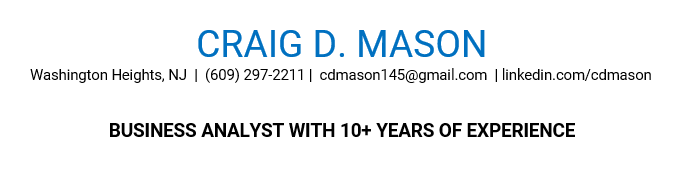
The primary keyword to match in your resume is the job title.
Most job seekers assume that keywords only belong in the body of your resume, but your resume headline—the short, attention-grabbing statement—which houses your job title, is a valuable space for keywords.
Your headline appears right below your contact information and helps recruiters instantly see that you’re a strong match. And given how many resumes hiring teams review, having the most important information front and center can make a huge difference.
In fact, Jobscan analyzed nearly one million job searches and found that resumes that contained the job title received 10.6 times more interview invitations than those who did not.
Here’s an example of how the job listing advertises the role.
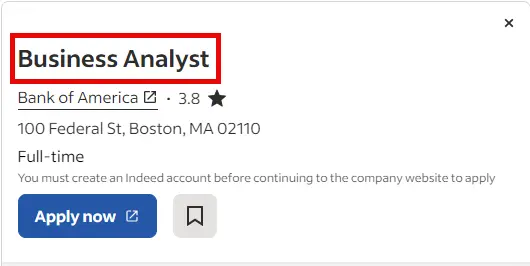
If you were writing a resume headline to include the job title, you could write it like this:
But what if you’re changing careers?
Can you still use “Business Analyst” in your headline if you don’t have direct experience?
Yes, but you just need to be strategic about it. Here’s how to make it work:
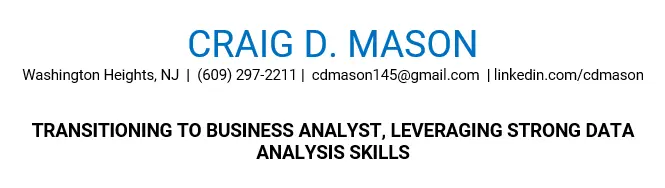
Keywords can also be integrated into a dedicated skills or core competencies section. A short list of skills mentioned less frequently in the job description capture recruiter’s searches.
What are hard skills vs. soft skills?
While writing the previously mentioned State of the Job Search report, we asked over 380 recruiters directly: What criteria do you use to filter candidates in an ATS or similar system? 76.4% of them said they start their search with skills.
If you want your resume to appear in ATS searches, you need to include the right skills.
Most keywords in a job description are skills and proficiencies that the recruiter is looking for. Your skills can be split into two categories: hard skills and soft skills.
Hard skills are job-specific, specialized, or technical skills needed to successfully perform a specific role. These skills are typically acquired through previous work experience, education, certifications, or specialized training.
In contrast, soft skills are interpersonal skills or behavioural traits. These are the valuable transferable skills that serve you in everyday life, and every professional role you take on. They’re more difficult to measure, but these skills like communication, flexibility, adaptability, and team work influence how well you’ll fit in an organization’s culture.
Here’s an example of a job description with key skills underlined. If you were applying for this job, you’d want to incorporate these keywords into your resume.
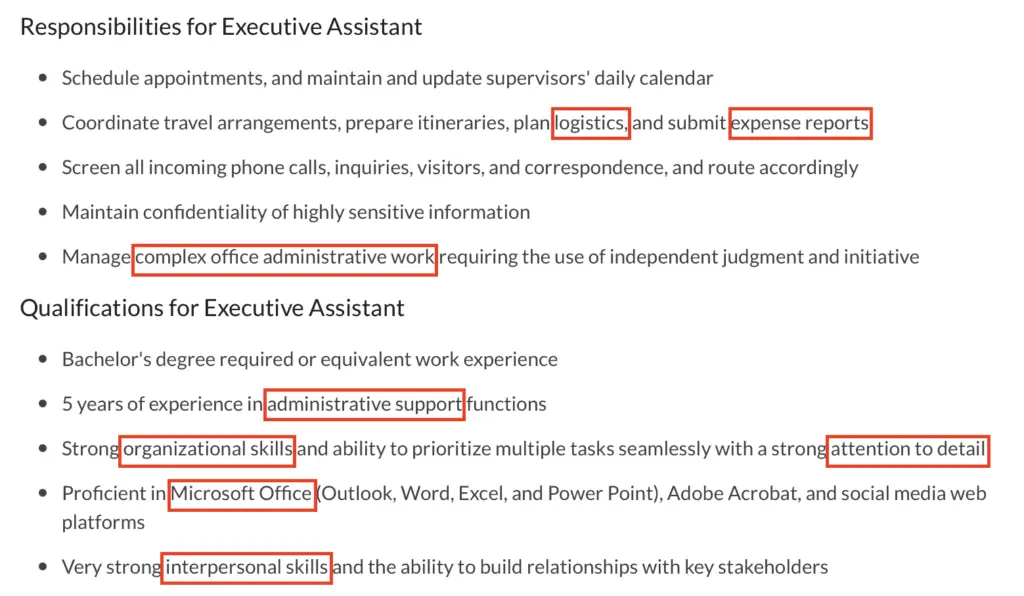
The key is to mirror the language used in the job description.
Many qualified candidates miss out on interviews simply because their resumes don’t include the exact keywords that hiring managers are searching for.
Step 2: Writing ATS-optimized bullet points
Bullet points are your place to shine and show off. But it’s a waste if you’re only describing your responsibilities in your previous roles or make generic statements.
You’ll have to be ruthlessly strategic when choosing your bullet points—stick to the highlight reel instead of including every detail.
A rich bullet point will include:
- Measurable accomplishments
- Action verbs
- Keywords and skills
Measurable accomplishments include numbers and metrics that help support the story you’re telling in your resume. It’s a lot more impactful to have tangible numbers, whether it’s percentage growth, revenue generated, or statistics proving how well you do your job, not just that you can do it.
Action verbs take those bullet points starting with “responsible for” or “assisted with” and transform them into achievement-driven statements. Don’t underestimate the impact of using direct actions to communicate. Words like “designed,” “initiated,” “executed,” and “accelerated” are a good starting point, but the options are limitless.
What are bad vs. good resume bullet point examples?
What do resume bullet points look like in action?
- “Worked with engineering to fix bugs.”
- “Launched a new checkout feature.”
- “Conducted user research.”
- “Prioritized a backlog of 50+ tickets, reducing critical app crashes by 22% in Q3.”
- “Launched ‘One-Click Checkout,’ resulting in a 15% increase in conversion rate for guest users.”
- “Synthesized insights from 30+ customer interviews to pivot the product strategy, saving 4 months of wasted dev time.”
Step 3: Integrating keywords without “stuffing”
Once you’ve unveiled the most valued keywords from the job description, the next step is to find the right places to integrate them. One snag many job seekers face is identifying the frequency of keyword integration—finding the balance between too many keyword mentions, too few, and just enough.
Keyword stuffing occurs when you overload your resume with so many keywords that it is either A) no longer a true representation of their abilities, or B) geared towards the ATS technology with no regard for a human reader.
Recruiters are wary of overly broad skill lists. A long keyword list could help an applicant’s resume get discovered in a search but recruiters don’t take those keywords at face value. They need to be able to see how those skills were actually utilized.
As they investigate further, they could reject resumes that seem suspicious or lack context.
Which is why strong bullet points—with measurable accomplishments and action verbs—are so key to success.
This is where Jobscan’s resume scanner can help.
The resume scanner analyzes the job description to show you exactly which keywords and skills are mentioned in the job description. This information will help you write bullet points for skills that are most likely to be searched in the ATS.
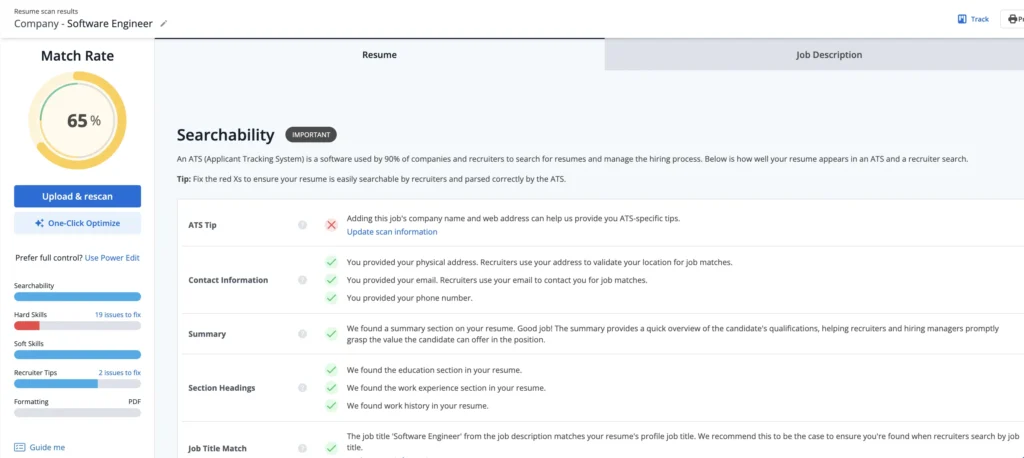
Jobscan’s Match Rate is designed to help you visualize the strength of your application compared to the job description.
The resume scanner mimics how ATS software works. A Match Rate can help you visualize and quantify how closely your resume aligns with the job description.
Here’s what a Match Report looks like:
Try the resume scanner for free below:
You can start organizing your document into an ATS-friendly resume format as you optimize, or wait until the end of your tailoring process with AI Optimize.
What is a Match Rate?
Including the right keywords in your resume is a great start, but it’s not always enough.
Many ATS platforms don’t just scan for keywords—they compare your entire resume to the job description. They analyze your work experience, education, qualifications, and skills to determine how well you match the role.
Hiring managers can then sort candidates by match rate, prioritizing those with the highest scores.
To make things even trickier, there are many different ATS platforms, and each one scores candidates differently.
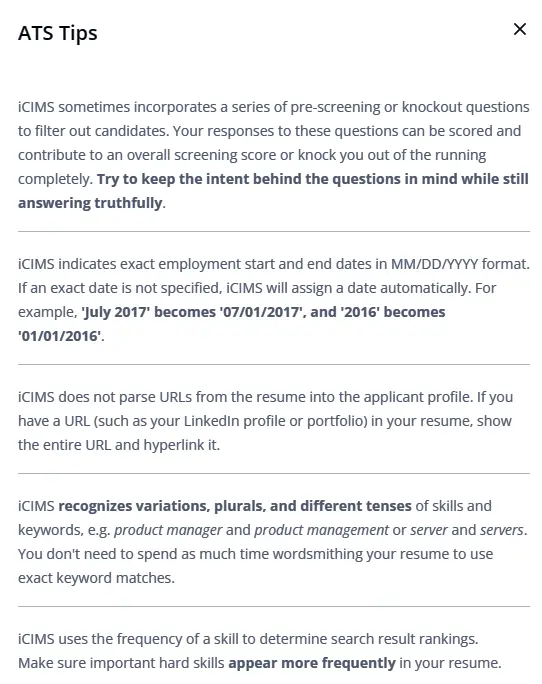
Jobscan has a database of thousands of companies and the ATS platforms they use—including Lever, Greenhouse, and Taleo. When you paste your resume into Jobscan, you can enter the company name you’re applying to.
Why does this matter? Because Jobscan provides ATS-specific recommendations to help you optimize your resume for that company’s hiring system.
For example, if the company uses iCIMS, you’ll receive tailored tips designed specifically for that platform.
Applying for jobs is a numbers game, but quality matters just as much as quantity.
Small tweaks—like adding the right keywords and optimizing your resume—can make a big difference. The more tailored your resume, the better your chances of getting noticed.
Take the time to customize, fine-tune, or convert your existing resume to an ATS-friendly format. Every small adjustment brings you one step closer to landing an interview.
Before you submit, double-check that you aren’t making these common ATS resume formatting mistakes.
FAQs
After scanning your resume, Jobscan scores your resume on a 1 – 100% scale. A score of 75% or higher means you are a good match for the job and are likely to get an interview. Check your resume score here.
The best way to run your resume through an ATS for free is to use a free online ATS resume scanner, such as the one offered by Jobscan. Simply paste in your resume along with a specific job description, and Jobscan will provide you with a match rate.
You can check if your resume is ATS-friendly by running it through an online tool like Jobscan’s resume scanner. It compares your resume to the job description and provides a match score, along with recommendations to improve formatting and keyword optimization.