




JazzHR is an Applicant Tracking System (ATS) used by over 6,500 small to mid-sized companies (like Peloton, Hulu, and TED Conferences) to manage their hiring.
Here’s what you need to know:
-
It’s All About Keywords: JazzHR doesn’t “score” your resume with AI. Instead, recruiters manually search for candidates using keywords, especially for specific skills listed in the job description.
-
Tailor Your Resume: You must customize your resume for every application, matching the language and keywords (skills, titles, certifications) used in the job post.
-
Beware of Knockout Questions: The application may include questions (e.g., “Do you have 3+ years of experience?”) that can automatically move you to a “Not Hired” pile if your answers don’t meet the minimum qualifications.
-
Use an ATS-Friendly Format: To ensure JazzHR can read your resume correctly, avoid using tables, columns, graphics, or text boxes. A clean, standard format is best.
-
Use the Right File Type: Save your resume as a .docx or a standard PDF (not a “flattened” or image-based PDF).
If you’re applying for roles at small businesses and medium sized companies, you may be submitting your resume to JazzHR.
Employ Inc.—which owns other popular applicant tracking system (ATS) platforms Lever, and Jobvite—is targeted to help smaller hiring teams manage candidate experience and applicant tracking.
As a job seeker, knowing how an ATS works can help you prevent simple mistakes that cost you an interview.
Tailoring your resume is crucial, but it’s also helpful to know what happens in the black box after you hit “Submit Application.”
What is JazzHR and who uses it?
JazzHR is a pared-down ATS system designed for small teams that emerged in 2009. It’s simple for recruitment teams to use and track communication, documents, interview notes, and scorecards for countless applicants.
Over 6,500 companies use JazzHR for their dynamic hiring needs; some include:
- Pure Barre
- Peloton
- Seattle Seahawks
- Logitech
- Brilliant Earth
- Iron Mountain
- Hulu
- TED Conferences
The versatility and flexibility of JazzHR is one of the highlights for many organizations who adopt this ATS software.
If you’re applying at any of these companies or targeting your job search to small-medium sized businesses, let’s get into how you can optimize your resume best for this specific ATS.
What are the key features of JazzHR recruiting software?
As it’s owned by the same company as Lever and Jobvite, they have some of the same features, just at a smaller scale. JazzHR can handle any recruitment task from drafting job descriptions, posting on job boards, interviews and assessments, applicant tracking and sourcing—all with a focus on candidate experience (no re-entering your resume information after clicking “upload”.)
How does JazzHR perform applicant tracking and candidate management?
Applicant tracking systems are like a digital filing cabinet for recruiters. Instead of getting paper resumes and filing them away, ATS resumes are neatly organized in a database hiring teams can reference and search like a browser.
Candidates are moved through recruitment processes seamlessly. Rejections come quickly, but so do interview invitations, assessments, follow-ups, and eventually, an offer.
How does JazzHR make this happen? Through:
- Customizable workflows: The system allows hiring teams to personalize hiring stages and create custom messaging for candidates.
- Collaboration capabilities: JazzHR helps centralize team communications about candidates within their profile, so the right team members are always informed.
- Automation of repetitive tasks: Talent acquisition teams can set up automations to trigger actions automatically, cutting down on repetitive tasks and freeing time to find the most qualified candidate faster.
Does JazzHR integrate with LinkedIn and major platforms for job posting?
With integration tools with LinkedIn, Indeed, ZipRecruiter, and other job boards, hiring teams using JazzHR can reach you.
Sometimes it’s difficult to know what ATS a job posting is using. The ATS Tip Feature in Jobscan can help identify the specific ATS software and make tailored suggestions so you know you’re getting the right guidance.
How does JazzHR read your resume?
When you apply at a company that uses JazzHR, your original resume gets stored in your candidate profile. In the later stage of the hiring process, hiring teams may take a close look at your resume, but to narrow down the list of candidates, they use keywords.
Here’s what JazzHR’s candidate filter looks like.
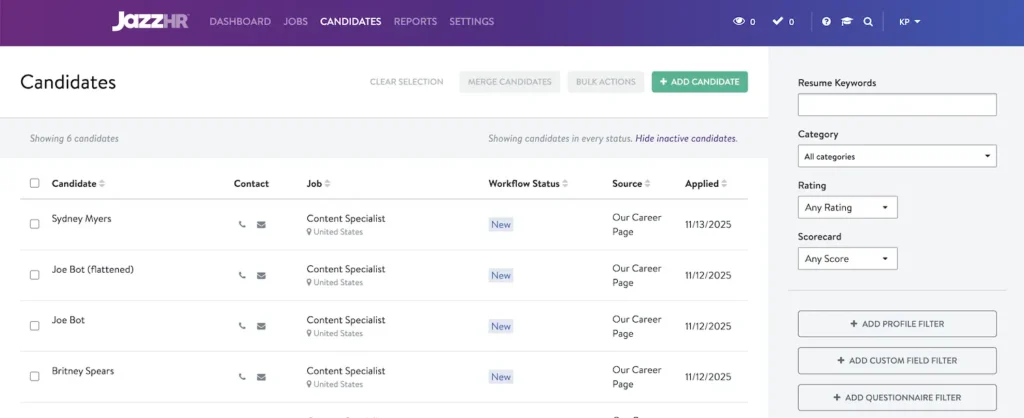
Candidates are listed with their name, contact details, where they are in the application workflow, where they applied from, and the application date.
At the top of the right side panel, recruiters can begin their keyword searches.
According to Jobscan’s State of the Job Search Report which surveyed 384 recruiters, hiring teams first filter by skills. The skills they look for are found in the job description.
That’s why optimizing your resume for keywords can make the difference in your job search. If you don’t include the most in-demand skills from the job description, how are hiring teams supposed to pick you out from the rest of the applicants?
Be sure to tailor your resume before you apply, so you can be the best candidate right from the start.

Does JazzHR score your resume?
When you submit your resume, no algorithm or AI is scoring your resume. Instead, hiring team members can score your resume using a standardized scorecard that measures based on qualifications, previous experience, and culture fit.
Does JazzHR automatically reject your resume?
Not exactly. JazzHR allows recruiters to create their own questionnaires. These questions can be short-form, multiple choice, a number select, or other formats. The goal is to quickly gather information like your years of experience, skill proficiency, familiarity with tools, and more.
Here’s how JazzHR allows recruiters to set up questionnaires. They can build a questionnaire for a specific role and make it a required or optional question for the candidate to answer in their application.
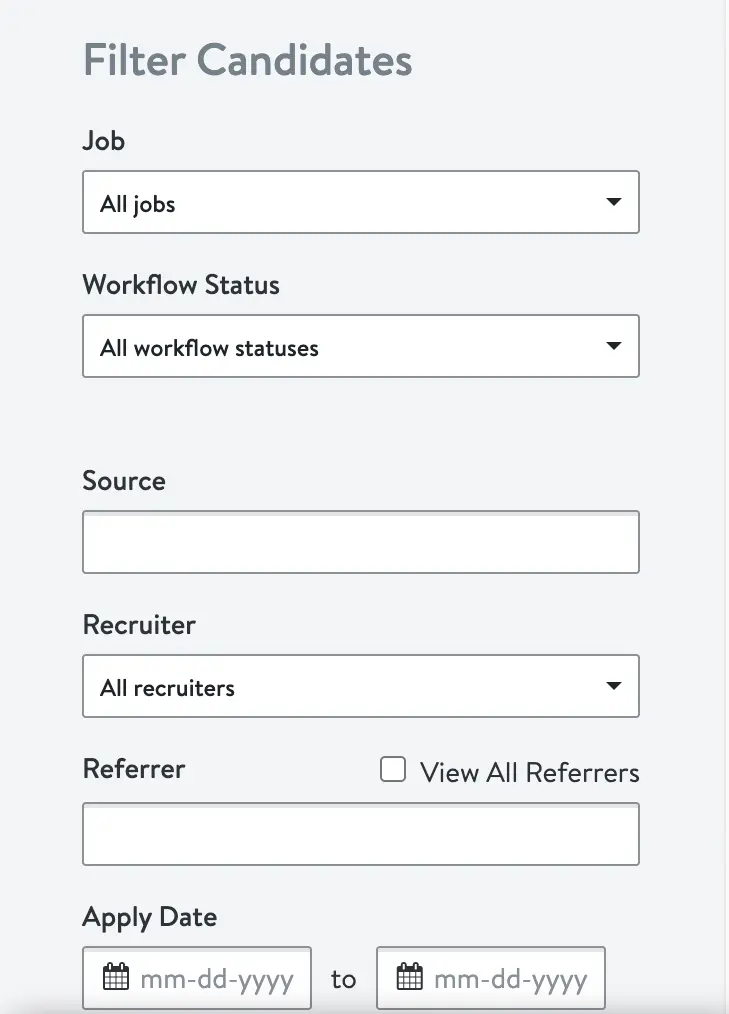
While these questions are helpful in getting to know you better, they can also be knockout questions.
Knockout questions are screening questions asked in an application to quickly flag candidates who don’t meet minimum qualifications.
JazzHR doesn’t hide these applicants from recruiters. However, it does place them in the “Not Hired” stage of a workflow.
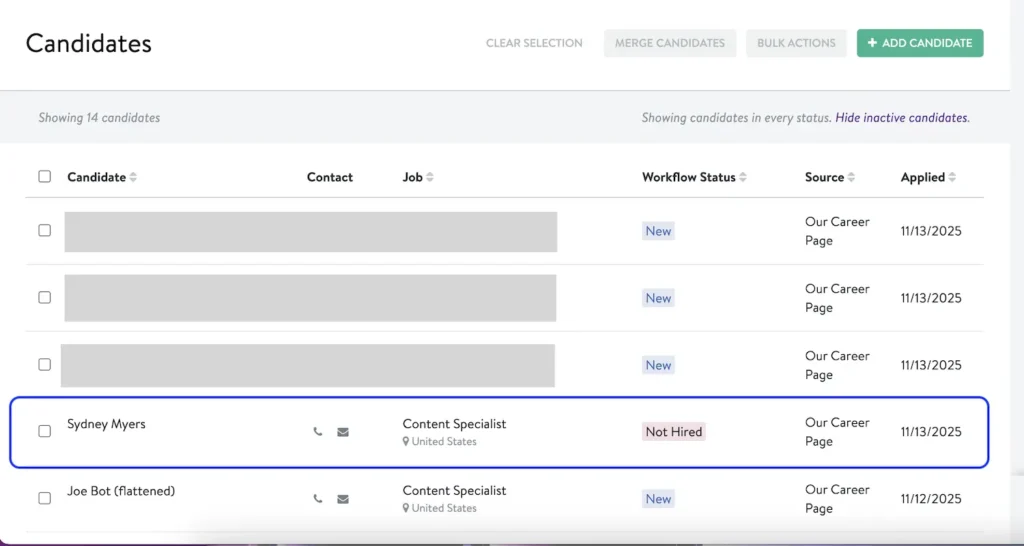
Hiring teams can also manually override this classification and move you back into their general pool of applicants.
How can you optimize your resume for JazzHR ATS?
Make sure to address these questions before you apply to give yourself the best chance of recruiters reading your resume and finding you in JazzHR or their other ATS.
Do I need to tailor my resume to the job description?
Carefully read over the job description and mirror the language it uses to describe skills, qualifications, and experience. For instance, if the job posting uses “Registered Nurse,” use both “Registered Nurse” and “RN” on your resume, if it’s applicable.
Jobscan’s resume scanner compares your resume to the job description and detects these details so nothing fall through the cracks.
Start by uploading or pasting your resume. Then, paste the job description and click “Scan.”
It will generate a full match report to help guide you through tailoring your resume, moving you one step closer to an interview.
You can click on the “ATS Tip” feature and input the URL for the job posting site and the scanner will detect if you’re applying through JazzHR or another ATS. This enables the scanner to make more targeted suggestions in your match report.
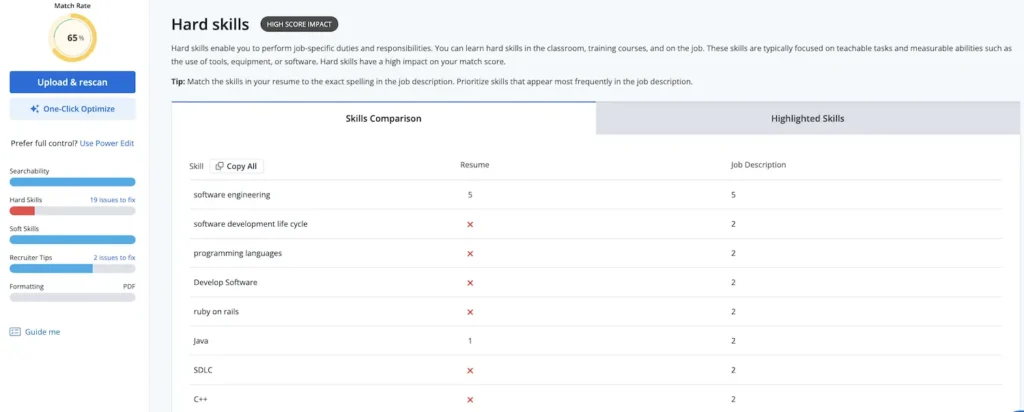
The match report will give you an overall Match Score and highlight which skills you’re missing. Once you see which skills you’re missing, and their frequency (and importance) in the job description, you can edit your resume to better align with the role before you click “Submit.”
Do I have to include all the relevant keywords in my resume?
Keywords can be anything from skills, to job titles, certifications, or tools. Be sure to integrate keywords naturally throughout your resume to boost your chances of being picked up in their searches (but avoid keyword stuffing).
JazzHR isn’t sensitive to verb tenses or plurals in keywords. Manage can be managed, or teams can be team. The recruiter searching the ATS will find you if you have a variation of the same word.
Read more: Resume Examples: Keywords for Photographers
Do I need an ATS-friendly resume?
A standard, ATS-friendly resume format may seem a little boring, but your resume has a utilitarian purpose: it needs to be easy to read and communicate what you want the reader to know.
That means staying away from tables and columns in your resume. Graphics, text boxes, and non-standard design features can also have an impact on your resume’s ATS readability.
Read more: You Need to Avoid These Resume Formatting Mistakes
JazzHR isn’t as picky about keyword parsing as Taleo, or iCIMS, but it’s best to keep things predictable for the hiring manager. They’re only glancing at your resume for approximately 7 seconds. Make sure their eyes are going where you want them to: the content of your resume.
One thing to note: JazzHR can’t read flattened PDF files. Double-check that your resume file format is a .docx or a standard PDF. Choose a standardized resume file name to help keep recruiters (and your desktop) organized.
Read more: How to Create an ATS-Friendly Resume
Looking for more ATS tips?
Jobscan is unmatched in ATS knowledge, and we have the resume scanner that can detect which ATS your dream job posting is using and provide a Match Rate. Try it below.
Discover the most common ATS software among 98% of Fortune 500 companies.
Read More:
Keep reading:
- Why Does the Jobscan Resume Scanner Say My Resume Is Missing Dates?
- VMock vs. Jobscan for Universities
Read how our customer’s use Jobscan :
- How Jobscan Helped Jack Break Into Fashion Luxury at Goyard
- After 20 years at a Company, Jobscan Taught an AI Pro How to Job Search
JazzHR is an applicant tracking system (ATS) that provides tools to streamline hiring. Key features include:
• Applicant Tracking: Manage all candidates and customizable hiring stages from one dashboard.
• Job Posting: Syndicate job listings to dozens of free and paid job boards, including Indeed and LinkedIn, with a single click.
• AI & Automation: Use AI-powered “Talent Fit” to screen candidates and automate repetitive tasks like workflow emails.
• Collaborative Hiring: Allows team members to review, rate, and comment on candidates.
• Offers & Reporting: Send digital offer letters and access reports to track key hiring analytics.
JazzHR connects with a wide variety of platforms:
• LinkedIn: It offers deep integration, including Recruiter System Connect (RSC) to sync candidate data, Apply with LinkedIn to pre-fill applications, and LinkedIn Apply Connect to enable the “Easy Apply” feature.
• Other Platforms: JazzHR also connects with a large ecosystem of other HR tools, including HRIS and payroll systems (like ADP), background check services, candidate assessment tools, and numerous other job boards.
Both are powerful ATS, but they often serve different markets:
• JazzHR is generally favored by small to mid-sized businesses (SMBs), prioritizing ease of use, affordability, and a quick setup.
• Greenhouse is often geared towards larger, enterprise-level organizations that require highly structured hiring workflows and advanced, in-depth analytics.
JazzHR is used by thousands of growing businesses across a variety of industries. Examples of companies that have used JazzHR for their hiring include:
• Solis Mammography
• Rumble Boxing
• Fox Dealer
• Comfort Dental
• Hunter Recruitment Advisors
• Wonder Pups Pet Care
• WeVote
Yes, JazzHR is a leading Applicant Tracking System (ATS). Its core function is to provide businesses with the HR software to organize, automate, and manage their entire recruiting and hiring process, from posting a job to tracking applicants and making a hire.
Yes, JazzHR posts to Indeed. As part of its job syndication feature, JazzHR automatically posts open roles to over 15 free job boards, including Indeed. It also integrates with “Indeed Apply,” allowing candidates to apply more easily, and features like “Indeed Disposition Sync” can send candidate status updates from JazzHR back to Indeed.