



“How long should my resume be?” is one of the most common questions job seekers ask.
Unfortunately, they often get conflicting answers.
Some experts say you must keep it to one page. Others say two pages is no problem. And some say three pages is fine for certain people. So what’s the truth?
The answer is: it depends. There’s no one-size-fits-all rule. The right length depends on many factors.
In this article, you’ll learn:
- How long your resume should be based on your experience level.
- When it’s okay to go beyond one page.
- How to cut your resume down without losing what matters.
Let’s get started.
Most resumes should be one page, especially for entry-level candidates or those with less than 10 years of experience. Two-page resumes are common for professionals with more experience or technical roles. Three pages are typically reserved for senior executives, academics, or federal positions.
Key factors to consider:
-
Experience Level: One page for early career; two pages for 10–15 years of relevant experience.
-
Industry Norms: Fields like academia or government may require longer, more detailed resumes.
-
Relevance: Only include experience and skills that support the job you’re applying for.
-
Clarity: Clean formatting and concise writing make your resume easier to scan.

How long should your resume be?
The short answer is: Most resumes should be one or two pages.
The longer answer? It depends on your experience and how relevant your experience is to the job you’re targeting.
Here’s a quick guide:
One page resumes are best for:
- Students and recent grads.
- Early-career professionals (under 10 years of experience).
- Career switchers with limited relevant experience.
Two page resumes are best for:
- Mid-career professionals with 10–15 years of experience.
- Applicants targeting leadership or technical roles.
- Anyone with multiple relevant roles or accomplishments that don’t fit on one page.
Three page resumes are best for:
- Senior executives, academics, or researchers.
- Federal resumes (which often require more detail).
- Professionals with 20+ years of highly relevant experience.
It’s easy to feel like you need to include everything you’ve ever done on your resume, especially if you’re proud of your work.
But the goal is to show that you’re qualified for the specific job you’re applying to. That means leaving out experience that’s outdated, irrelevant, or repetitive, even if it feels important to you.
Why does resume length matter so much?
Because recruiters don’t read resumes. Instead, they scan them to see if you’re qualified.
If your resume is cluttered, too long, or packed with irrelevant details, it makes their job harder.
That’s why resume length matters. The easier it is for recruiters to spot your value, the more likely you are to get an interview.

PRO TIP: How long should a CV be? A CV (curriculum vitae) is a detailed document used mainly for academic, research, or medical roles. CVs are often 2–3 pages or longer, depending on your area of expertise.
How to make your resume the right length
The ideal resume length depends on your experience and your ability to highlight what truly matters.
Here’s how to write your resume so it’s as concise as possible without losing important details:
1. Use 4–6 bullet points for each role
Too many bullet points can make your resume longer than it needs to be, and harder to read.
To keep your resume the right length, focus on the 4–6 most impactful things you achieved. Highlight accomplishments on your resume that show your value and directly align with the job you’re targeting. The goal is clarity, not coverage.
And don’t let your bullet points turn into mini paragraphs. If a bullet runs longer than two lines, consider breaking it into two separate points.
Keep each bullet short, focused, and backed by measurable results.
- “Managed 12 client accounts across 3 industries; delivered all projects on time and under budget.”
- “Introduced new project tracking tool that cut turnaround time by 20%.”
- “Responsible for managing multiple client accounts across various industries including healthcare, retail, and education, while also overseeing internal project management tools and ensuring that deadlines and budgets were consistently met across all deliverables.”
Read more: Should You Use Past or Present Tense on Your Resume?
2. Delete older experience to maintain proper resume length
Including too much work history can make your resume unnecessarily long, without increasing your chances of getting hired.
Most resumes only need to cover the past 10–15 years. If a role dates back to 2004 and doesn’t directly relate to the job you’re targeting, it’s probably doing more harm than good.
Highlight the roles that are most recent and most relevant to where you’re headed.
But what if you have older experience that’s highly relevant? Don’t delete it. Instead, create an “Additional Experience” section and list it there. Include the title, company, and dates. No other detail is needed.
This approach keeps your resume focused while maintaining an appropriate length.
For example:

PRO TIP: Throughout your resume, make sure you’re formatting dates consistently and correctly. Even small inconsistencies can distract from your qualifications.
3. Avoid unnecessary repetition that adds to your resume length
Repeating the same responsibilities again and again can increase your resume’s length without adding new value.
For example, if you “managed client accounts” in three different jobs, you don’t need to say it three times.
Instead, say it once, under the role where it had the biggest impact. Skip it in the others.
This keeps your resume focused, highlights what’s unique about each role, and helps you stay within the ideal length.

Read more: Your Resume File Name Matters: How to Name Your Resume
4. Cut the clutter and get to the point
Phrases like “responsible for” or “duties included” are outdated and can quietly make your resume longer than it needs to be.
Instead, start each bullet point with a strong action verb like led, designed, increased, or streamlined.
Also, try to avoid using words like “that,” “the,” “a,” “an,” or “like.” These words may seem small, but too many of them can bloat your resume.
And you don’t need to include your full address on your resume. Just the city and state.
The goal is simple: make every word count. This not only helps your resume stand out, but it keeps it to the right length for today’s hiring standards.
- “Increased sales 32% in Q3 by implementing targeted email campaigns.”
- “Designed responsive website, boosting mobile conversions 47%.”
- “Streamlined inventory process, reducing costs $45K annually.”
- “Responsible for increasing the company’s sales through the implementation of various email marketing campaigns that helped to improve our quarterly results.”
- “Was tasked with the design and development of a new website that was responsive and that could be viewed on mobile devices, which helped the company to get more conversions.”
- “Duties included looking at the inventory process and finding ways to make it more efficient so that we could save money for the company on an annual basis.”
Read more: How to Write a ChatGPT Resume (with Prompts)
5. Trim sections that aren’t relevant
One of the easiest ways to keep your resume the right length is to remove what doesn’t matter.
For examples, unrelated hobbies or volunteer work, outdated certifications, and high school education can usually be left off.
Focus instead on sections that add value, like skills, relevant certifications, and areas of expertise that align with the job.
When in doubt, ask yourself: Does this resume section help me get the interview?
If the answer is no, leave it out. Your resume needs to remain an appropriate length while showing what matters most.
6. Use an online tool to help you keep to the right length
Not sure what to include on your resume? Use an online tool like Jobscan’s resume scanner to find the exact keywords, skills, and qualifications recruiters are looking for.
This helps you create a focused, tailored resume that hits the mark and stays the right length.
Here’s how the resume scanner works:
-
Paste in your resume.
-
Paste in the job description.
-
Click “Scan.”
You’ll then receive a match rate that shows how closely your resume matches the job description, and a report highlighting the keywords you should add to your resume.
Here is an example of the report and match rate:

The red X’s highlight the hard skills that are missing from the resume. Adding them will increase your match rate and your chances of landing an interview.
How to format your resume for ideal length
Even if your content is solid, poor formatting can make your resume longer and harder to read than it should be.
These simple formatting tweaks can help you maximize space, improve readability, and make your resume look the way it should—clean, clear, and easy to scan.
Stick to 0.5–1 inch margins. Larger resume margins waste space, but anything smaller than 0.5 inches can look crammed.
Use 10–12 pt for body text and 12–14 pt for section headings. Smaller resume fonts may save space but become hard to read.
Fancy two-column layouts might look sleek, but they often confuse applicant tracking systems (ATS). One clean column is safer and easier to scan.
Keep spacing consistent but tight—around 1.0 to 1.15 line height—to reduce white space without making it feel crowded.
You don’t need to label every section if it’s obvious. For example, your name and contact info don’t need a “Contact” heading.
Graphics, charts, or tables take up space and may confuse the ATS. When it comes to resume design, boring is better!
Formatting often trips up job seekers. This is where an online tool like Jobscan’s resume scanner can help again.
It flags issues that can make your resume hard for applicant tracking systems (ATS) to read, like columns, tables, or unusual layouts.
Here’s an example of Jobscan’s formatting checklist:
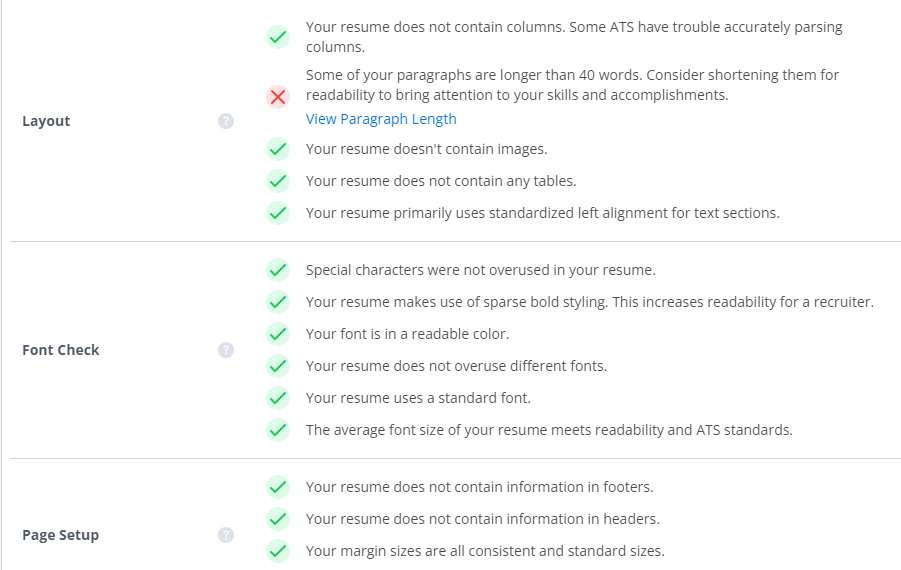
Using this tool can provide immediate results. One Jobscan user said “I went from not getting interviews for months at a time and then I got three or four interviews. It was a definite change.”
Try the resume scanner for free below: