



Using ChatGPT to write your resume can save you hours of work, but only if you use it the right way.
What is ChatGPT and how does it work?
ChatGPT is an AI tool built by OpenAI. It’s designed to understand your written instructions—called prompts—and respond like a human would.
You can ask it to explain a concept, summarize an article, or write full documents like resumes, cover letters, or emails. And it generates a response in just seconds.
Instead of staring at a blank page, you can ask ChatGPT to:
- Draft a resume based on your work history.
- Rewrite bullet points to sound more impactful.
- Tailor your resume to match a specific job description.
But here’s the catch: ChatGPT doesn’t know you or your experience. You have to guide it with clear, detailed prompts to get good results. The better your instructions, the better your resume will be.
Is ChatGPT free? Yes, it is free to use for basic resume writing, though some features may require a paid subscription.

Should you use ChatGPT to write your resume?
Yes, but only if you use it wisely. ChatGPT can be a powerful tool, but it’s not perfect.
Here’s a quick look at the pros and cons:
- Saves time: ChatGPT can generate a full draft in minutes, especially useful when tailoring your resume for multiple jobs.
- Offers a fresh perspective: It can help rephrase your experience, highlight overlooked skills, and break you out of resume writer’s block.
- Customizable: You can guide ChatGPT with prompts to target specific industries, roles, or accomplishments.
- It doesn’t know you: ChatGPT can only work with what you tell it. If your prompt is vague, the output will be too.
- It can sound generic or robotic: Without your input and edits, the resume may feel like it was written by a machine.
- It’s not always accurate: ChatGPT might insert filler skills or fabricate achievements. Always double-check everything it generates.
ChatGPT is great for generating content, but it won’t format your resume or tailor it for ATS.
That’s where Jobscan’s resume builder comes in. It helps you organize your content, choose the right layout, and optimize every resume section for the job you want.
You can even upload your ChatGPT output and turn it into a professionally formatted, job-ready resume in minutes.
How to create effective prompts
ChatGPT is only as good as the prompts you give it. If your prompt is vague, the result will be generic or full of filler.
The best prompts for creating your resume should include:
- Your years of experience and industry.
- Specific accomplishments or projects.
- Key skills you want to highlight.
- The job title or industry you’re targeting.
Think of ChatGPT as a writing assistant, not a mind reader. The more direction you give it, the better the output will be.
“I have 6 years of experience in customer success, with a focus on SaaS and client onboarding. Write a resume summary that highlights my communication skills, leadership, and success improving customer retention.”
“Here’s what I did as a marketing coordinator: managed email campaigns, grew social media, and wrote blog posts. Write 3 bullet points that include results and match this job description.”
“Write my resume.”
“Make bullet points for my job.”
Want to take your prompts to the next level? Two advanced techniques can help:
Role prompting
This means telling ChatGPT who to “be,” like an experienced resume writer. It gives your prompt more context and often results in stronger, more relevant responses. For example:
“You’re an expert resume writer. Help me write a summary for a marketing job.”
Chain-of-thought prompting
This involves walking ChatGPT through the task step-by-step instead of asking everything at once. It’s especially useful for complex edits or feedback. For example:
Prompt 1: “Here’s the job description. What are the top 5 skills needed?”
Prompt 2: “Here’s my current resume. What’s missing or needs improvement to match those skills?”
Prompt 3: “Now rewrite my bullet points to better align with the job.”
Try using one or both of these techniques the next time you want more strategic help from ChatGPT.
How to use ChatGPT to write your resume
You can use ChatGPT to write your entire resume, headline, summary, bullet points, and more. Remember, to get the best results, you’ll need to guide it with clear, specific prompts.
Here’s a simple step-by-step process to help you create a strong first draft with ChatGPT.
1. Start with a simple prompt
If you’re writing a brand new resume, ChatGPT needs to know a bit about you first. Your goal here is to provide a brief overview of your background and then let ChatGPT guide the process.
Write 1–2 sentences describing your experience and career goals. Then, ask:
“What information do you need to start writing my resume?”
Here are a few examples:
-
“I’m a recent computer science graduate looking for an entry-level software development role. What information do you need to create my resume?”
-
“I’ve worked in marketing for 5 years and want to transition into a digital marketing role. What do you need from me to start writing a resume?”
-
“I’m a sales executive aiming for my first management position. What should I provide to help you write my resume?”
In response, ChatGPT will usually ask for things to put on your resume, like your address, work history, key accomplishments, skills, education, certifications, volunteer experience, and the type of job you’re targeting.
Once you’ve shared that information, it can start drafting your resume.
2. Use ChatGPT to write your resume headline
Recruiters often spend just a few seconds scanning each resume. That’s why your headline matters. It’s one of the first things they’ll see.
A resume headline is a short, one-line statement that sits right below your contact information. It should include your target job title and highlight your top strengths or areas of expertise.
Here’s a prompt you can use:
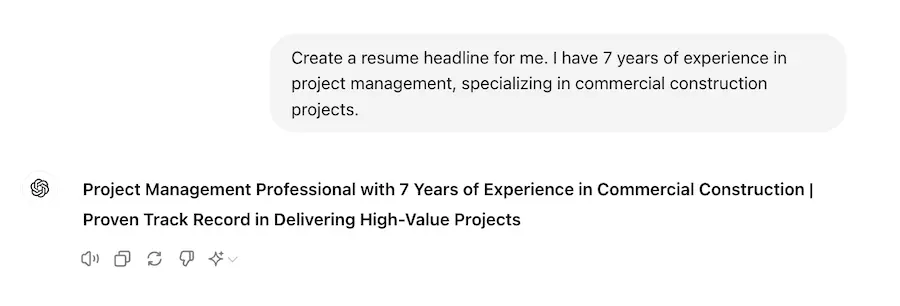
Create a resume headline for me. I have [number of years] years of experience in [your field/industry], specializing in [key skills or areas of expertise]. I’m seeking a role as a [specific job title you’re targeting].
Here’s an example of the prompt in action, along with how ChatGPT might respond:
3. Use ChatGPT to write your resume summary
Your resume summary sits just below your headline and gives a quick snapshot of your experience, skills, and achievements. Think of it as your elevator pitch.
Together with your headline, it helps you make a strong first impression and encourages hiring managers to keep reading.
Here’s a prompt you can use:
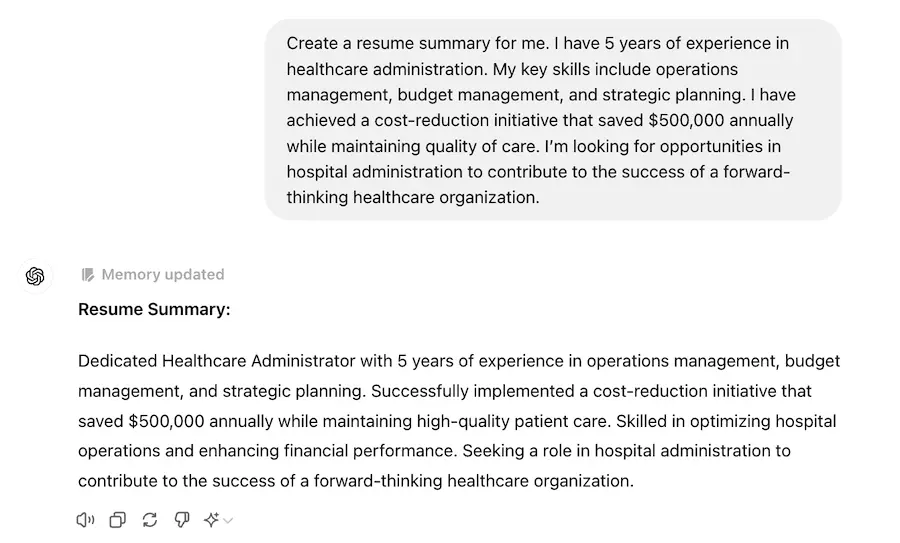
Create a resume summary for me. I have [number of years] years of experience in [your field/industry]. My key skills include [list key skills or areas of expertise]. I have achieved [mention notable achievements or milestones]. I’m looking for opportunities in [specific job or industry you’re targeting] where I can [mention your goals or what you hope to accomplish in the new role].
Here’s an example of the prompt in action, along with how ChatGPT might respond:
PRO TIP: Jobscan’s premium resume builder includes a summary generator that uses your job title, skills, and experience to create a tailored summary in seconds. Just enter a few details, and the builder does the rest.
4. Use ChatGPT to write your work experience section
Your work experience is the heart of your resume. It’s where you show hiring managers what you’ve done and what kind of results you can deliver.
Start by listing your jobs in reverse chronological order, beginning with your most recent position. For each role, use bullet points to describe your key responsibilities and accomplishments.
To get help from ChatGPT, follow this simple process:
-
Choose a job you’re targeting and copy the responsibilities from the job description.
-
Make a rough list of what you did in similar roles, especially anything with measurable results.
-
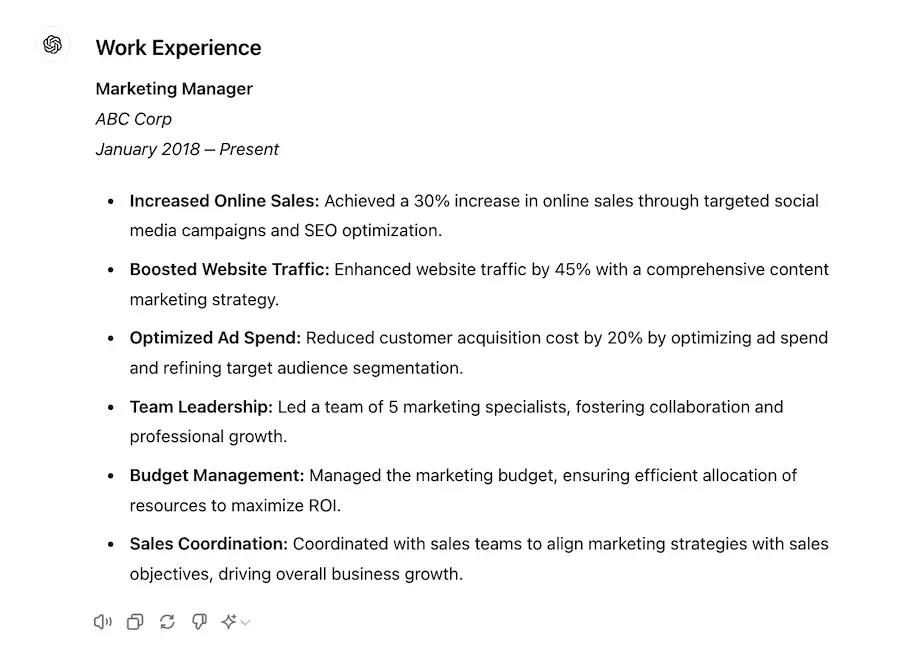
Paste both into ChatGPT with a prompt like: “Help me write bullet points for my resume based on these accomplishments. Match them to this job description and include metrics or results where possible.”
-
Review the output and revise anything that doesn’t reflect your actual experience.
Your goal is to create bullet points that show not just what you were responsible for, but what you achieved. This will help your resume stand out.
Here’s how ChatGPT might respond:
5. Use ChatGPT to refine your bullet points
ChatGPT can help you refine and strengthen your bullet points through a series of focused prompts. Instead of rewriting everything at once, break it down to get better results:
To strengthen language: Ask ChatGPT to improve phrasing by adding strong action verbs and making your accomplishments stand out. For example:
“Here are some bullet points from my resume. Make them more impactful using action verbs and clearer language.”
To replace clichés: Have ChatGPT identify and rework any overused phrases into more original, descriptive alternatives. For example:
“Find and replace any clichés in these bullet points with more specific language.”
To make them more concise: Get suggestions for tightening up wordy or redundant phrasing. For example:
“Rewrite these bullet points to be shorter and more concise without losing meaning.”
To add metrics and numbers: Ask where you can add metrics to make your impact measurable. For example:
“Where can I add quantifiable results to these bullet points? Suggest metrics based on what’s already here.”
By taking this step-by-step approach, you can transform generic resume bullets into polished, results-driven statements that stand out.
PRO TIP: Jobscan’s premium resume builder includes a bullet point generator that creates tailored, keyword-optimized bullet points based on your job title and responsibilities.
6. Use ChatGPT to proofread your resume
One small typo can be enough to cost you the interview. That’s why proofreading is one of the best ways to use ChatGPT. It catches spelling, grammar, and clarity issues you might miss.
Here’s a prompt you can use:
Please proofread my resume carefully and point out any spelling, grammar, or formatting errors. Also, let me know if there are any vague or weak sections that might concern a recruiter. Here’s my resume:” (Paste your full resume below the prompt.)
How to tailor your resume with ChatGPT
You’ve got a solid resume draft. Now it’s time to tailor it.
Most companies use applicant tracking systems (ATS) to help sort through the flood of applications they receive. These systems scan your resume for specific keywords, usually job titles, skills, and qualifications pulled straight from the job description.
If your resume doesn’t include the right keywords, it might never show up in a recruiter’s search results.
That’s why tailoring is so important. Just like websites need to be optimized for Google, your resume needs to be optimized for the ATS.
Here’s where ChatGPT can help. Paste in the job description for the role you’re applying to, and ask ChatGPT to identify the most important keywords and align your resume to match them.
Here’s a prompt you can use:
Help me tailor my resume for a specific job application. I will provide the job description and my resume. Please adjust my resume to highlight the most relevant experiences and skills that align with the job requirements. Also, suggest any changes or additions that would make my resume more appealing for this position.
ChatGPT resume dos and don’ts
- Be specific with your prompts: The more specific your prompts, the more tailored and relevant the output will be.
- Personalize the output: Customize the content to reflect your voice and unique experiences.
- Verify and edit the information: Check for grammar errors and inaccuracies.
- Highlight measurable achievements: Use prompts that lead to results-oriented statements, showcasing your impact in previous roles.
- Don’t rely solely on ChatGPT: Always customize the suggestions to ensure they accurately reflect your experience.
- Don’t ignore formatting: ChatGPT might not handle formatting perfectly.
- Don’t use generic phrases: Avoid using phrases that don’t add value, such as “hard worker” or “team player.”
- Don’t ignore the job description: Make sure your resume addresses the key requirements and qualifications mentioned in the job posting.
PRO TIP: Don’t overlook the file name. A clear, professional resume file name helps you stand out and stay organized.
How to use ChatGPT to update your resume
If your resume is a little outdated, ChatGPT can help you bring it up to speed.
Here are a few ways to use it:
-
Rewrite your work experience: ChatGPT can help rephrase your past roles using stronger action verbs, clearer phrasing, and measurable results. This is especially helpful if you’re not sure how to describe your accomplishments.
-
Expand your skills section: Based on your current experience, ChatGPT can suggest additional skills you may have but haven’t included yet, especially if they match your target job.
-
Polish the wording: ChatGPT can help you clean up awkward phrasing or confusing sentences. Just keep in mind: it doesn’t know what’s true. You’ll need to fact-check everything and make sure your resume reflects your real experience.
You can upload your resume to ChatGPT by pasting the text directly into the chat box. Then use this prompt:
“Help me update my current resume. I have [number of years] of experience in [your field/industry] with a focus on [key skills or areas of expertise]. Since my last update, I’ve achieved [new accomplishments] and developed skills in [new skills]. Please revise my resume to highlight these updates and tailor it for a [specific job title or industry].”
PRO TIP: Wondering how long your resume should be? Most professionals should aim for one to two pages, depending on experience.
How to use ChatGPT for a career change resume
Changing careers can be intimidating, but a well-crafted resume can make all the difference. The key is to highlight your transferable skills and show how your past experience applies to the new role.
ChatGPT can help you reframe your background for a different industry or position, focusing on what matters most to hiring managers in your target field.
To get started, paste in both your current resume and the job description for the role you’re aiming for. Then use a prompt like this:
“Help me create a career change resume. I have [number of years] of experience in [your current field/industry] and am looking to transition to [new field/industry]. My key skills include [list of transferable skills], and I’ve achieved [notable accomplishments] in my current role. Please tailor my resume to highlight my transferable skills and relevant experience for a position as a [target job title].”
PRO TIP: Confused about whether you should use past or present tense on your resume? Use the present tense for your current job and the past tense for previous roles.
Is ChatGPT the best tool for writing your resume?
ChatGPT can be a great starting point. It’s fast, flexible, and helpful for brainstorming and drafting. But it has its limits.
It doesn’t know your experience. It can sound generic. And without the right prompts—and careful editing—your resume might not look the way it should.
That’s why we recommend combining ChatGPT with tools designed specifically for resumes, like Jobscan’s resume builder.
Here’s how to use it:
Begin by importing an existing resume, creating one from scratch, or importing your LinkedIn profile.
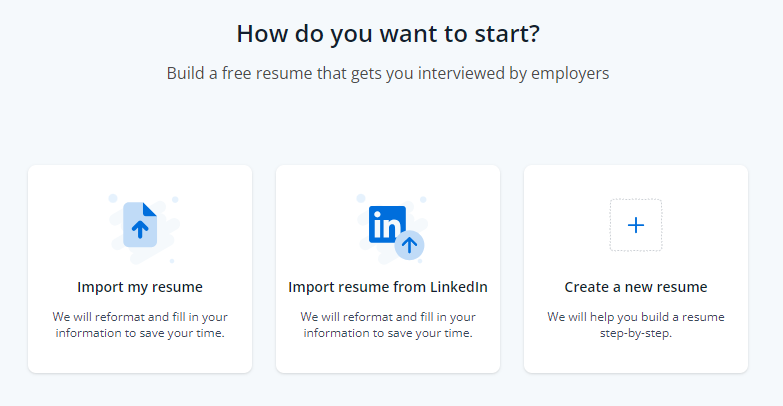
Then follow these steps:
- Add your job title.
- Choose an ATS-friendly resume template.
- Fill in your contact information, work history, dates, education, skills, and certificates.
- Click on the “Jobs” button to see personalized job listings.
- Use Jobscan’s resume scanner to optimize your resume.
- Download your resume as a PDF.
Once you’ve added your job title and experience, you can generate a custom professional summary with just one click.
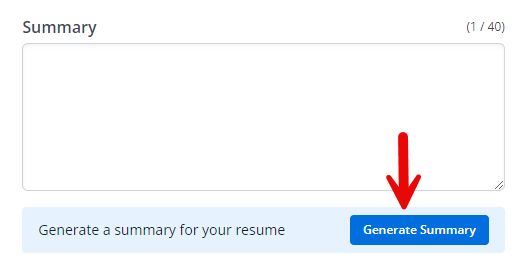
The premium version of the resume builder also allows you to instantly generate keyword-rich bullet points.
For each keyword, you’ll receive three bullet points. Choose the best one, copy it, and paste it directly into your resume.
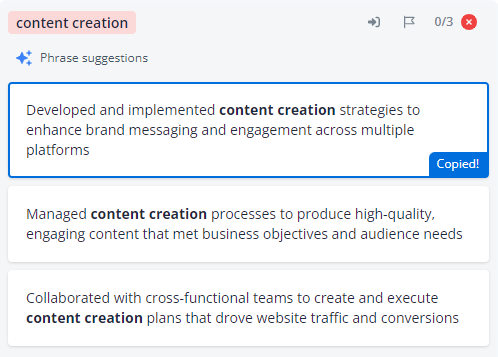
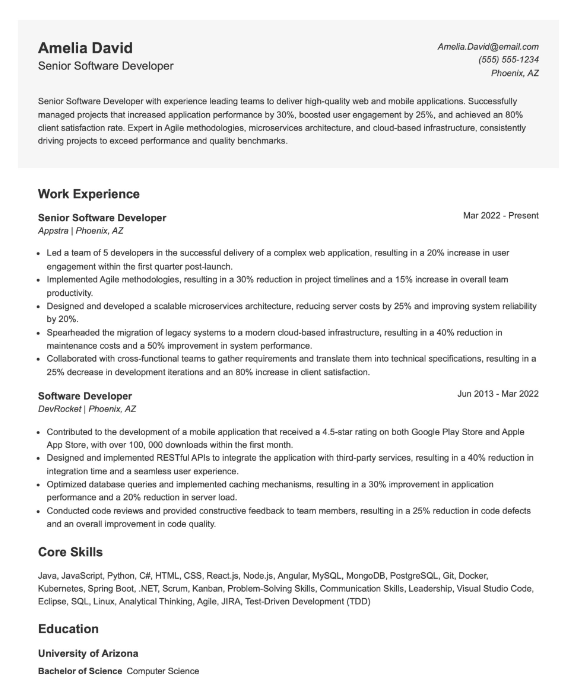
The result is a cleanly formatted, keyword-optimized resume that can be found by recruiter ATS searches.
Hear what our hiring expert has to say about using ChatGPT for resumes, and why human judgment still matters.
How to use ChatGPT to write your cover letter
Writing cover letters can be frustrating and time-consuming, especially if you’re not sure what to say. That’s where ChatGPT can help.
You can use it to generate a solid first draft. Just provide a few key details: your background, the job you’re applying for, and the skills or accomplishments you want to highlight.
Here’s a simple prompt to try:
“Write a cover letter for me. I have [number of years] of experience in [your field/industry], with a strong background in [key skills]. I’m applying for the [job title] role at [company name]. Highlight my accomplishments in [relevant projects or achievements], and explain how my skills could benefit [company name].”
But like its resumes, ChatGPT cover letters often sound a little too generic or robotic.
If you want something more targeted—and formatted correctly for ATS—consider using Jobscan’s cover letter generator instead. It creates a custom, ATS-friendly letter using your resume and the actual job description.
How to use ChatGPT for your job search
ChatGPT isn’t just helpful for writing resumes. It can also support your entire job search.
Here are some of the ways ChatGPT can help you:
Before applying or interviewing, it helps to know what a company actually does and how to talk about it. ChatGPT can quickly summarize key information so you don’t have to dig through dozens of pages. Try this prompt: “What does [Company Name] do? Summarize it in 2–3 sentences.”
ChatGPT can help you brainstorm answers to common interview questions, or even role-play as the interviewer so you can practice aloud. Try this prompt: “Act as a hiring manager interviewing me for a project manager role. Ask me five behavioral questions.”
Whether you’re following up after an interview or reaching out to a potential connection on LinkedIn, ChatGPT can help you draft polished, professional messages. Try this prompt: “Write a short thank-you email to a recruiter after an interview for a data analyst role.”
Some job seekers even use ChatGPT as a virtual accountability partner, asking it to suggest job search strategies, create to-do lists, or organize tasks by priority. Try this prompt: “Help me build a weekly job search checklist. I’m applying to marketing roles and want to stay consistent.”
Key takeaways
-
ChatGPT can help speed up your resume writing, but only if you guide it with clear, detailed prompts.
-
Use it for drafting headlines, summaries, bullet points, and tailored versions of your resume for each job.
-
Edit everything ChatGPT generates. It doesn’t know your experience, and the default output can sound generic or inaccurate.
-
Tailor your resume using the right keywords so it’s easily found in recruiter searches and compatible with ATS
-
Jobscan’s resume builder bridges the gap. It helps you turn ChatGPT content into a clean, ATS-optimized resume that’s ready to apply.
-
AI can support your full job search, including company research, interview prep, networking messages, and organization.