



While ChatGPT is a powerful general writer, it lacks the “hiring intelligence” needed to beat modern recruitment software. Here is why Jobscan is the superior tool:
-
ATS-Specific Intelligence: Jobscan identifies the exact ATS software (like Greenhouse or Taleo) a company uses and provides optimization tips specific to that system’s logic.
-
True Keyword Weighting: ChatGPT provides generic lists, but Jobscan calculates a Match Rate based on the specific “weight” and frequency recruiters look for in a job description.
-
Technical Formatting Checks: ChatGPT often suggests layouts (tables/columns) that ATS cannot read. Jobscan audits 30+ technical factors, including file names, date formats, and parsing errors.
-
Faster Tailoring: Instead of manual “prompt engineering,” Jobscan’s One-Click Optimize uses pre-prompted AI to rewrite bullets and generate cover letters instantly.
-
Professional Voice: Jobscan flags “robotic” tones, clichés, and a lack of measurable results—common pitfalls where ChatGPT-generated content often feels generic or “hallucinated.”
-
All-in-One Ecosystem: Beyond the resume, Jobscan provides specialized tools ChatGPT lacks, including LinkedIn Optimization and a dedicated Job Tracker board.
The current job market demands more than just a good resume; it requires ATS optimization and high-quality, personalized application materials. AI is the copilot job seekers are turning to for help with resume optimization. The question is, Jobscan vs ChatGPT: Which is the right choice for AI support?
In a competitive job market, standing out is more than just having a solid work experience. It’s about how you present your professional story to both hiring managers and the applicant tracking systems (ATS) that screen your documents. Since almost 98% of Fortune 500 companies use a detectable ATS software, ATS optimization needs to be at the top of job seekers’ minds.
As we move through 2026, artificial intelligence has become a central part of the job hunt. Here is a breakdown of how to use these AI tools effectively to land your dream job.
How can you use AI in your job search?
Job seekers can leverage AI tools at almost every stage of the job search process. Beyond just writing a new resume, AI can assist with:
- Interview Prep: Using tools to simulate job interviews and receive detailed feedback on your answers.
- LinkedIn Profile Optimization: Ensuring your LinkedIn profile matches your career goals and attracts recruiters.
- Job Discovery: Using AI-powered job trackers and search engines to find a specific job that fits your soft skills and experience.
- Application Materials: Drafting cover letters and refining bullet points to showcase measurable results.
Using AI tools in your job search is the new normal for many job seekers, but not all AI tools are designed for optimizing your job application to get more interviews. Instead, you need a targeted tool designed to boost your resume and cover letter.
Read more: ATS Resume: How to Create a Resume That Gets You Noticed
Which is better for optimizing resumes for job applications, Jobscan vs. ChatGPT?
The “best” AI tool is one that supports you as you move through every stage of your job search.
If you’re actively job hunting, an AI-powered resume optimization tool with a cover letter generator is your golden resource. When you’re focusing on polishing your professional LinkedIn presence, a LinkedIn optimization tool can elevate your profile to another level.
Using Jobscan over a generic AI software like ChatGPT helps you create stronger resumes that actually get interviews. It’s a specialized resume optimization tool. It doesn’t just write; it audits.
The resume scanner is built specifically for ATS optimization, making it better for the complete cycle of the job application where you need to ensure your resume survives ATS parsing.
Is Jobscan more accurate than ChatGPT for improving resume keyword matching?
Jobscan is a more targeted tool specifically for resume keyword optimization. While ChatGPT can identify relevant keywords, it doesn’t know the “weight” an ATS and recruiters might give them.
Resume optimization with Jobscan provides a Match Rate and identifies missing keywords. It pulls data directly from your focus job posting, ensuring you don’t miss keyword targeting that a general AI might overlook.
The ATS Tip feature allows you to paste in the job posting URL and the scanner will detect the exact ATS your target company is using. Knowing which popular ATS software the organization is using—Greenhouse, iCIMS, Lever, Taleo, SmartRecruiters, and others—allows your custom match report to make suggestions based on specific ATS software and how they work.

Jobscan’s resume scanner runs the checks that matter most for the ATS and recruiters. It checks for missing keywords and skills, of course. But the scanner also detects formatting errors, inconsistencies in contact information or dates, flags overuse of cliches and jargon, and identifies a lack of measurable results.
In one easy scan, you’ll get over 30 checks with actionable fixes so you can optimize your resume fast.
Read more: How Recruiters Really Read Your Resume
How do Jobscan and ChatGPT compare when helping users tailor their resumes to job descriptions?
When the goal is to land a job while maximizing your time, Jobscan provides a more specialized tool to give you results.
Jobscan’s resume scanner helps you tailor your resume to a job description.
The premium AI features in One-Click Optimize are pre-prompted so you can generate resume summaries, rewrite resume bullet points, and create cover letters with a few clicks.
In ChatGPT, you have to engineer the prompts yourself, wade through the long threads as you refine your prompts, and manually format your resume.
To compare, here’s a breakdown of how ChatGPT measures up to Jobscan for resume optimization.
| Feature | ChatGPT | Jobscan |
|---|---|---|
| Tailoring Speed | Works for creative drafting. | Fast for technical auditing. |
| Best Results | Better for tone and voice. | Better for ATS compatibility. |
| Customization | Rewrites sections based on your manual prompting. | Provides actionable tips to fix specific gaps. |
| Context | Understands your personal branding. | Understands the hiring process mechanics. |

How does Jobscan work for resume tailoring?
Jobscan’s resume scanner is a free tool that offers limited scans to kick off your resume optimization. From your Jobscan dashboard, paste your resume contents, upload your document, or choose from a saved base resume to start. Then paste in your target job description and click “Scan.”
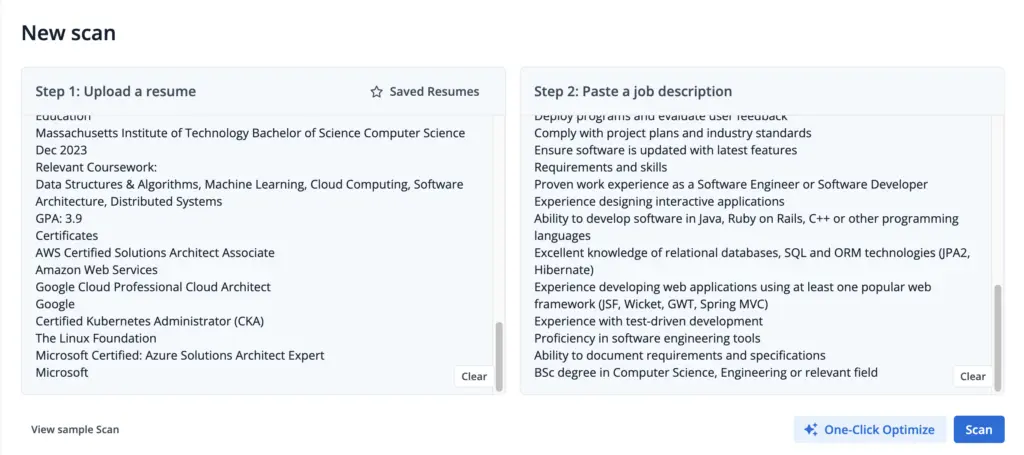
The resume scanner will compare your resume to the job description, running over 30 checks to help you improve your application.
The match report will generate a Match Score to quantify how closely you match the job. The report will explain any changes you need to make to improve your score and help you prioritize by detailing which parameters are more important to the ATS.
This is what a match report looks like:
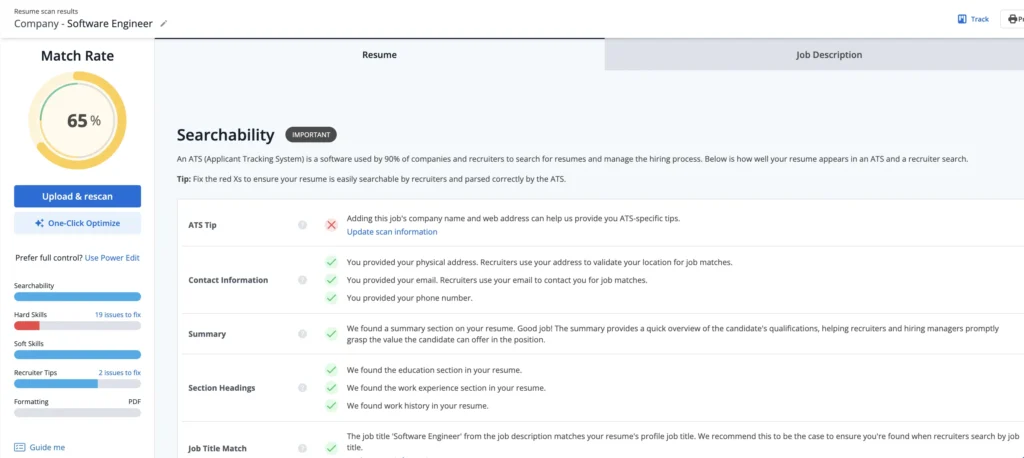
The report will delve into how to improve your skills section, layout, tone of voice, and measurable results. Further, it will check your file type (make sure it has a professional file name), verb tenses, plurals, and abbreviations, alongside other common ATS formatting mistakes.
Once you’ve made your changes you can rescan to see your updated report and match score.
If you don’t want to make manual changes and want the support of AI tools in the resume writing process, One-Click Optimize is a faster solution to help you overcome writer’s block and indecision.
It provides the bullet point writing assistance of ChatGPT in edit mode, but pre-prompted to speed up your resume tailoring. Or you can simply accept or reject suggestions with a single click.
This is what the One-Click Optimize workspace looks like:
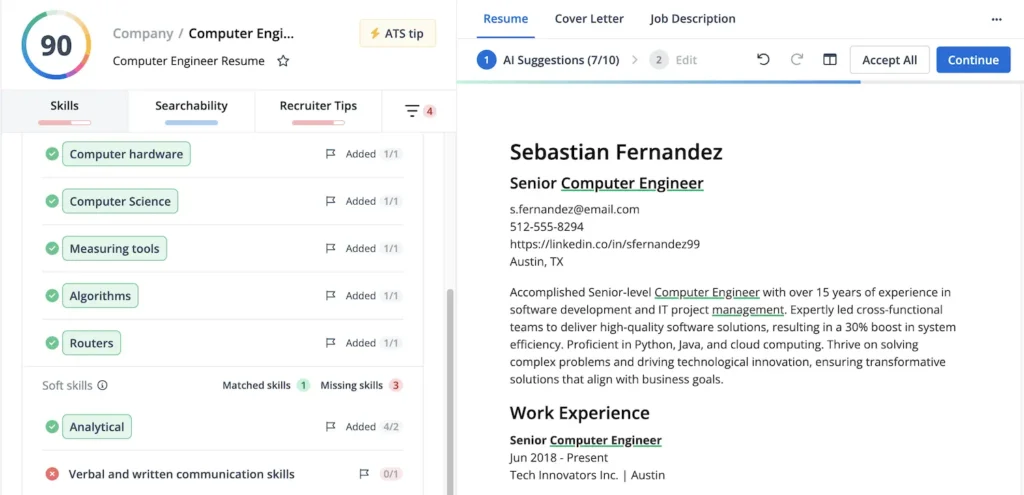
You can even draft a cover letter with the help of AI in the “Cover Letter” tab. Or move your resume, job description, and cover letter to the Job Tracker to come back to later.

Read more: Why Does the Jobscan Resume Scanner Say My Resume Is Missing Dates?
What are the main features that Jobscan offers compared to using ChatGPT for resume writing?
Jobscan provides a dedicated resume building environment that ChatGPT lacks:
- ATS-Friendly Resume Templates: Ensuring your layout won’t break when scanned and parsed by the ATS.
- LinkedIn Optimization: A tool to sync your profile with industry standards and attract recruiters on LinkedIn.
- Job Tracker: A kanban-style board to manage your job application process all in one place.
- Match Rate Analysis: A percentage-based score showing how well you fit the job requirements.
- Free Scans: A free plan that allows for a limited number of free resume scans.
Read more: Sick of Re-Entering Your Info After Uploading Your Resume? Here’s Why Companies Do It
Are there downsides to relying only on ChatGPT rather than Jobscan for job applications?
Using ChatGPT for writing a resume or optimizing your resume can be time-consuming and impractical. Manually prompting the AI to perform the writing you need takes valuable time away from applying for jobs or preparing for knockout questions, and you typically need multiple prompts to get a functional document that’s ready to submit.
Relying solely on ChatGPT for your job application carries risks:
- Generic Tone: Without keyword targeting tools like Jobscan, ChatGPT-generated resumes can often sound “robotic,” which is a red flag for hiring managers.
- Hallucinations: ChatGPT might suggest relevant keywords that don’t actually appear in the job description, or it might “lie” about your experience to fit the role. It can also resort to keyword stuffing—inserting too many keywords inorganically.
- Formatting Issues: ChatGPT cannot see if your contact information or bullet points are in a format that an ATS can read. And it might add tables or columns that the ATS can’t parse. In the end, you’ll still need to convert your resume to an ATS-friendly format.
Discover our ATS Toolkit to help boost your job search.
FAQs
While ChatGPT is great for brainstorming, it often produces “robotic” prose and lacks the data to know which keywords an ATS actually prioritizes. It also frequently suggests layouts—like multi-column templates or graphics—that are unreadable to many Applicant Tracking Systems.
Yes. Unlike general AI, Jobscan’s ATS Tip feature can analyze a job posting URL to detect the specific software (such as Greenhouse, Taleo, or Workday) being used. It then provides optimization advice tailored to that specific system’s quirks.
ChatGPT can identify keywords, but it cannot provide a Match Rate score. Jobscan provides a quantitative analysis of how well your resume aligns with a job description, ensuring you don’t miss high-priority skills that a general AI might overlook.
ChatGPT sometimes “invents” experience or keywords that don’t exist to satisfy a prompt. Jobscan’s One-Click Optimize is pre-prompted to stay grounded in your actual work history while auditing for measurable results and professional tone.
Yes. Jobscan includes a dedicated tool to sync your LinkedIn profile with current industry standards and recruiter search patterns, whereas ChatGPT requires you to manually prompt and copy-paste every section without knowing the platform’s SEO requirements.