




Step-by-step instructions to make your resume ATS-friendly:
1. Match keywords from the job description
-
Add the exact job title: Include the job title exactly as it appears in the posting, placing it prominently in your resume headline or summary.
-
Incorporate relevant skills: Use skills (keywords) found in the job description, as over 75% of recruiters filter candidates by skills.
-
Use exact phrasing: Use keywords precisely as they appear in the job description. If a term has an acronym, include both the long-form and the acronym (e.g., “Enterprise Resource Planning (ERP)”).
2. Ensure clean, ATS-friendly formatting
-
Use the right format: Choose a chronological or hybrid resume format, as they are easiest for the ATS to parse. Avoid functional formats.
-
Keep it simple: Use common, simple fonts (e.g., Garamond, Calibri, Arial, Helvetica, or Georgia) and stick to standard bullet styles.
-
Avoid complex elements: Do not use headers, footers, graphics, columns, tables, or symbols, as these can confuse the ATS.
-
Use standard headings: Stick to traditional section headings like “Work Experience,” “Education,” and “Skills.”
-
Save correctly: Save your resume as a Word document (.doc/.docx) or a PDF (unless the application specifically forbids PDF).
Technology is changing the way we do everything, and that includes applying for jobs.
This is why you need to have an ATS-friendly resume if you want to stay competitive in today’s job market.
ATS stands for applicant tracking system, which is software that helps employers manage the flood of resumes they get for every job posting.
In other words, the moment you hit “submit,” your resume likely ends up in an ATS database. Whether it gets found depends on how well it matches the job description.
In this article, I’ll show you how to create an ATS resume that shows up in recruiter searches and increases your chances of getting noticed.
What is an applicant tracking system (ATS)?
An applicant tracking system, or ATS, is software that companies use to manage and organize all the resumes they receive.
Instead of reviewing each resume by hand, recruiters rely on the ATS to store applications and search for top matches using keywords from the job description.
If your resume doesn’t contain the right keywords or is formatted incorrectly, it might never be found.
ATS platforms are used by companies of all sizes, from small businesses to Fortune 500 giants.
In fact, 97.8% of Fortune 500 companies use an ATS detectable by Jobscan’s scanner. Some of the most popular systems include Greenhouse, Lever, Workday, and iCIMS, but some large companies also use propriety ATS software.
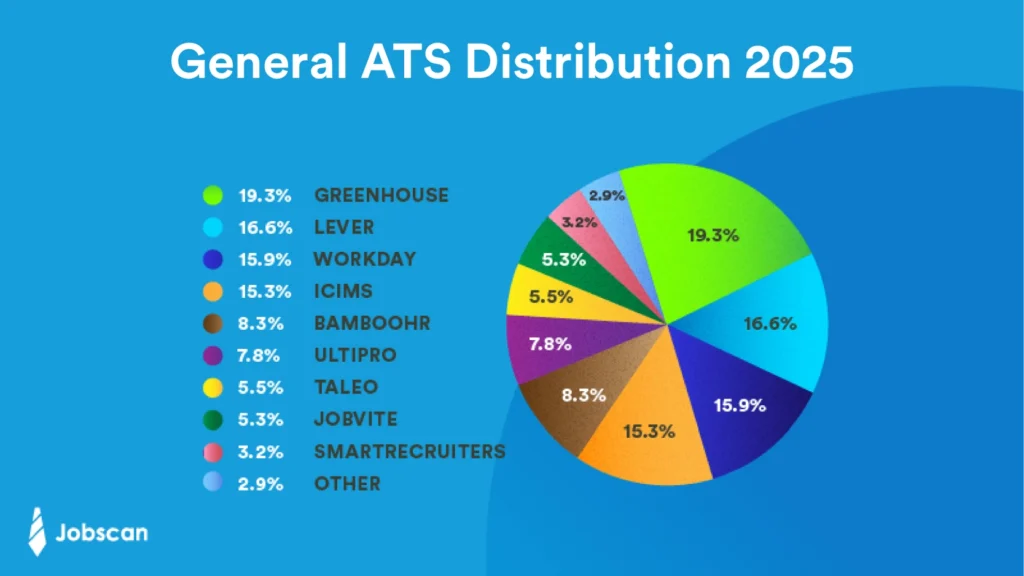
Of the 98% of companies who use a detectable ATS, here’s which ones they use:
- 19.3% use Greenhouse
- 16.6% use Lever
- 15.9% use Workday
- 15.3% use iCIMS
- 8.3% use BambooHR
- 7.8% use UltiPro
- 5.5% use Taleo
- 5.3% use Jobvite
- 3.2% use SmartRecruiters
- 2.9% use another ATS
Each platform works a little differently, but most follow the same basic process:
1: Recruiters enter the job description and details about the job opening into the ATS.
2: The ATS parses incoming resumes, sometimes ranking candidates, and stores the resumes in a searchable database.
3: Recruiters can choose from the ranked candidates. They can also search the database for strong candidates using resume keywords and skills.
A well-optimized resume helps you show up in searches and gives you a much better shot at landing an interview.
Read more: Jobscan’s ATS Toolkit
How does ATS impact your job search in 2026?
A predominant shift in ATS in 2026 is the integration with AI features to speed up the recruiting process, manage larger volumes of applicants, and improve candidate experience.
Specifically, AI aims to support recruiters by:
- Anonymizing resume content to reduce bias.
- More effectively parse resumes to improve keyword searches for qualified candidates.
- Automate communications to keep candidates aware of their place in the hiring workflow, whether that’s a rejection email instead of ghosting, or interview feedback follow-ups.
The foundational rules of ATS optimization still apply. Your resume has to be readable by the machine, and then it has to impress the human recruiter.
Why do you need an ATS-friendly resume?
Almost all companies use applicant tracking systems (ATS) to sort and filter resumes.
Recruiters search through the ATS database for suitable candidates by typing keywords into the ATS search bar. Resumes with those keywords then appear to the recruiter.
Not every recruiter uses the ATS in this way, but the vast majority do.
In fact, according to Jobscan’s State of the Job Search 2025 report, 99.7% of recruiters use keyword filters in their ATS to sort and prioritize applicants.
So which keywords do recruiters look for the most?
- 76.4% filter by skills
- 59.7% by education
- 55.3% by job title
- 50.6% by certifications or licenses
- 44.3% by years of experience
- 43.4% by location
If your resume doesn’t include the right keywords, it may never show up in a recruiter’s search—no matter how qualified you are.
That’s why creating an ATS-friendly resume isn’t just a nice-to-have in today’s job market. It’s essential.

Read more: Sick of Re-Entering Your Info After Uploading Your Resume? Here’s Why Companies Do It
What are common features of ATS resumes?
Your resume is a data entry in an ATS, so the primary goal for an ATS-friendly resume is clarity and simplicity.
-
Use a clean, single-column format. Avoid multi-column layouts, tables, and text boxes, as the ATS can scramble the information.
-
Stick to universally recognized, web-safe fonts like Arial, Calibri, Garamond, Georgia, or Times New Roman.
-
Use a font size between 10 and 12 points for the body text and 14-16 points for headings.
-
Don’t put critical information (like your name, email, or phone number) in the document’s header or footer.
-
Use clear, traditional titles for each section.
-
Use standard solid or open circles or squares. Avoid custom symbols, checkmarks, or arrows.
-
Unless the job posting specifies a specific file format, submit your resume as a .docx file or a text-based PDF (with a professional file name).
How does an ATS read your resume?
When you submit your resume to a job posting, the ATS parses the document and turns your document into searchable data for the recruiter. Once the hiring teams move onto the resume review stage, they’ll start searching their database for candidates.
An ATS-friendly resume needs to be readable by the ATS so it can extract the data properly. And it also needs to be rich in keywords to enable recruiters to find you more easily.
Step-by-step guide to creating an ATS-friendly resume
Creating an ATS-friendly resume doesn’t have to be complicated.
I’ve broken it down into five easy steps. Each step plays a key role in helping your resume get noticed. Skip one, and you could miss your shot at an interview.
Step 1. Do I need to use the job title from the job description on my resume?
Jobscan analyzed over 2.5 million resumes and found that those with the exact job title from the job posting in them were 10.6 times more likely to get an interview.
First, find the job title at the very top of the job description. For example, if the job title is “Solar Sales Representative,” add that job title to your resume headline.
Your resume headline appears at the top of your resume and is a short statement that highlights what makes you a strong candidate.
Here’s an example of a resume headline with the job title “Solar Sales Representative” in it:
“Solar Sales Representative with 5 years of experience closing deals and generating leads.”
The job title is the first, most eye-catching keyword, so make sure it appears right at the top of your resume.
You can also add the job title to your resume summary. This is a brief paragraph that gives an overview of your experience and qualifications.
The best way to make sure every resume you send out contains the exact job title is by using Jobscan’s resume scanner. Here’s how to use it:
-
Paste in your resume.
-
Paste in the job description.
-
Click “Scan.”
You’ll then receive a detailed Match Report showing exactly which keywords to add and what mistakes you might be making, including whether you forgot to include the job title.

PRO TIP: If you’re a recent grad or changing careers, you can still work the job title into your resume by using phrases like “Aspiring [Job Title]” or “Transitioning to [Job Title]”. This shows alignment while being truthful.
Step 2. Do I have to identify relevant keywords and integrated them into my resume?
Jobscan’s State of the Job Search Report reveals that 76.4% of recruiters search for specific hard and soft skills. These skills, or keywords, can be found in the job description.
Below is an example of a job description with important hard skills underlined in red.
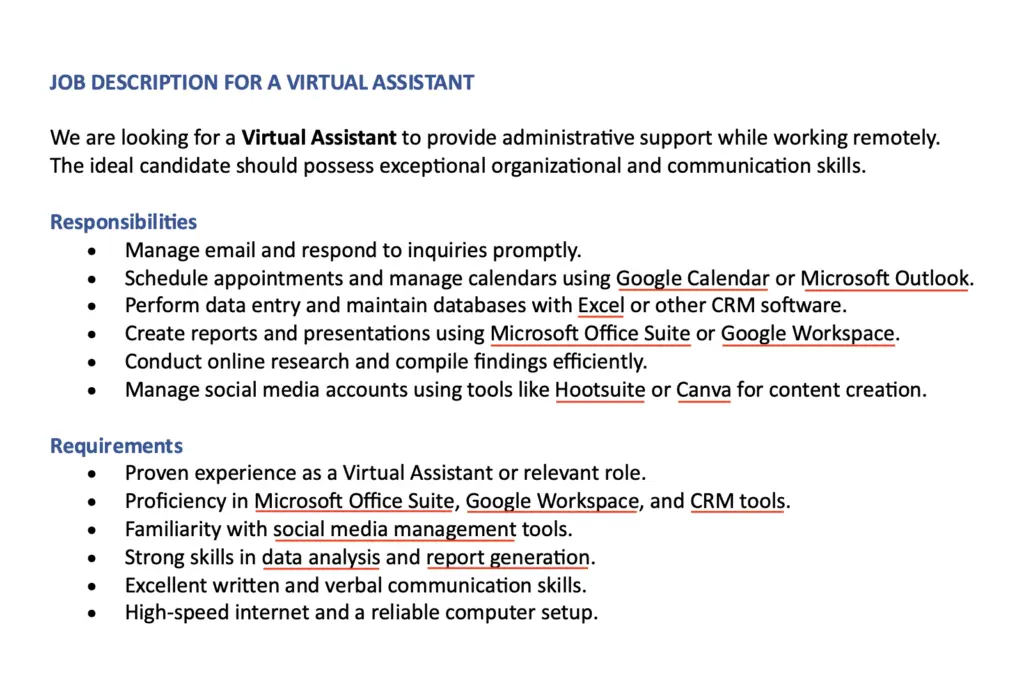
If you were applying for this job, you would want to work keywords like “Google Calendar,” “Microsoft Outlook,” “Hootsuite,” “Canva,” and others into your resume.
Employers don’t expect you to have every skill listed, so don’t resort to keyword stuffing your resume.
Using the right keywords helps your resume show up in searches and signals that you’re a strong match for the role.
Is there an online tool to find the right resume keywords?
Jobscan’s resume scanner shows you exactly which keywords to include based on the job description.
Just paste in your resume and the job listing. You’ll get a personalized Match Report and Match Rate that highlights missing keywords and gives your resume a score based on how well it matches the job.
Here’s what the skills section of the match report looks like:
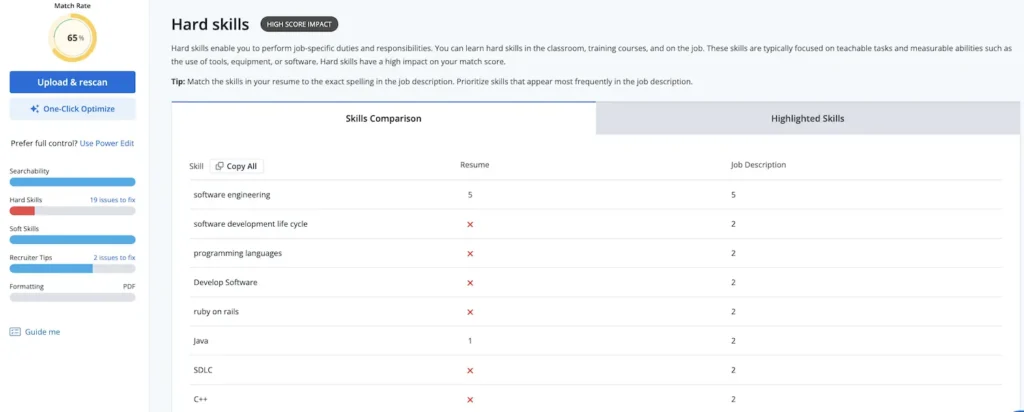
The red Xs show which keywords are missing from your resume. Adding these keywords can boost your resume score and increase your chances of getting an interview.
But don’t overdo it. Use keywords naturally throughout your resume.
If a hiring manager sees too many crammed-in keywords, it can feel like you’re trying to game the system. It also makes your resume harder to read and understand.
Step 3. Do I need to use the exact keywords as they appear in the job description?
It’s important to use keywords exactly as they appear in the job description.
For example, a job description might ask for “leadership experience.” Try to include the exact keyword phrase “leadership experience” on your resume. Don’t simply list your leadership roles.
Also be sure to include both long-form versions of keywords and acronym versions.
- “Proficient in Enterprise Resource Planning (ERP) systems.”
- “Proficient in ERP systems.”
- “Proficient in Enterprise Resource Planning systems.”
Include both versions because recruiters might search for either the acronym or the full term. It would be a shame to have that skill and not get recognized for it.
Note: Some ATS are sensitive to verb tense and plurals. Use Jobscan’s ATS Tip feature and paste the job posting URL when you use the scanner and it will detect the ATS and provide more specific advice.
Step 4. Do I need to use an ATS-friendly resume template?
When it comes to formatting your resume for an ATS, chronological and hybrid formats are your best options.
A chronological resume lists your work experience in reverse order, starting with your most recent job.
A hybrid resume combines a skills section at the top with a chronological work history below.
I don’t recommend using a functional resume. This format focuses entirely on skills and leaves out detailed work history or dates. Because of this, most ATS struggle to read it properly.
Jobscan’s free ATS-friendly templates are designed to work with applicant tracking systems and built to be easy for recruiters to read.
Step 5. Is my resume easy to scan for the ATS and human recruiters?
Once your resume has the right keywords and format, don’t forget the little things. Clean, professional formatting helps both the ATS and recruiters read your resume quickly and clearly.
Here’s a quick checklist to make sure your resume looks the part:
- Use simple, clear language throughout your resume.
- Stick to common fonts like Garamond, Calibri, Arial, Helvetica, or Georgia.
- Use 11–12 pt for body text and 14–16 pt for section headers.
- Set your resume margins to about 1 inch on all sides.
- Stick to standard bullet point styles.
- Format dates consistently: either MM/YYYY or Month, Year. (e.g., March, 2022).
- Save your resume as a Word doc or PDF so ATS can read it without issues.
All of this might sound like a lot to check, but you don’t have to do it alone.
Jobscan’s resume scanner flags formatting mistakes and other errors that could keep your resume from being read by an ATS. It takes just a few seconds and can save you from getting overlooked for simple mistakes.
Here’s a section of the match report:
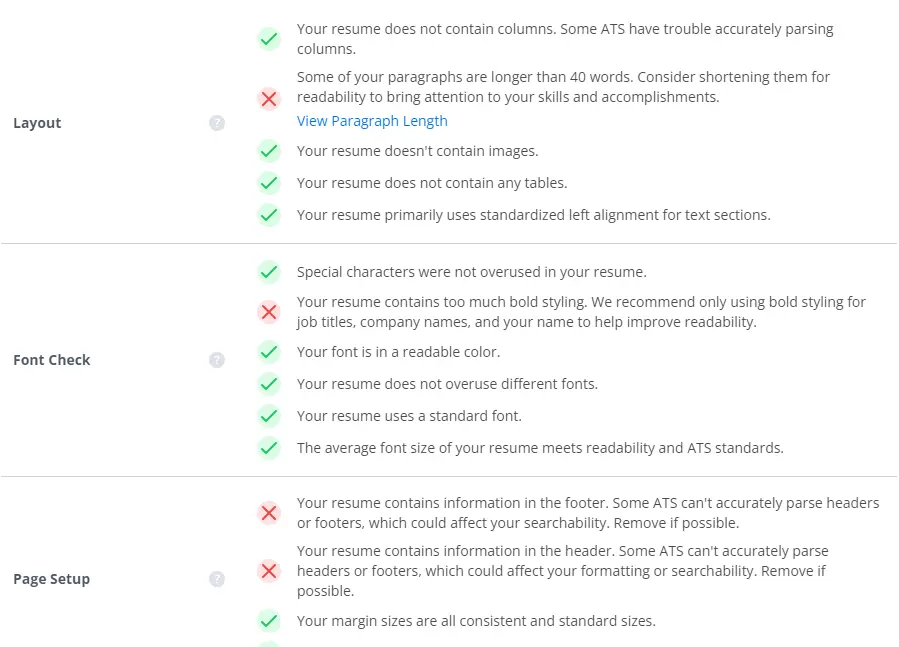
Try Jobscan’s resume scanner for free to get tips on how to improve your formatting, keyword use, and overall match rate.
Read more: How an HR Professional and Her Husband Found New Jobs Using Jobscan
What are common mistakes to avoid when creating an ATS-friendly resume?
No matter which ATS the company you’re applying to uses, these are some universal ATS formatting mistakes to avoid.
- Using non-standard bullet styles.
- Adding graphs, tables. or columns.
- Formatting dates inconsistently: mixing MM/YYYY or Month, Year. (e.g., March, 2022).
- Saving your resume as an image or non-PDF or .docx files.
Further reading:
FAQs
Jobscan’s resume scanner can ensure your resume is ATS-friendly by flagging formatting errors. By fixing these errors, you can feel confident your resume will be readable for the ATS.
There’s no one-size-fits-all approach to keyword optimization. You must identify keywords specifically from the job description you are applying to. Look for hard skills, specific software or tools, certifications, and industry terminology found in the “Requirements” or “Qualifications” sections of the job post.
Yes, strictly avoid them. Most ATS software cannot “read” information contained within images, graphics, skill bars, or charts. Any text inside these elements will be scrambled or ignored, resulting in recruiters not finding your resume in their ATS searches.
An ATS-friendly resume is formatted in a way that makes it easy for an ATS to read and understand it. It also includes keywords and phrases that are relevant to the specific job opening. If you write your resume with ATS software in mind, it will have a much better chance of making it into the hands of a hiring manager.
Strip away complex formatting. To convert your resume to an ATS-friendly format, use a clean, straightforward format. Avoid images and graphics. Tailor your resume to each job application by incorporating keywords and phrases from the job description, ensuring they match your skills and experience.
Proceed with caution. Many resume builders focus on aesthetics over function and may use code, tables, or columns that confuse an ATS. Only use builders that explicitly offer ATS-compliant templates like Jobscan.