




Jobscan surveyed 442 job seekers to learn about their challenges. We found that 44% of them had no interviews in the past month. It’s time to change that by creating a standout chronological resume.
As a job seeker, grabbing a recruiter’s attention quickly is your top priority. This resume format highlights your work history and achievements. It starts with your latest experience.
This guide shows you how to make a chronological resume that stands out to recruiters. You can use our free chronological resume templates. Check out examples for different jobs to help you.

What is a chronological resume format?
The chronological resume, or reverse chronological resume, highlights your work experience. It starts with your latest job.
This resume format is popular. It quickly shows recruiters your career growth. It also highlights how your skills and competencies have improved over time.
It works well for candidates with steady jobs. This helps employers spot patterns of growth, promotions, and specialization easily. Most applicant tracking systems (ATS) work best with this format. So, it’s great for online job applications.
Here is an example of what a chronological resume looks like:

When do you use the chronological resume format?
Use the chronological resume format when:
- You have a steady career trajectory.
- Your have recent work experience that is relevant to the position you are applying for.
- You are applying for a role in traditional industries such as finance or marketing.
- You have minimal employment gaps.
You can check out the best resume formats in this article.
7 steps to writing a chronological resume
Building your chronological resume is straightforward. Here’s how you do it:
Step 1. Start with your contact information
Update your contact info. It needs to be error-free. This way, recruiters and hiring managers can reach you easily. Here’s a quick guide:
- Use your full name exactly as it appears on professional documents.
- Include your contact number. Don’t use your work number unless you’re applying internally.
- Add your professional email address.
- Include your location. Just list your city and state.
- Add your LinkedIn URL or a link to your portfolio
Here is an example:

Step 2. Write a strong resume summary
Your resume summary is your elevator pitch to recruiters and hiring managers. At a glance, your summary shows what you bring to the table and whether you’re fit for the role.
When writing your resume summary, try to:
- Keep it short, around 3-4 sentences long.
- Focus on your years of experience, key skills, and major accomplishments.
- Tailor it to the job you are applying for.
“Highly motivated and detail-oriented professional with over a decade of experience in bilingual customer management, technical service coordination, and quality assurance. Adept at optimizing workflows, improving operational efficiency, and cultivating strong vendor and client relationships. Demonstrated success in implementing cost-reduction strategies, refining processes, and ensuring exceptional customer satisfaction across multiple industries.”
Jobscan’s resume summary generator helps you quickly create a personalized summary in seconds. It gives your resume the standout introduction it might need to grab a recruiter’s attention.
Step 3. Outline your work experience in reverse chronological order
List your jobs starting with the most recent one. This helps recruiters spot your career growth, progress, and achievements over time.
Recruiters focus on your latest job. It’s key in deciding if they will read more of your resume or skip to another candidate.
Here’s how you write your work experience section in your chronological resume:
- Start with your current or most recent job.
- Write your job title, company name, location, and dates of employment.
- Describe your quantifiable achievements and the impact you made while in that role. You can put these in 3-5 bullet points.
- Start with strong action words like “optimized,” “improved,” or “increased.”
- Tailor your resume work experience section to the specific job you are applying for.
Here’s an example:

Step 4. Include your education
Your education section shows recruiters your qualifications, competencies, and expertise.
Here’s a guide on writing your education section:
- Write the full title of your degree or program.
- Include the name of your school or university.
- Mention the period you attended.
- Include your GPA if it’s strong (if it’s 3.5 or higher.)
- List your honors, academic achievements, or awards if applicable and relevant.
- If you studied a minor, you can also include it.
Here’s an example of what an education section of a recent graduate might look like:

You can check our full guide on formatting your resume education section in this article.
Step 5. Add your key skills
Your skills section is also an important part of your chronological resume. This gives recruiters and hiring managers a rundown of your top hard skills and soft skills.
Here’s what to remember when writing your key resume skills:
- Check the job description to indentify skills recruiters are looking for.
- Choose 6 to 10 skills that match those in the job description and directly relate to the specific job you are applying for.
- Don’t list generic skills unless specifically mentioned in the job description.
It is also worth noting that when you submit your application, it usually goes into an applicant tracking system (ATS). This is a type of software most companies use to streamline their hiring process.
Recruiters use the ATS to search for specific keywords like hard and soft skills to look for top candidates. Only job applications that contain those keywords will show up in the search results.
Step 6. Add optional resume sections
There are also other optional resume sections you can include to help you stand out. But, only add them if they’re relevant to the specific job you want.
Here are some optional sections:
- Volunteer experience
This shows that you are proactive and willing to contribute to make a difference. Specify the role you played, the name of the organization, dates you served, and the measurable accomplishments, and key skills you used. - Certifications
Certifications validate your expertise, knowledge, and skills in a specific area. They demonstrate to recruiters and hiring managers that you meet industry standards. They also show your commitment to ongoing learning. - Honors and awards
In a competitive job market, your honors and awards can set you apart from other candidates. These show that your work and excellence have been recognized and valued by others, whether in academics or in your field.
Step 7. Tailor your resume to the job you are applying for
Tailoring your resume for each job shows recruiters and employers that you care. It proves you’re a good match for the position. This increases your chances of getting noticed and landing interviews.
Here’s how you tailor your resume:
- Review the job description closely. Find the skills and qualifications needed for the role.
- Tailor your resume sections to fit the job. This shows recruiters you’re the top candidate for the role.
- Focus on proving your skills and expertise by adding relevant and measurable accomplishments.
- Incorporate keywords found in the job description into your resume if applicable.
- Make sure to proofread your resume.
Build your chronological resume for free with Jobscan
To make it easier and faster to create your chronological resume, use Jobscan’s resume builder. You can build, edit, and download as many resumes as you need all for free with no hidden costs.
All you have to do is:
- Upload your resume, import your LinkedIn profile, or create from scratch.
- Enter your job title.
- Choose skills from our suggested skills list.
- Pick from 5 ATS-friendly resume templates.
- Add your contact information, work history, education, skills, and certifications.
- Download your resume as a PDF.

Chronological resume template
Here is a ready-to-go template for a chronological resume to help you create yours. You can just copy the format below and edit it to showcase what you bring to the table.
[Your Full Name]
[Your Name] [Your Email] | [Your Phone] | [LinkedIn or Portfolio]
Resume Summary
Write 2–3 sentences summarizing your career, highlighting key skills and achievements.
Example:
“Customer service pro with over 10 years in client relations. I boost satisfaction scores and streamline processes to improve efficiency.”
Work Experience
(List your jobs in reverse chronological order. This means you start with the most recent work experience.)
[Job Title]
[Company Name], [City, State]
[Start Date] – [End Date or Present]
- Focus on measurable results (e.g., “Increased sales by 20%” or “Reduced operational costs by 25%”).
[Previous Job Title]
[Previous Company Name], [City, State]
[Start Date] – [End Date]
- Use action verbs to start each bullet point.
- Highlight skills or achievements relevant to the job you’re applying for.
Education
(Include your highest level of education first.)
[Degree or Certification]
[School Name], [City, State]
[Graduation Year]
Skills
(List your relevant technical, hard, and soft skills.)
- Skill 1
- Skill 2
- Skill 3
Optional Sections (Include if applicable and relevant to the job)
- Certifications: List relevant certifications (e.g., “Certified Project Manager, 2022”).
- Volunteer Experience: Include organization names, roles, and achievements.
- Awards: Mention honors or recognition related to your career.

Chronological resume examples for different jobs
Here are 15 resume samples. They can help you create a standout chronological resume for different jobs.
You can also check our comprehensive library of resume examples to guide you.
1. Chronological resume for recent data science graduate
If you have little work experience, follow these tips to build your chronological resume:
- Start with your most recent experience. This can be through internships or leadership roles in organizations or clubs. Use reverse chronological order to list them.
- Focus on your education. Put your education section at the top as a recent graduate. Highlight relevant coursework, honors, and your GPA if it’s 3.5 or above.
- Highlight transferable skills. Highlight the skills and abilities you gained from internships, part-time jobs, or volunteer work. Focus on those that relate directly to the job you’re applying for.
- Quantify your achievements. Use strong action verbs like “optimized,” “organized,” or “led” to showcase your main achievements in each role.
- Keep it organized and consistent. Use reverse chronological order in your resume. This makes it clear, easy to read, and well-structured.
Here is an example of a resume for a recent data science graduate using the chronological resume format:

2. Registered nurse chronological resume
When building your chronological resume, here are three tips:
- Focus on your recent clinical roles first. Recruiters want to see your hands-on experience.
- Highlight your nursing license or any relevant certifications that demonstrate your credibility.
- In your work experience section, include specific and measurable achievements.
Here is an example:

Read more: Registered Nurse Resume Examples, Skills, and Keywords
3. Software developer chronological resume
To write a software developer resume in reverse chronological format, follow these steps:
- List your most recent roles first.
- Focus on key projects and technologies. It shows recruiters your current technical skills. They can see if these skills match the job requirements.
- Feature in-demand skills like Java or Python to validate your expertise.
Here’s a sample chronological resume for a software developer:

Read more: Software Developer Resume Examples for 2024
4. Retail sales associate chronological resume
For a role in sales, you need to:
- Highlight your most recent roles. Show how you assisted customers or upsold products.
- Show your sales achievements.
- Mention your years of work experience.
- Include measurable results as these demonstrate your ability to drive sales.
Here’s an example of a chronological resume for a sales associate:

Read more: Sales Associate Resume Examples, Skills, and Keywords
5. Customer service representative chronological resume
For a role in customer service, you should:
- Share your recent experiences with customer questions, handling complaints, and improving customer satisfaction.
- Focus on customer service skills and other soft skills such as problem-solving, communication skills, and leadership.
- Show clear results to convince recruiters of your past effectiveness and success.
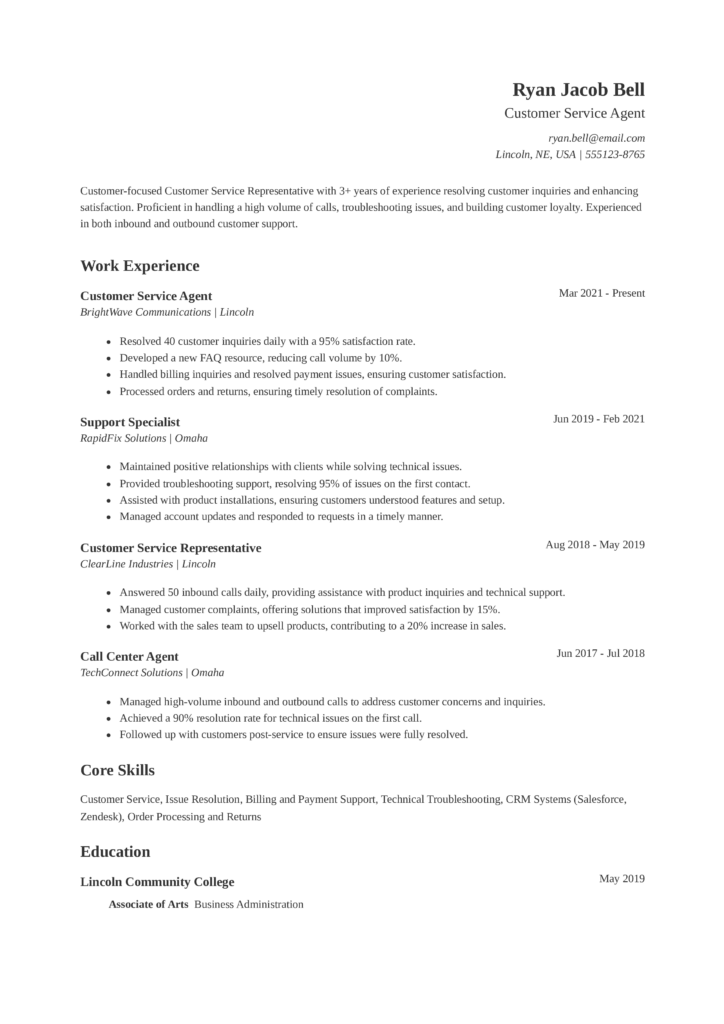
Here’s an example of a chronological resume for a customer service representative:
Read more: Customer Service Resume Examples for 2024
6. Teacher chronological resume
When starting a reverse chronological resume for a teaching position, it’s important to:
- Highlight key teacher skills in your work history section. These include creating effective lesson plans, assessing student progress, and offering support.
- Mention your teaching experience.
- Demonstrate how you’ve fostered learning and helped your students.
Here’s an example:

Read more: Education Resume Examples, Skills, and Keywords
7. Accountant chronological resume
If you are applying for an accounting role, you need to:
- Showcase your skills in preparing and analyzing financial reports. Focus on managing records and ensuring compliance with financial rules.
- List your credentials to prove that you are qualified for the profession. You can call yourself a Certified Public Accountant or a Certified Management Accountant.
- Tailor your resume to match the technical skills and certifications required for the job.
Here’s an example:

Read more: Accounting Resume Examples, Skills and Keywords
8. Administrative assistant chronological resume
When writing a reverse chronological resume format for an administrative assistant role, you need to:
- Focus on your skills in organizing, scheduling, and communication.
- Outline your competencies with office software, data entry, and managing tasks.
- Show how you improved efficiency and provided strong admin support in your previous jobs.
Here’s a chronological resume sample for an administrative assistant.

Read more: Administrative Resume Examples, Skills, and Keywords
9. Construction manager chronological resume
With a chronological resume for a role in construction, you need to:
- Focus on your practical experience with construction tasks, safety protocols, and equipment use.
- Include relevant certifications to show your qualifications and expertise.
- List measurable accomplishments in your resume to establish your credibility.
Here’s an example:

Read more: Construction Project Manager Resume Examples, Skills, and Keywords
10. Creative marketing professional chronological resume
For a role in creative marketing, you need to:
- Highlight your experience with content creation and brand strategy.
- Include any relevant certifications or courses to demonstrate your proficiency.
- Add a link to your portfolio and successful projects.
- Mention measurable accomplishments in your resume work experience section.
Here’s an example:

Read more: Digital Marketing Resume Examples, Skills and Keywords
Are there any downsides to a chronological resume?
The chronological resume is popular with recruiters, but it isn’t right for everyone. One big downside is that it can show gaps in employment, frequent job changes, or a lack of recent experience. This format puts your latest job first, highlighting your work timeline.
So, any gaps or inconsistencies in your history will stand out more.
It can also be limiting for career changers or those re-entering the workforce after a long break. If your recent experience doesn’t fit the role, use a chronological format. It can highlight your transferable skills. A functional or combination resume format can better highlight your qualifications.
This approach doesn’t depend on a traditional job timeline.
Who should not use a chronological resume?
A chronological resume suits those with steady careers. But, it might not work for everyone. If you have big gaps in your work history or many short jobs, this format might raise questions. Changing fields can also cause confusion. Focusing too much on dates and job titles can hide your skills and achievements.
If your recent roles don’t match your target job, this may be especially true.
New graduates and those with little work experience may feel stuck with the chronological format. In these cases, a functional or combination resume works better. If your experience isn’t clear to hiring managers, try a different format. It might help you reach your job search goals better.
Other resume formats: combination and functional resume
There are two other resume formats aside from the chronological resume format. These are functional or skills format and combination resume format.

Functional resume
The functional resume format (or skills format) focuses on your skills and abilities. In this format, your work experience is outlined near the bottom of your resume with minimal detail. This can be used if you have employment gaps or if your skills speak louder than your experience. However, recruiters don’t always like this format as it’s hard to get a full picture of your career. Additionally, this format is not always ATS-friendly.
Here’s an example:

Combination resume
The combination resume format (or hybrid resume) combines the chronological format and functional format. This resume format shows a summary of your key skills and a reverse chronological list of your work experience.
Here’s what it looks like:

Do’s and don’ts when writing your chronological resume
Here are some do’s and don’ts to keep in mind when starting your resume:
- Add your updated and correct contact information.
- Start with a compelling resume summary that shows your skills and expertise.
- List your work experience in reverse chronological order. This means you start with your most recent job.
- Include measurable accomplishments and use strong action words when describing your achievements.
- Add your key skills relevant to the job you want.
- Tailor your chronological resume to the specific job you are applying for.
- Keep your formatting consistent.
- Proofread your resume for grammar and spelling errors before you submit.
- Update your chronological resume regularly.
- Use outdated contact information.
- Include irrelevant job experience that don’t relate directly to the job you are applying for.
- Use long and wordy paragraphs.
- Use an unprofessional email address.
- Use fancy fonts and complex formatting.
- List personal information like your marital status or social security number.
- Exaggerate or lie.
Key takeaways
Here are some key pointers to remember:
- The chronological resume format shows your work experience, beginning with your latest job.
- This format is a good choice for those with a stable and steady career trajectory.
- To make a strong chronological resume, customize each section for the job you want. Study the job description closely. Note the specific skills and qualifications needed for the role. Next, add those skills to your resume. This will help you catch recruiters’ attention.
- When you write your work experience section, add measurable achievements. This helps show your skills and credibility.
- You can make a great chronological resume with free tools like Jobscan’s resume builder.
FAQs
You can list down your key skills in a separate section. Highlight hard skills that relate directly to the job you want.
The chronological resume format is great for people with steady work history in their field. It is also a good choice for those who have no significant employment gaps.
To create an ATS-friendly chronological resume, include the right keywords and skills for the job. You also need to make sure your formatting is clear and simple so that the ATS can parse it correctly. You can use free online tools like Jobscan’s resume builder to make sure your resume is compatible with the ATS.
Study the job description closely. Find the key hard and soft skills needed. Try to match your skills section with those that are mentioned in the job description.
The chronological resume format is not ideal for job seekers with employment gaps and frequent job changes. It is also not recommended for those with limited work experience.
In a chronological resume, list your job experiences starting with the most recent.