



How to write a resume: Your resume must be sharp, focused, and optimized using keywords and formatting that satisfy both the ATS software and the human reader.
Follow these 6 essential steps to writing an ATS-friendly resume:
-
-
Your Contact Information: Include your Name, Phone, Email, Location (City, State, Zip), and LinkedIn URL. Use a professional email.
-
Your Resume Headline: A short, punchy line. Crucially, include the exact job title from the job description to match ATS search criteria.
-
Your Resume Summary: A brief, focused “elevator pitch” highlighting top qualifications, achievements, and relevant skills. Avoid personal pronouns (I, me, my).
-
Your Skills Section: List 10 to 20 key hard and soft skills. Use the exact wording found in the job description to improve ATS matching.
-
Your Work Experience: List jobs in reverse-chronological order, focusing on the last 10-15 years. Use strong action verbs and measurable accomplishments (e.g., “Increased sales by 20%”), not just responsibilities.
-
Your Education: Include the degree, institution name, and graduation date (optional if you prefer not to reveal your age). Place this section after your work experience.
-
Want to land more interviews? It starts with knowing how to write a resume that works.
Most recruiters spend about seven seconds deciding whether to keep reading or move on.
So your resume has to be sharp, focused, and optimized for both humans and applicant tracking systems (ATS).
In this article, I’ll show you exactly how to do it, step by step.

How to write a resume from scratch in 6 steps
Starting from scratch? Don’t worry, I’ll walk you through each resume section, one step at a time. By the end, you’ll have a clean, professional resume ready to go.
Step 1. What is the right resume format?
There is no one-size-fits-all resume format. Although every resume should include the six sections listed above, they can appear in different orders depending on your experience level, career goals, or job seeker status.
There are three different types of formats to choose—chronological, functional, and hybrid. Let’s take a deeper look at each one.
What is a chronological resume format?
The chronological resume format lists your work history in reverse chronological order, with your most recent jobs listed first.
Your skills and education should come after your work history in this format.
This is the most traditional resume format, especially for job seekers with lots of relevant experience.
- Have a strong work history.
- Are staying in the same field.
- Want to highlight career progression.
What is a functional resume format?
In the functional resume format, your skills and education should be emphasized over your work history.
This resume format focuses on your skills rather than your work history. It helps you downplay your lack of experience in a particular field.
- Are changing careers.
- Have gaps in employment.
- Are new to the workforce.
Generally speaking, I don’t recommend the functional resume format.
Recruiters want to see some kind of work history. Instead of the functional format, try the next resume format—the hybrid.
What is a hybrid resume format?
A hybrid resume is a combination of the chronological resume and the functional resume.
This is why it’s sometimes called a combination resume. It showcases both your work history and your skills.
In this format, your skills come before your work history. But your work history is still the heart of your resume, just like in the chronological format.
- Have lots of skills.
- Have employment gaps.
- Are climbing the career ladder.
- Are changing roles within the same industry.
If you have employment gaps, a hybrid resume is a great way to keep the focus on your skills and achievements rather than specific dates.
At the same time, it maintains a clear work history, making it easy for hiring managers to follow your career progression.
I like the hybrid resume because it offers the best of both worlds, combining the strengths of the chronological and the functional resume formats.

No matter which resume format you choose, having a well-structured template can make the writing process much easier.
You can find free templates in Jobscan’s resume builder.
Each template is fully optimized for applicant tracking systems (ATS), ensuring your resume is formatted correctly and has the best chance of getting noticed by employers.
You can also build a resume using free Google Docs templates or Microsoft Word templates. Just choose a format you like, then customize it to fit your experience and career goals.
Step 2. What do you include for the contact information in your resume?
This part goes at the very top of your resume. It might seem simple, but it’s more important than you think. If a hiring manager can’t reach you, you won’t get the interview.
Your contact information should include your:
- Name
- Phone number
- Location (City, State, Zip Code)
- Email Address
- LinkedIn profile URL
You don’t need to include your full home address on your resume. Just your city, state, and zip code are enough to show recruiters where you’re located while keeping your personal information private.
Use the location where you want to work, not necessarily where you live now. According to a Jobscan survey, 43.4% of recruiters filter resumes by location when using an ATS.
Here’s an example of a resume contact information section:
Craig Mason
Washington Heights, NJ | (555) 555-1234 | craigmason@email.co | linkedin.co/craig-mason
Use a professional email address from a modern provider like Gmail. If you’re still using an old Yahoo or AOL account, consider creating a Gmail address just for your job search.
It’s free, easy to set up, and helps you look more up-to-date to employers.
Step 3. Do you need to include a resume headline?
Your resume headline goes right below your contact info. It’s a short, punchy line that sums up who you are and what you bring to the table.
Here’s the key: include the exact job title from the job description, if you can. Recruiters often start by typing that title into the ATS search bar. If it’s not on your resume, you might not show up.
Jobscan analyzed 2.5 million job applications and found that resumes with matching job titles received 10.6 times more interviews than those that did not.
Your headline can also include years of experience, key qualifications, and certifications.
Here’s an example of a resume headline:
Craig Mason
Washington Heights, NJ | (555) 555-1234 | craigmason@email.co | linkedin.co/craig-mason
Highly Trained Practice Administrator | 5+ Years Experience | RHIT Certified
If you’re aspiring to a job title or changing careers, you can still include it in your headline by using phrases like “Aspiring [Job Title]” or “Transitioning to [Job Title].”
Step 4. Do you need a resume summary?
Your resume summary gives recruiters a quick snapshot of why you’re a strong candidate for the job. Think of it as your elevator pitch—a short, focused way to say “Here’s what I bring to the table.”
It should highlight your top qualifications, key achievements, and relevant skills. You’ll place it right under your resume headline, like this:

Never use personal pronouns (e.g., “I,” “me,” “my”) in your resume summary, or anywhere else on your resume.
Here’s a simple formula you can use to write your summary:
[Your Professional Title] with [Years of Experience] years of experience. Proven track record in [Top Achievement 1] and [Top Achievement 2]. Skilled in [Skill 1], [Skill 2], and [Skill 3]. Known for [Unique Value or Strength].
Here’s an example of a resume summary that follows this formula:
“Practice Administrator with 5+ years of experience overseeing healthcare operations and staff management. Proven track record in implementing an expanded EHR system and leading the transition from ICD-9 to ICD-10 coding. Skilled in strategic planning, process optimization, and regulatory compliance. Known for driving efficiency, improving patient care, and maximizing profitability.”
Sometimes job seekers will use a resume objective instead of a summary.
A resume objective is like a summary except it outlines your career goals and what you’re looking for in a job.
Resume objectives are usually used by students with no work experience. Here’s an example:
“Motivated marketing graduate seeking an entry-level role to apply my skills in digital strategy, content creation, and data analysis. Eager to contribute fresh ideas and strong problem-solving skills to a dynamic marketing team.”
While resume objectives were once common, they’re generally not recommended today because they focus on what you want rather than what you can offer the employer.
If you’re struggling to write your resume summary, try Jobscan’s resume builder.
It features a resume summary generator that writes a compelling introduction in seconds.
Watch this brief video to see the summary generator in action:
Step 5. Do you need a skills section in your resume?
Your skills section helps recruiters and applicant tracking systems (ATS) quickly spot your top qualifications. There are two main types of skills: hard skills and soft skills.
Hard skills are specific, teachable abilities like using software, analyzing data, or speaking another language.
Soft skills are how you work with others—things like communication, teamwork, and adaptability.
Read more: Best Resume Skills

You can list your skills in several ways: as bullet points in columns, as a single list, or by using vertical lines to separate each skill (Python | Excel | Data Analysis).
Try to include 10 to 20 key skills in this section.
Here’s an example:
Skills & Competencies
Technical Aptitude • Training and Mentoring • Hiring and Recruiting • Medical and Business Administration • Healthcare Regulations Compliance and EMRs • Relationship Building and Team Development • Customer Service and Client Relations • Communication, Management, and Leadership • Analytical Thinking and Strategic Planning • Lifelong Learning and Professional Development
Employers often use different terms for the same skill in job postings. To increase your chances of getting noticed, use the same wording that appears in the job description.
Step 6. What do you need to include in your resume work experience?
Now it’s time for the most important part of your resume—the work experience section.
This is where employers will spend the most time when reviewing your application.
Why does it matter so much? Because it backs up everything you’ve said in your headline, summary, and skills section with real-world proof.
How many jobs should you list on your resume?
Stick to the most recent 10–15 years of relevant experience. This usually works out to 3 to 6 jobs.
The key is to focus on roles that best support your current career goals.
List your jobs in reverse-chronological order, starting with the most recent, and include the following details:
- Company name and location
- Job title
- Start and end dates
- Achievements and responsibilities
What is the right date format for your resume?
Dates might seem like a small detail, but they matter, especially when it comes to applicant tracking systems (ATS).
According to Jobscan data, 99.7% of recruiters use an ATS to filter candidates. If your dates are formatted inconsistently, the system might not read your resume correctly.
To stay ATS-friendly, use a standard date format like:
- Jan 2021 – Mar 2023
- January 2021 – March 2023
- 01/2021 – 03/2023
Whatever format you choose, just make sure it’s consistent throughout your resume.
Jobscan’s resume scanner performs checks for formatting and will flag any errors or inconsistencies in your date structure. Along with additional checks for content and keywords, the generated match report provides recruiter tips on how to improve your resume to land an interview invitation.
Should you focus on resume accomplishments or responsibilities?
One of the biggest work experience section mistakes is only listing job responsibilities. These describe what you were expected to do, but not how well you did it.
Responsibilities give employers a general idea of your role, but they don’t show the impact you made.
That’s why it’s so important to highlight accomplishments. Use numbers when you can. For example: “Increased sales by 20%.”
Here’s an example of a work experience section with measurable accomplishments:
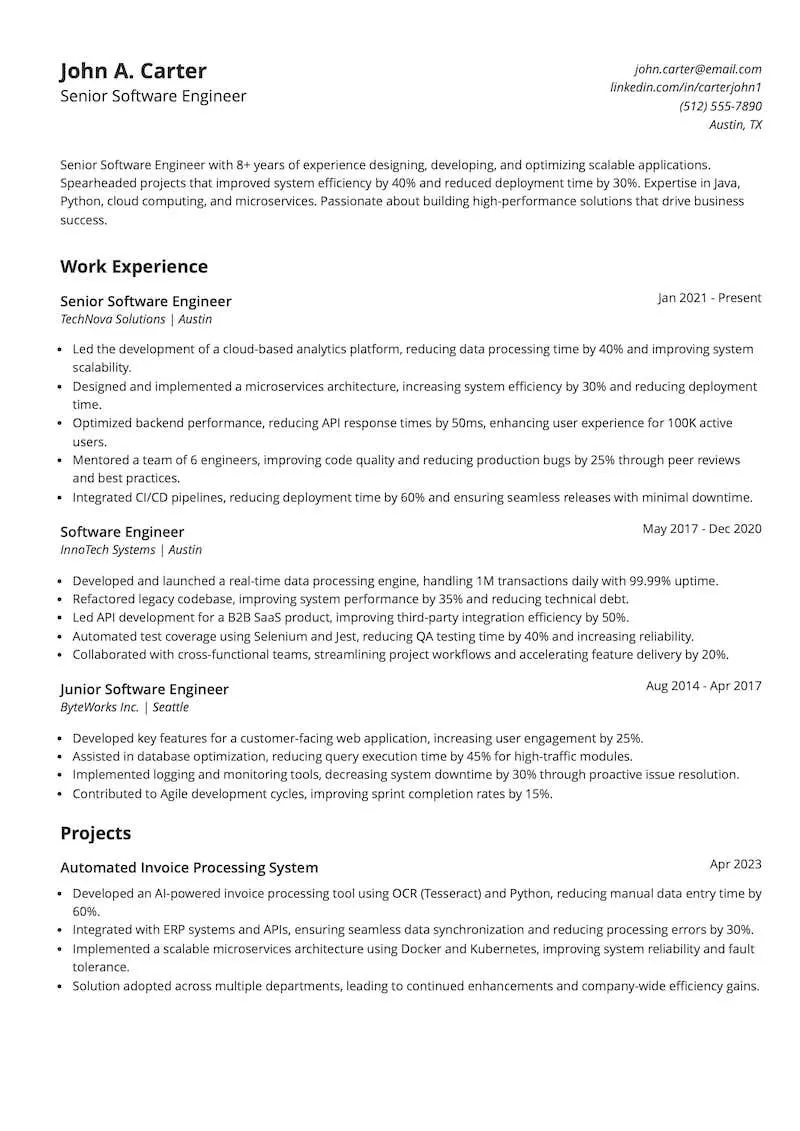
Make your accomplishments stand out more by providing context.
Instead of just saying “Increased sales by 20%,” explain the situation, what you did, and the impact:
“Revamped the company’s email marketing strategy, launched targeted campaigns using customer segmentation, and increased sales by 20% in six months.”
Step 7. What should you include in your resume’s education section?
Your education section should come right after your work experience. If you’re applying for a role that requires advanced education—like in medicine, law, or academia—you’ll want to include more detail.
For most jobs, though, you just need to include the basics:
- Name of the degree/certification
- Institution name
- Location (optional)
- Graduation date
If you’re an older job seeker and don’t want to reveal your age, leave out your graduation dates. They’re not required, and employers are more interested in your skills and experience than when you earned your degree.
Keep reading: How to List a Degrees on Your Resume
Here’s an example of an education section on a resume:
EDUCATION
MBA in Healthcare Administration | Grayland University, New York, NY | 2023
BSc in Healthcare Management | Grayland University, New York, NY | 2017
AS in Health Information Management | Teaneck Technical University, New York, NY | 2015
Optional: Should you include honors, awards, and volunteer work on your resume?
Only include honors and awards that are relevant to the job you’re applying for.
If something really stands out, consider placing it in your summary so it doesn’t get overlooked at the bottom of your resume.
Have any volunteer experience? Add it, especially if it’s relevant to the job you’re seeking.

Here’s how to list your volunteer experience:
- The name of the organization.
- The dates of your service.
- A brief description of your duties and responsibilities.
Here’s an example of what this section of your resume should look like:
HONORS & AWARDS
2021 John Doe Leadership Award for exceptional leadership in sales management.
Employee of the Year 2020 at Medical Corporation for outstanding performance and dedication.
VOLUNTEER EXPERIENCE
Friends of the Downtown Theater | New York, NY | 2014–Present
Assists with fundraising events and volunteers as usher and marketing assistant for performing arts productions.
Annual Charitable Fundraisers | New York, NY | 2014–Present
Participates in the American Cancer Society’s 5K Walk/Run, Walk MS, and the Palmetto Half Marathon.
How do you create a resume?
Writing your resume from scratch can be painstaking and leech hours from your day. Jobscan’s resume builder was designed to save you time so you can focus on finding the right jobs, tailoring your resume, and preparing for your influx of interview requests!
You can build your resume from scratch, upload your existing resume, or import from LinkedIn to get started.
As you start building your resume, you’ll be guided through each step to ensure you include everything from work history, skills, education, and certifications, to awards, publications, and projects.
When you’re done building your resume, you can save it as a base resume to your dashboard. This makes it easy to scan against job descriptions. Or you can download your resume straight to your computer.
How do you write a resume with strong action verbs?
Action verbs convey doing, and include words like achieved, designed, and implemented.
The best place to use these words is at the beginning of bullet points on your resume.
Strong action verbs make your resume more engaging, easier to read, and more memorable to hiring managers.
In fact, one study showed that using strong action verbs on your resume can increase your chances of getting an interview by 140%.

Avoid saying “responsible for” on your resume—it’s outdated and vague.
Instead, use strong action verbs that show what you actually did.
- Leadership: Directed, led, mentored, coached, supervised
- Problem-Solving: Resolved, improved, optimized, streamlined, troubleshot
- Communication: Presented, negotiated, wrote, collaborated, advised
- Project Management: Executed, implemented, developed, organized, spearheaded
- Technical Skills: Programmed, engineered, designed, built, automated
How long should your resume be?
The ideal resume length depends on your experience level and career stage, but in most cases, shorter is better.
Generally speaking, try to keep it to 600 words or less.
Recruiters and hiring managers don’t care if your resume is one page or two pages. They just want to see if you have the qualifications to do the job.
Cut unnecessary details like outdated jobs, unrelated experience, or generic soft skills.
Your resume should be laser-focused for the job you’re applying to. This is why tailoring your resume is so important.
How often should I update my resume?
You should aim to update your resume at least once or twice a year, even if you aren’t actively job searching. This keeps your professional story current and makes it easier to apply quickly when opportunities arise.
Immediately update it whenever you complete a major project, receive a promotion, gain a new certification, or acquire a significant new skill, ensuring it always reflects your best accomplishments.
How do you tailor your resume to a specific job position?
Tailoring your resume isn’t optional—it’s essential.
Most companies use applicant tracking systems (ATS) to manage the flood of resumes they receive.
When you apply, your resume goes into an ATS database. Then hiring managers search that database using keywords from the job description.
Jobscan’s 2025 State of the Job Search report reveals that recruiters overwhelmingly rely on filters to find candidates. Skills (76.4%), job title (55.3%), and education (59.7%) are top filtering criteria.
The first step to tailoring your resume is reading the job description carefully. That’s where you’ll find the exact keywords to include.
Yes, customizing your resume takes time. But a tool like Jobscan’s resume scanner can speed things up.
Just paste in your resume and the job description, hit scan, and you’ll get a match report showing how well your resume aligns with the job—and which keywords to add to improve it.
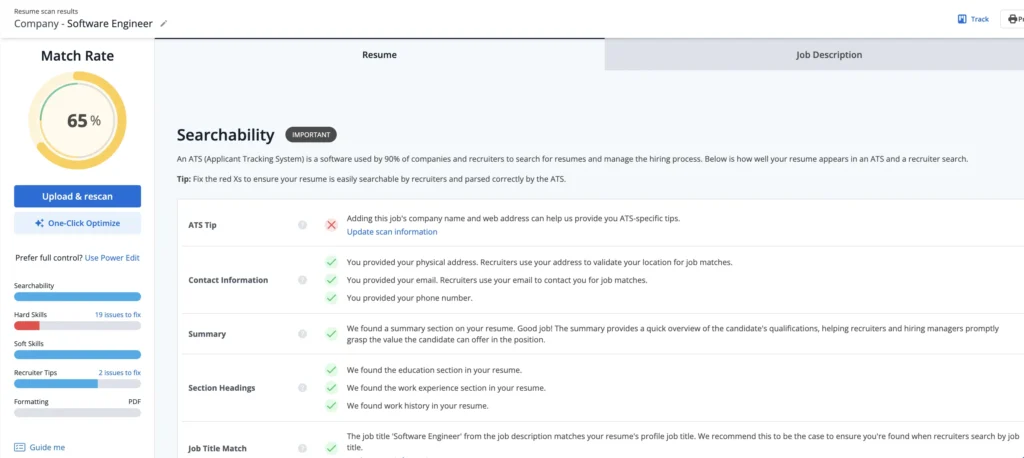
Try the resume scanner for free below:
Keep reading: How to Create and ATS Resume
Should you include references on your resume?
In the past, job seekers often listed references directly on their resumes, but today, that’s no longer necessary.
Hiring managers typically request references later in the hiring process.
Including them upfront takes up valuable space that could be used to highlight your skills and accomplishments.
- Have a separate reference sheet ready with names, job titles, company names, phone numbers, and email addresses.
- Only provide references when a recruiter or hiring manager requests them.
- Let your references know in advance so they can be prepared to speak about your qualifications.
By keeping references off your resume and focusing on your achievements, you’ll create a stronger, more effective document that keeps the hiring manager’s attention where it matters most.
How should you format your resume?
Properly formatting your resume makes it easy for hiring managers to find what they’re looking for.
At the same time, good formatting helps the ATS understand your resume.
Fonts: keep it simple and professional
Stick to clean, easy-to-read resume fonts that look professional and are ATS-friendly.
- Sans-serif fonts: Arial, Calibri, Verdana (modern and easy to read on screens).
- Serif fonts: Georgia (classic and professional).
- Avoid: decorative, script, or heavily stylized fonts.
Color: keep it subtle and professional
A black-and-white resume is always safe, but adding a touch of color can help your resume stand out if you do it correctly.
- Use subtle accents: (e.g., dark blue or gray) for headings or section dividers.
- Ensure high contrast: so the text is easy to read.
- Avoid: bright, distracting colors or too many colors.
Layout: organized and ATS-friendly
Your resume layout should be clean, structured, and easy to scan.
- Use clear headings: (e.g., Work Experience, Skills, and Education).
- Left-align your text: ATS struggles with centered or justified text.
- Use bullet points: for achievements instead of long paragraphs.
- Set resume margins: to 0.7 inches or more to ensure readability.
- Avoid: complex graphics, tables, columns, and text boxes. These can confuse ATS and cause formatting issues.
Save your resume with a clear, professional resume file name like “FirstName_LastName_Resume.pdf” instead of generic names like “Resume_Final” or “Document1”.
This makes it easy for recruiters to find and identify your file.
What are resume examples for different roles?
Looking for inspiration? Below are resume examples for a project manager, marketer, business analyst, human resources professional, and a software developer.
Each one is designed to showcase key skills, experience, and achievements in a way that stands out to employers.
All these resumes were created using templates from Jobscan’s free resume builder.
After these examples, you’ll find a list of additional resume examples by job title. Click on any link to see a resume for your specific role.
1. What does a project manager resume example look like?
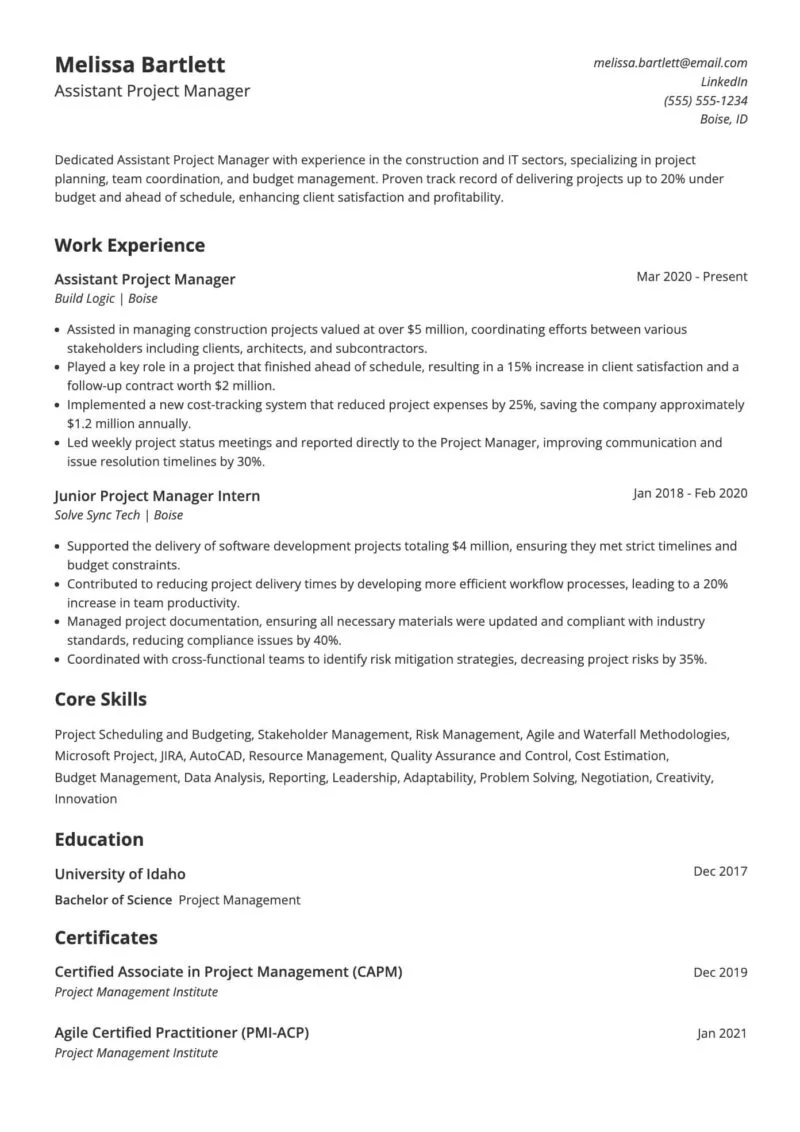
A project manager plans and organizes projects to ensure they are completed on time and within budget. They coordinate teams, track progress, and solve problems. Project managers help keep everything on track and running smoothly.
-
Clear headline and summary: The headline includes the exact job title, and the summary highlights industry focus, core strengths, and measurable impact—all tailored to project management roles.
-
Strong use of accomplishments: Each bullet point in the work experience section focuses on results, using numbers to show impact (e.g., “reduced project expenses by 25%”).
-
ATS-friendly format: Clean layout, reverse-chronological order, and consistent date formatting make it easy for applicant tracking systems to read.
-
Relevant skills and certifications: Includes both hard and soft skills aligned with the role, plus industry-recognized certifications like CAPM and PMI-ACP.
-
Professional and easy to scan: Uses clear headings, bullet points, and a simple, readable font. This is ideal for busy recruiters scanning quickly.
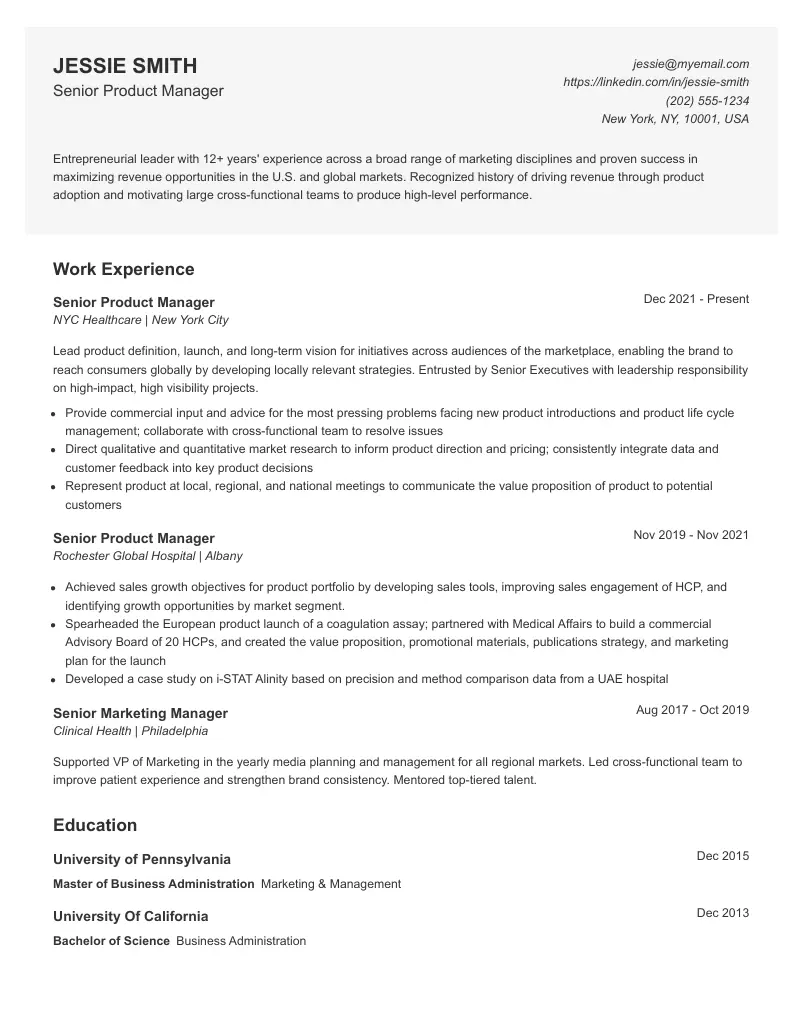
2. What does a marketing resume example look like?
A marketing professional helps promote products or services to reach customers. They create campaigns, study market trends, and find ways to attract and keep customers. Marketing helps businesses grow and connect with their audience.
-
Strong headline and summary: Clearly states the candidate’s title and years of experience, while emphasizing leadership, product adoption, and team performance.
-
Focused on accomplishments: Each role highlights outcomes—like sales growth, international launches, and cross-functional leadership—rather than just responsibilities.
-
Relevant to the role: Emphasizes product strategy, market research, and customer-driven decision-making. These are critical for a senior product or marketing manager.
-
Education supports seniority: Includes both an MBA and a relevant bachelor’s degree from strong institutions, reinforcing credibility for leadership roles.
-
Professional and well-organized: Clean formatting, clear sections, and consistent styling make it easy for both ATS and human reviewers to navigate.
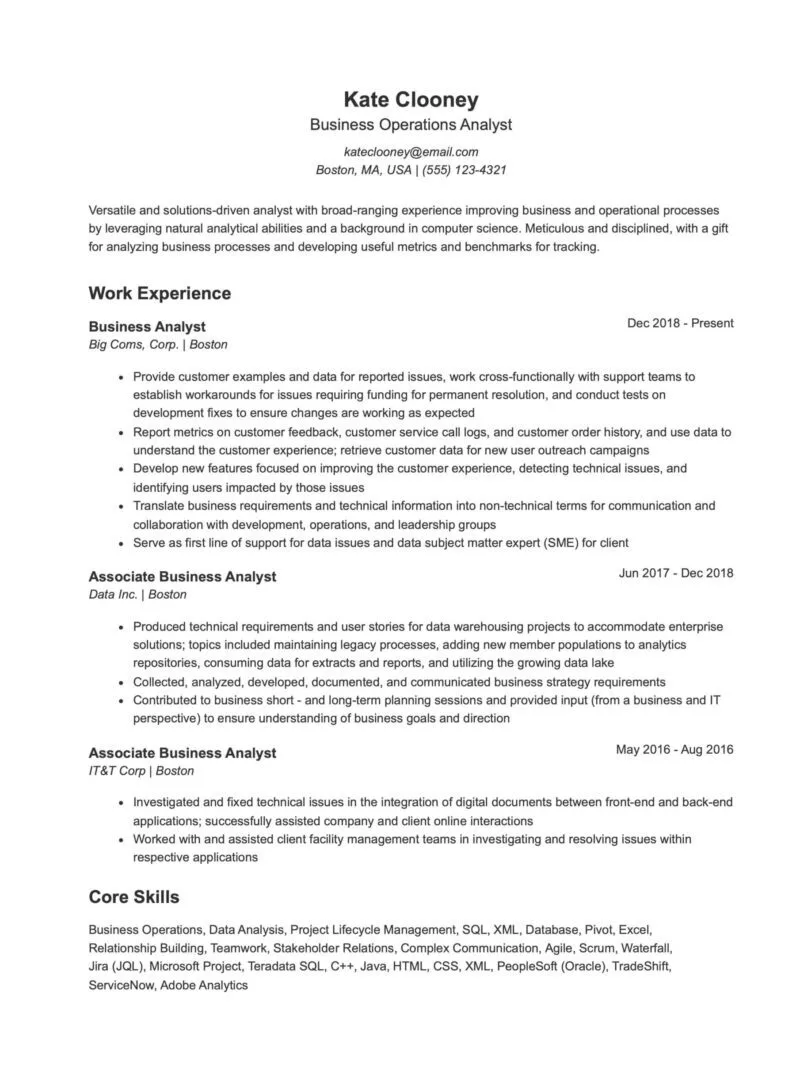
3. What does a business analyst resume example look like?
A business analyst helps companies solve problems and improve processes. They study how things are done, gather information, and suggest changes to make work more efficient. Business analysts also help teams plan and reach their goals.
-
Clear title and summary: Opens with a direct job title and a summary that highlights analytical strengths, technical knowledge, and a solutions-driven mindset.
-
Detailed, relevant experience: Each role includes technical responsibilities and business impact, showing progression from associate to analyst-level work.
-
Strong use of action verbs: Bullet points begin with active verbs and focus on real contributions like improving customer experience and translating data into insights.
-
Well-rounded skills section: Lists both technical tools (SQL, Jira, ServiceNow) and soft skills (teamwork, stakeholder relations), which are essential for business analyst roles.
-
Clean, professional formatting: The layout is easy to scan, ATS-friendly, and clearly organized by section and job title.
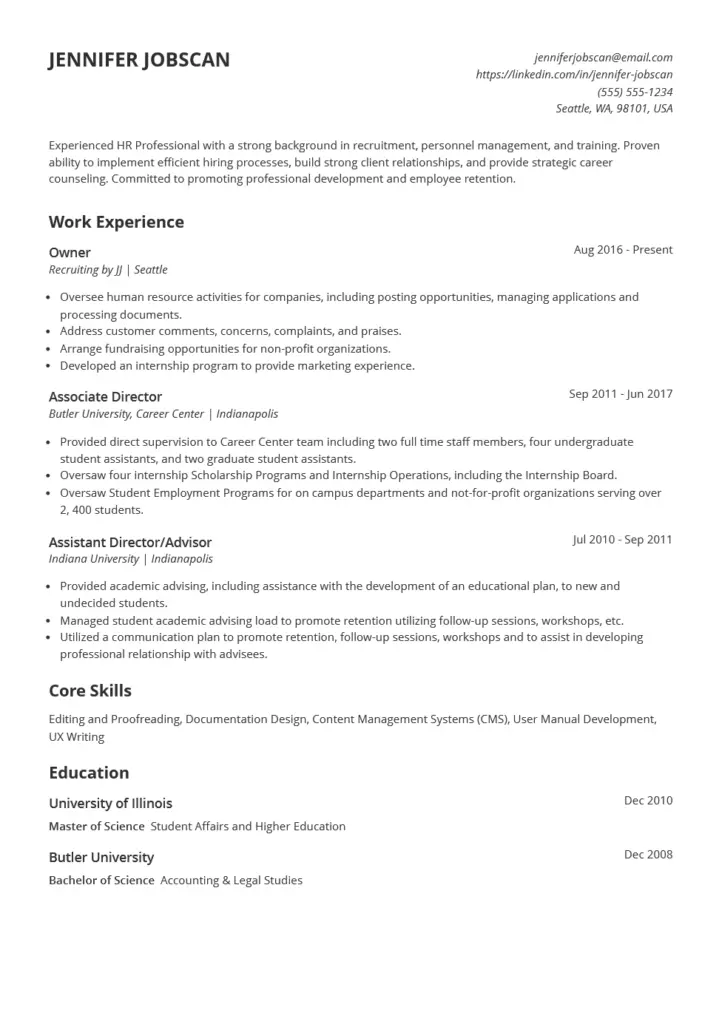
4. What does a human resources resume example look like?
A human resources professional helps manage a company’s employees. They handle hiring, training, and answering questions about benefits or workplace rules. Human resources professionals work to support employees and create a positive work environment.
-
Strong, targeted summary: Clearly positions the candidate as an experienced HR professional with strengths in recruitment, employee retention, and career counseling.
-
Relevant and varied experience: Shows both entrepreneurial HR work and higher education leadership, highlighting versatility and deep experience in people-focused roles.
-
Accomplishments with context: Each position includes specific responsibilities and outcomes, such as managing internship programs and overseeing student employment services for thousands.
-
Core skills align with the field: Skills like documentation, UX writing, and CMS show the candidate’s adaptability in both HR and content-focused environments.
-
Education supports career track: Advanced degree in Student Affairs and Higher Education strengthens credibility for HR and career development roles.
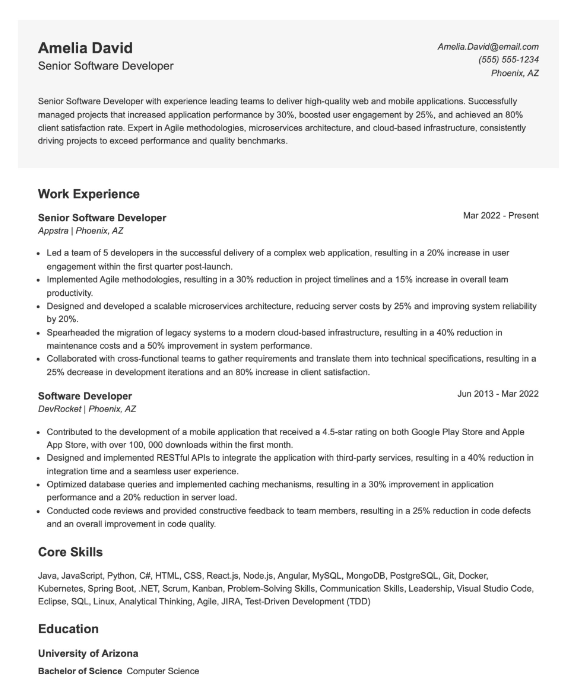
5. What does a software developer resume example look like?
A software developer creates and improves computer programs and apps. They write code, fix problems, and test their work to make sure it runs smoothly. Software developers work with teams to build tools that meet users’ needs.
-
Impactful summary: Quickly establishes the candidate’s leadership experience and quantifiable success with metrics like performance gains and client satisfaction rates.
-
Achievement-focused bullet points: Each role highlights measurable results—like reducing server costs by 25% and project timelines by 30%—not just responsibilities.
-
Strong technical depth: Clearly showcases a broad tech stack (Java, React, SQL, AWS, etc.) and modern methodologies like Agile, microservices, and TDD.
-
Career progression and leadership: Demonstrates growth from developer to senior role, with examples of leading teams and overseeing high-impact projects.
-
Well-organized and ATS-friendly: Easy-to-read formatting, consistent structure, and keyword-rich sections ensure applicant tracking systems can accurately parse the resume.
Resume examples by job title
Follow the links below to see job-specific resume examples tailored to different roles. Each example is designed to highlight key skills and experience while following best practices for formatting and ATS optimization.
- Accounting
- Administrative
- Business Data
- Computer Science
- Customer Service
- Education
- Engineering
- Healthcare
- Human Resources
- Legal
- Marketing
- Nursing
- Pharmaceutical
- Project Management
- Sales
- Writer
Find more resume examples: Professional Resume Examples for Every Career Path in 2025
How do you match your cover letter to your resume?
Are cover letters still necessary?
According to Jobscan’s data, job seekers who included a cover letter landed 3.4x more interviews. That’s a strong case for taking the time to write one.
To make the most of it, match your cover letter with your resume to create a polished, cohesive application. Here’s how:
- Keep formatting consistent: Use the same font, header, and layout as your resume.
- Use similar language: Reinforce your qualifications by including key skills and phrases.
- Expand on key achievements: Choose one or two major accomplishments to elaborate on.
- Match the tone: Keep your cover letter’s tone aligned with your resume.
- Address the job’s needs: Show how your experience makes you the right fit.
- End with a call to action: Express enthusiasm and invite the employer to connect.
Related: How to Write a Cover Letter That Gets You a Job Interview
FAQS
To make your resume stand out to recruiters, start by tailoring it specifically for each job application, incorporating keywords from the job description to align closely with the requirements.
Highlight your achievements by quantifying them with specific numbers and outcomes, such as “increased sales by 20%” or “reduced processing time by 30%,” to demonstrate measurable success.
Begin with a compelling professional summary that succinctly outlines your key qualifications and what you bring to the role, clearly establishing why you are the ideal candidate. Ensure your resume has a clean and professional layout, with logical sections and easy-to-read fonts, to facilitate quick review and make a strong first impression.
1) Gather information
2) Choose a format
3) Write contact information
4) Craft a headline and summary
5) Detail your experience and education
6) Highlight skills
7) Add additional sections
8) Tailor for the job
9) Proofread and edit
10) Finalize and save
Use Jobscan’s resume builder, which is specifically designed to help you craft an AI resume that is both appealing to hiring managers and optimized for Applicant Tracking Systems (ATS). This tool provides templates and real-time content suggestions, helping you tailor your resume effectively for each job application. You can also use ChatGPT to write a resume for free. Just be sure to edit and personalize the results you get.
1) Log into your Google account, go to Google Docs, and either start a new document or use the template gallery. Jobscan also offers free Google Docs resume templates.
2) Select a resume template that fits the job you’re applying for from the template gallery.
3) Replace the template’s placeholder text with your personal information, including contact details, educational background, work experience, and skills.
4) Tailor the content to the job by adding relevant keywords from the job description and adjusting the format—like fonts and spacing—for clarity and appeal.
5) Double-check your resume for any errors and consider having someone else review it too.
6) Once satisfied, download your resume as a PDF or DOCX file, or share it directly via email or a shareable link.
1) Start the program and select “New” from the file menu to access templates.
2) Type “resume” in the template search bar to see available resume designs.
3) Choose a template that suits your needs, then replace the placeholder text with your personal details, including work experience, education, and skills.
4) Adjust the content to match the job description, using relevant keywords and highlighting your qualifications.
5) Modify font size, style, and colors to ensure the resume is clean and professional.
6) Check for any errors, and consider having someone else review it.
7) Save your resume as a PDF to maintain formatting and make sharing easy.
8) Print for physical submissions or save digitally for online applications.
In 2025, resumes should be designed for clarity and ATS compatibility. Start with a professional layout that includes plenty of white space and a logical structure. The top should have your contact information—just your name, phone number, email, and LinkedIn URL, omitting a full address for privacy.
Follow this with a concise professional summary, then list your work experience, skills, and education. The format should ensure easy readability for both human recruiters and Applicant Tracking Systems, emphasizing a clean design without complex graphics or tables that could confuse the ATS software.
Choosing the right resume format depends on your career background:
Chronological: Lists your work history in reverse chronological order, ideal for those with a solid work history.
Functional: Focuses on skills rather than work history, suitable for career changers or those with gaps in employment.
Combination: Mixes elements of both chronological and functional formats, highlighting skills followed by work history in reverse order. Good for those with significant skills and experiences.
The number of jobs you should include on your resume depends on your experience level and relevance to the role. Typically, if you’re early in your career with less than 10 years of experience, aim for 2-3 recent and relevant positions. For mid-career professionals, around 3-4 positions spanning the last 10-15 years is common.
Experienced professionals may include the most pertinent roles from their extensive history, focusing on the past 10-15 years. Ensure each listed job directly relates to the position you’re applying for, prioritizing relevancy over quantity to present a focused and impactful resume.
A resume should typically be one to two pages long, with rare exceptions for highly experienced individuals or those in certain industries. Aim to keep it concise and focused on highlighting your most relevant qualifications and experiences for the position you’re applying for.